EasyManua.ls Logo

Samsung 450 - Using the 3 D Function

Samsung 450
95 pages
Print Icon
To Next Page IconTo Next Page
To Previous Page IconTo Previous Page
Loading...
You
can
enjoy
3D
movies
and
games
on
your
TV.
The
3D
effects function enables you to view
3D
images using
special
3D
glasses.
IUsing the
3D
Function
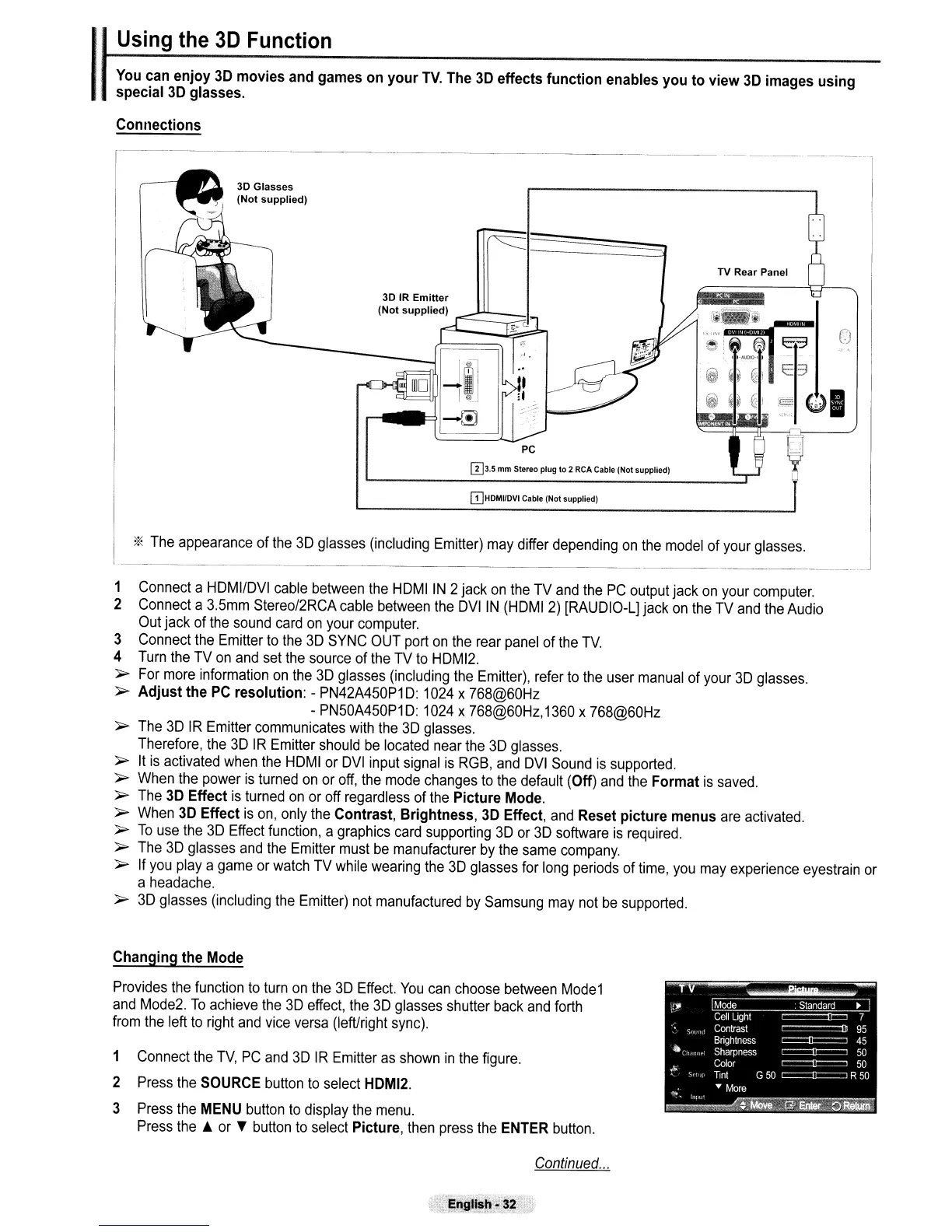
Connections
----
--._--
------
o
TV Rear Panel
Ei3
I
I-AUOlO-1
I
iJ
0
~i
c3
~
~~
.€~
i~
QI
W3.5
mm
Stereo
plug
to
2 RCA Cable (Not supplied)
PC
3D IR
Emitter
(Not
supplied)
3D Glasses
(Not
supplied)
ITJHDMI/DVI Cable (Not supplied)
*
The
appearance
of
the
3D
glasses
(including
Emitter)
may
differ
depending
on
the
model
of
your
glasses.
1
Connect
a
HDMI/DVI
cable
between
the
HDMIIN 2jack
on
the
TV
and
the
PC
output
jack
on
your
computer.
2
Connect
a
3.5mm
Stereo/2RCA
cable
between
the
DVIIN
(HDMI
2)
[RAUDIO-L]
jack
on
the
TV
and
the
Audio
Out
jack
of
the
sound
card
on
your
computer.
3
Connect
the
Emitter
to
the
3D
SYNC
OUT
port
on
the
rear
panel
of
the
TV.
4
Turn
the
TV
on
and
set
the
source
of
the
TV
to
HDMI2.
~
For
more
information
on
the
3D
glasses
(including
the
Emitter),
refer
to
the
user
manual
of
your
3D
glasses.
~
Adjust the
PC
resolution: -
PN42A450P1D:
1024
x
768@60Hz
-
PN50A450P1D:
1024
x
768@60Hz,1360
x
768@60Hz
~
The
3D
IR
Emitter
communicates
with
the
3D
glasses.
Therefore,
the
3D
IR
Emitter
should
be
located
near
the
3D
glasses.
~
It
is
activated
when
the
HDMI
or
DVI
input
signal
is
RGB,
and
DVI
Sound
is
supported.
~
When
the
power
is
turned
on
or
off,
the
mode
changes
to
the
default (Off)
and
the
Format
is
saved.
~
The
3D
Effect
is
turned
on
or
off
regardless
of
the
Picture
Mode.
~
When
3D
Effect
is
on,
only
the
Contrast, Brightness,
3D
Effect,
and
Reset picture menus
are
activated.
~
To
use
the
3D
Effect
function,
a
graphics
card
supporting
3D
or
3D
software
is
required.
~
The
3D
glasses
and
the
Emitter
must
be
manufacturer
by
the
same
company.
~
If
you
playa
game
or
watch
TV
while
wearing
the
3D
glasses
for
long
periods
of
time,
you
may
experience
eyestrain
or
a
headache.
~
3D
glasses
(including
the
Emitter)
not
manufactured
by
Samsung
may
not
be
supported.
Changing the
Mode
Provides
the
function
to
turn
on
the
3D
Effect.
You
can
choose
between
Mode1
and
Mode2.
To
achieve
the
3D
effect,
the
3D
glasses
shutter
back
and
forth
from
the
left
to
right
and
vice
versa
(left/right
sync).
1
Connect
the
TV,
PC
and
3D
IR
Emitter
as
shown
in
the
figure.
2
Press
the
SOURCE
button
to
select
HDMI2.
3
Press
the
MENU
button
to
display
the
menu.
Press
the.
or
~
button
to
select
Picture,
then
press
the
ENTER
button.
Continued
...
-~
- -
,-~nglish
3~
,,-.

Table of Contents

Other manuals for Samsung 450

Related product manuals