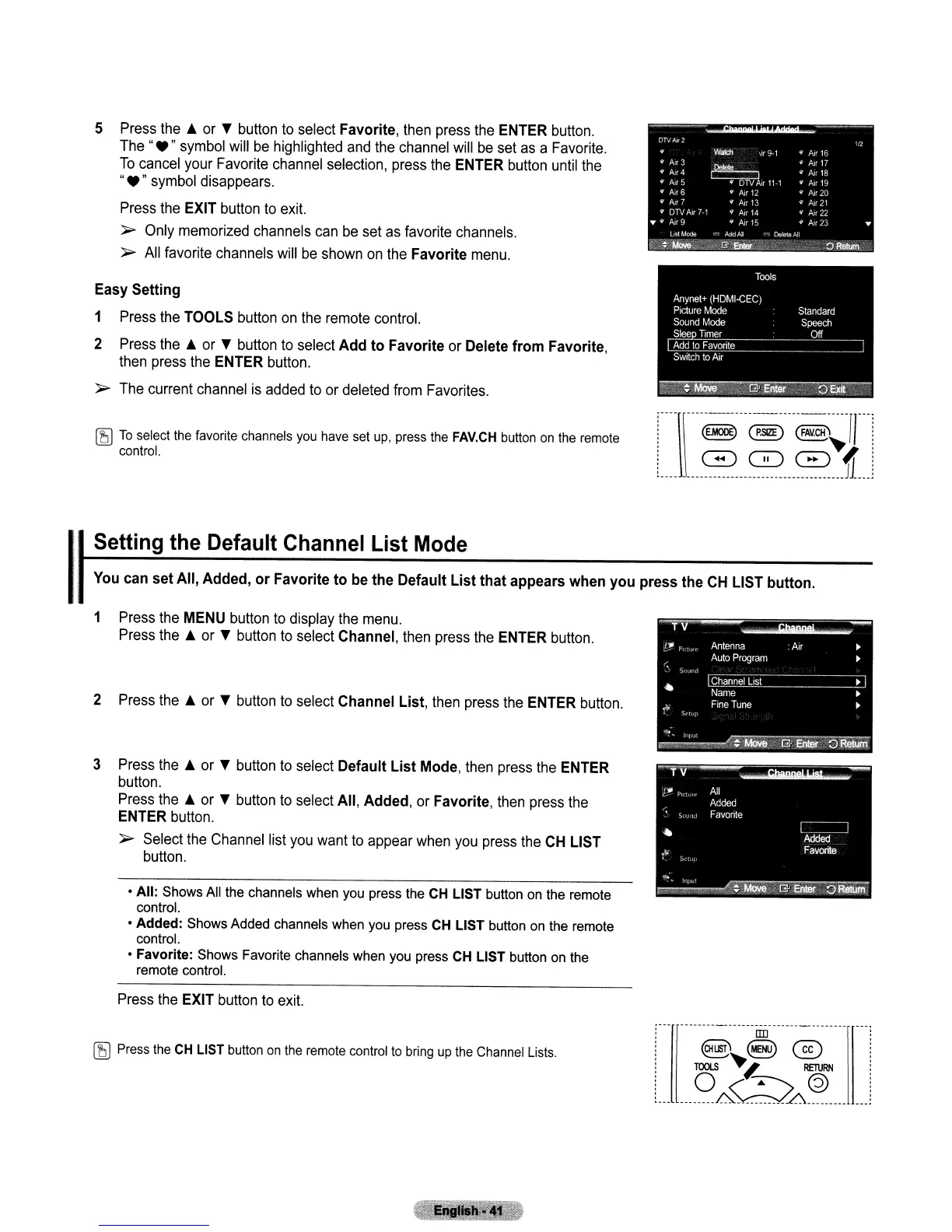
5 Press the
~
or T button to select Favorite, then press the ENTER button.
The"."
symbol will
be
highlighted and the channel will be set
as
a Favorite.
To
cancel your Favorite channel selection, press the ENTER button until the
"."
symbol disappears.
Press the EXIT button to exit.
~
Only memorized channels can
be
set as favorite channels.
~
All favorite channels will
be
shown
on
the Favorite menu.
Easy Setting
1 Press the TOOLS button
on
the remote control.
2 Press the
~
or T button to select
Add
to
Favorite or Delete
from
Favorite,
then press the ENTER button.
~
The current channel
is
added to or deleted from Favorites.
[5J
To
selecllhe favorite channels
you
have set
up,
press the
FAV.CH
button
on
the remote
control.
----\\-----------------------rr-
....
u~r~n~~!f
I
Setting the Default Channel List Mode
You can
set
All, Added,
or
Favorite
to
be the Default
List
that
appears when
you
press the
CH
LIST button.
1 Press the MENU button to display the menu.
Press the
~
or T button to select Channel, then press the ENTER button.
2 Press the
~
or T button to select Channel List, then press the ENTER button.
3 Press the
~
or T button to select Default
List
Mode, then press the ENTER
button.
Press the
~
or T button to select All, Added, or Favorite, then press the
ENTER button.
~
Select the Channel list you want to appear when
you
press the
CH
LIST
button.
• All:
Shows All the channels when you press the CH LIST button on the remote
control.
• Added: Shows Added channels when you press CH LIST button on the remote
control.
• Favorite: Shows Favorite channels when you press CH LIST button on the
remote control.
Press the EXIT button to exit.
[5J
Press the
CH
LIST button
on
the remote control
to
bring
up
the Channel Lists.
IIIJ
@~~®
06@
________
~
:A
_



 To Next Page