I
PC
Display
~C,ter>'.:oJJlon
'OOl~J'
J
t.looff:
i1"i>e~I(32bo11
---
D~play
P\J;1endPl"9~"'."'Of1tMDIAGefo,,;.r,..:5600
Using
Your
TV
as
a
Computer
(PC)
Display
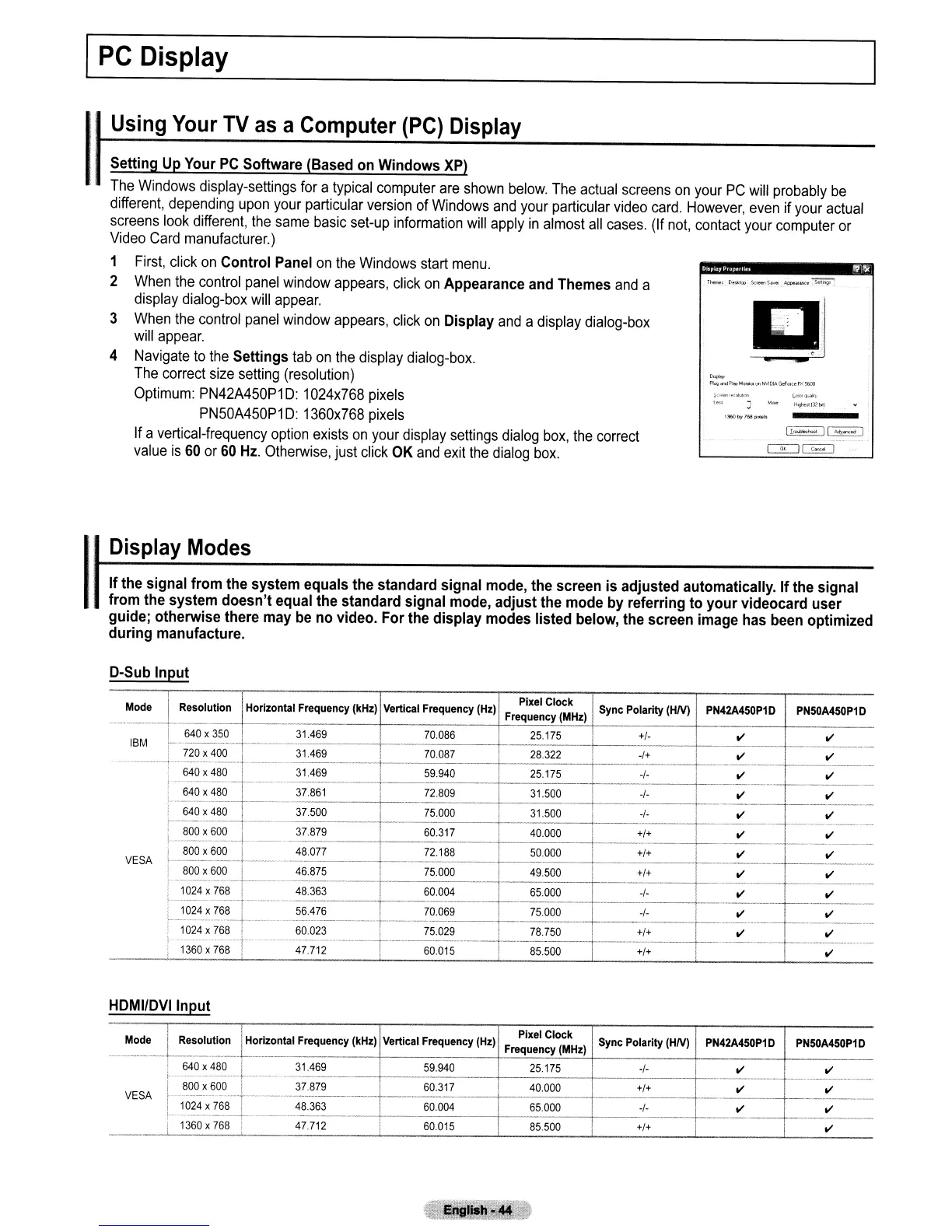
Setting Up Your
PC
Software (Based on Windows
XP)
The
Windows
display-settings
for
a
typical
computer
are
shown
below.
The
actual
screens
on
your
PC
will
probably
be
different,
depending
upon
your
particular
version
of
Windows
and
your
particular
video
card.
However,
even
if
your
actual
screens
look
different,
the
same
basic
set-up
information
will
apply
in
almost
all
cases.
(If
not,
contact
your
computer
or
Video
Card
manufacturer.)
1
First,
click
on
Control Panel
on
the
Windows
start
menu.
2
When
the
control
panel
window
appears,
click
on
Appearance and Themes
and
a
display
dialog-box
will
appear.
3
When
the
control
panel
window
appears,
click
on
Display
and
a
display
dialog-box
will
appear.
4
Navigate
to
the
Settings
tab
on
the
display
dialog-box.
The
correct
size
setting
(resolution)
Optimum:
PN42A450P1D:
1024x768
pixels
PN50A450P1D:
1360x768
pixels
If
a
vertical-frequency
option
exists
on
your
display
settings
dialog
box,
the
correct
value
is
60
or
60
Hz.
Otherwise,
just
click
OK
and
exit
the
dialog
box.
1
I
'
Display
Modes
If
the signal from the system equals the standard signal mode, the screen is adjusted automatically. If the signal
from the system doesn't equal the standard signal mode, adjust the mode by referring to your videocard user
guide; otherwise there may
be
no video. For the display modes listed below, the screen image has been optimized
during manufacture.
D-Sub Input
Mode
I
I
I
I'
Pixel Clock
I
Resolution Horizontal Frequency
(kHz)
Vertical Frequency
(Hz)
Sync Polarity (HN)
PN42A450P1D
PNSOA450P1D
Frequency
(MHz)
IBM
VESA
i 640 x
350
! 31469 i 70086 25175
+1-
II
II
1---
..
------,--------
i
--
---.-----
! 720x400 i 31.469 !
70.0~7
28.322
-1+
II
II
......
(-.
--.
·--·-+---··-·
..
·---------·-----t-·--·-------·-
------
.-------------
---.-.-
---.--.
-----------
..
-.
..
640
x
480
! 31.469 I 59.940 25175
-1-
II
II
I-···:~:::~-t===·~~~:-----
-r
~:-~~~
~;-:~--
:;:
-+-
~
--~-.~-.-.--
r------
~
800
x
6~--+.
__
37.879 I 60.317 40.000
+1+,
II II
~~~?-!-60~-L---
48077 i 72.188
~OOO
+1+
I
II
i--II---
I
800
x
600
i 46.875 I 75000 I 49500
+1+
II
i
II
f~~r-=~~~--~
F=F-~=
!
1360-x-768
i--'
47.712 I 60.015 85.500
+1+--
II
HDMI/DVI Input
PN50A450P1D
PN42A450P1D
t
+1+
VESA
Mode
I
~cl~.
I Resolution Horizontal Frequency
(kHz)
Vertical Frequency
(Hz)
Frequency
(MHz)
Sync Polarity (HN)
------.--t------t--
! 640 x
480
31.469 59.940 I 25.175
-I-
i 800 x600
\_.-
37.879 60.317 40.000
+1+
i
'1-024
x
768--+1--
-4·8-.3-6-3--------t,---6-0-.00-4---+----6-5.-00-0-----t------
1
----+----
r
-------+--
i
1360
x
768
! 47.712 I 60.015 85500



 To Next Page