EasyManua.ls Logo

Samsung 450 - Anynet+ System Integration

Samsung 450
95 pages
Print Icon
To Next Page IconTo Next Page
To Previous Page IconTo Previous Page
Loading...
IAbout Anynet+
, Samsung TV's remote.
I
:~n::i:
~::::::
system that enables
you
to
control
all
connected Samsung
AV
devices
with
your
I
Connecting
Anynet+
Devices
The Anynet+ system can be used only with Samsung
AV
devices that have the Anynet+ feature.
To
be
sure
your
Samsung
AV
device has this feature, check
if
there is
an
Anynet+ mark on it.
To
directly connect
to
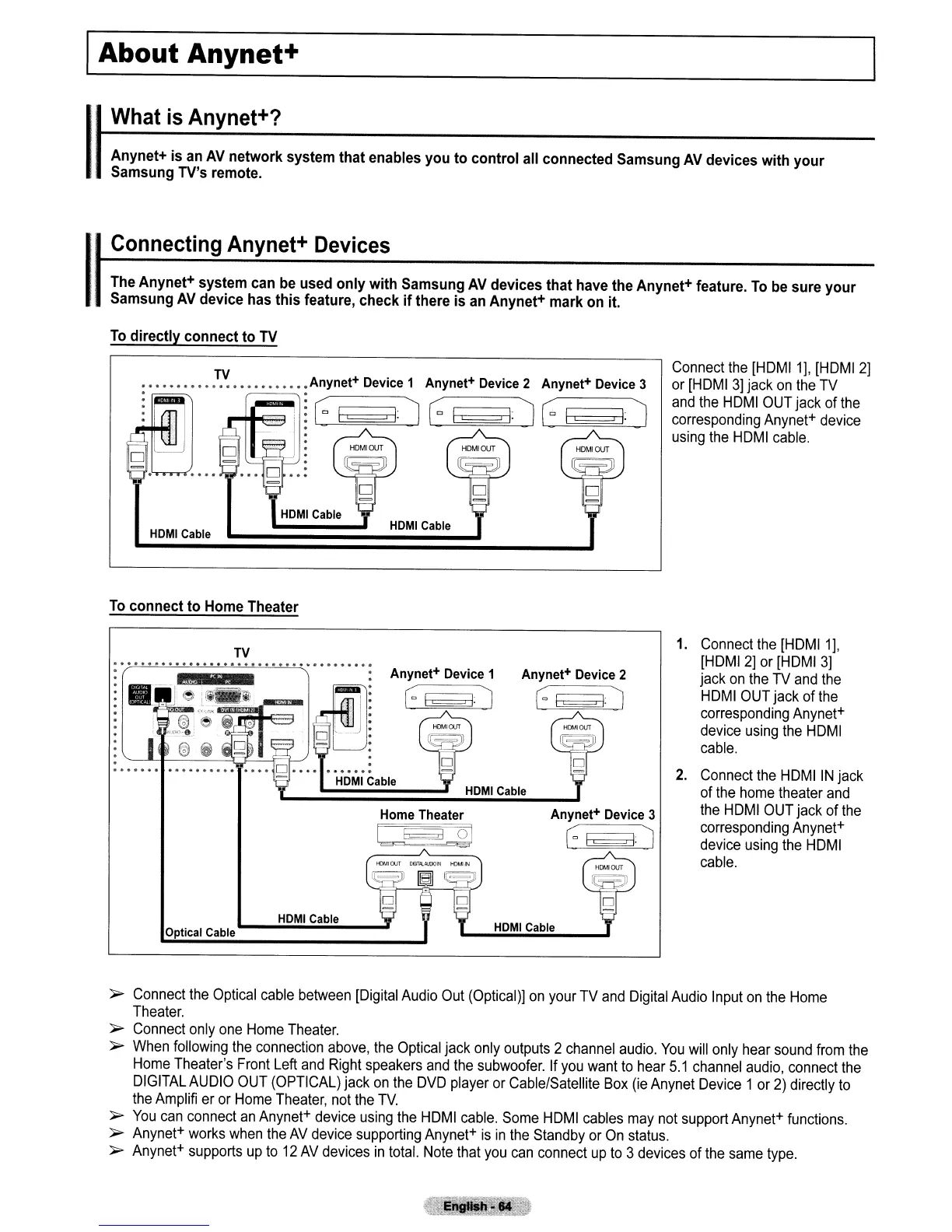
TV
•••••••••••
~~
•••••••••••
Anynet+ Device 1 Anynet+ Device 2 Anynet+ Device 3
HOMI
Cable
Connect
the
[HOMI1],
[HOMI
2]
or
[HOMI
3]
jack
on
the
TV
and
the
HOMI
OUT
jack
of
the
corresponding
Anynet+
device
using
the
HOMI
cable.
To
connect to Home Theater
TV
'"
••••
'"
••
"'.
"'
••
'" '" '"
'"
'"
'"
Of
'" '"
'"
'"
'"
••
'" '"
'"
'"
'" '"
. .
. .
HOM
I Cable
Optical Cable
Home
Theater
L~21
HOMI
Cable
1.
Connect
the
[HOMI1],
[HOMI
2]
or
[HOMI
3)
jack
on
the
TV
and
the
HOMI
OUT
jack of
the
corresponding
Anynet+
device
using
the
HOMI
cable.
2.
Connect
the
HOMI
IN
jack
of
the
home
theater
and
the
HOMI
OUT
jack of
the
corresponding
Anynet+
device
using
the
HOMI
cable.
~
Connect
the
Optical
cable
between
[Digital
Audio
Out
(Optical)]
on
your
TV
and
Digital
Audio
Input
on
the
Home
Theater.
~
Connect
only
one
Home
Theater.
~
When
following
the
connection
above,
the
Optical
jack
only
outputs
2
channel
audio.
You
will
only
hear
sound
from
the
Home
Theater's
Front
Left
and
Right
speakers
and
the
subwoofer.
If
you
want
to
hear
5.1
channel
audio,
connect
the
DIGITAL
AUDIO
OUT
(OPTICAL)
jack
on
the
OVO
player
or
Cable/Satellite
Box
(ie
Anynet
Device
1
or
2)
directly
to
the
Amplifi
er
or
Home
Theater,
not
the
TV.
~
You
can
connect
an
Anynet+
device
using
the
HOMI
cable.
Some
HOMI
cables
may
not
support
Anynet+
functions.
~
Anynet+
works
when
the
AV
device
supporting
Anynet+
is
in
the
Standby
or
On
status.
~
Anynet+
supports
up
to
12
AV
devices
in
total.
Note
that
you
can
connect
up
to
3
devices
of
the
same
type.

Table of Contents

Other manuals for Samsung 450

Related product manuals