EasyManua.ls Logo

Samsung 450 - Using the V-Chip

Samsung 450
95 pages
Print Icon
To Next Page IconTo Next Page
To Previous Page IconTo Previous Page
Loading...
I
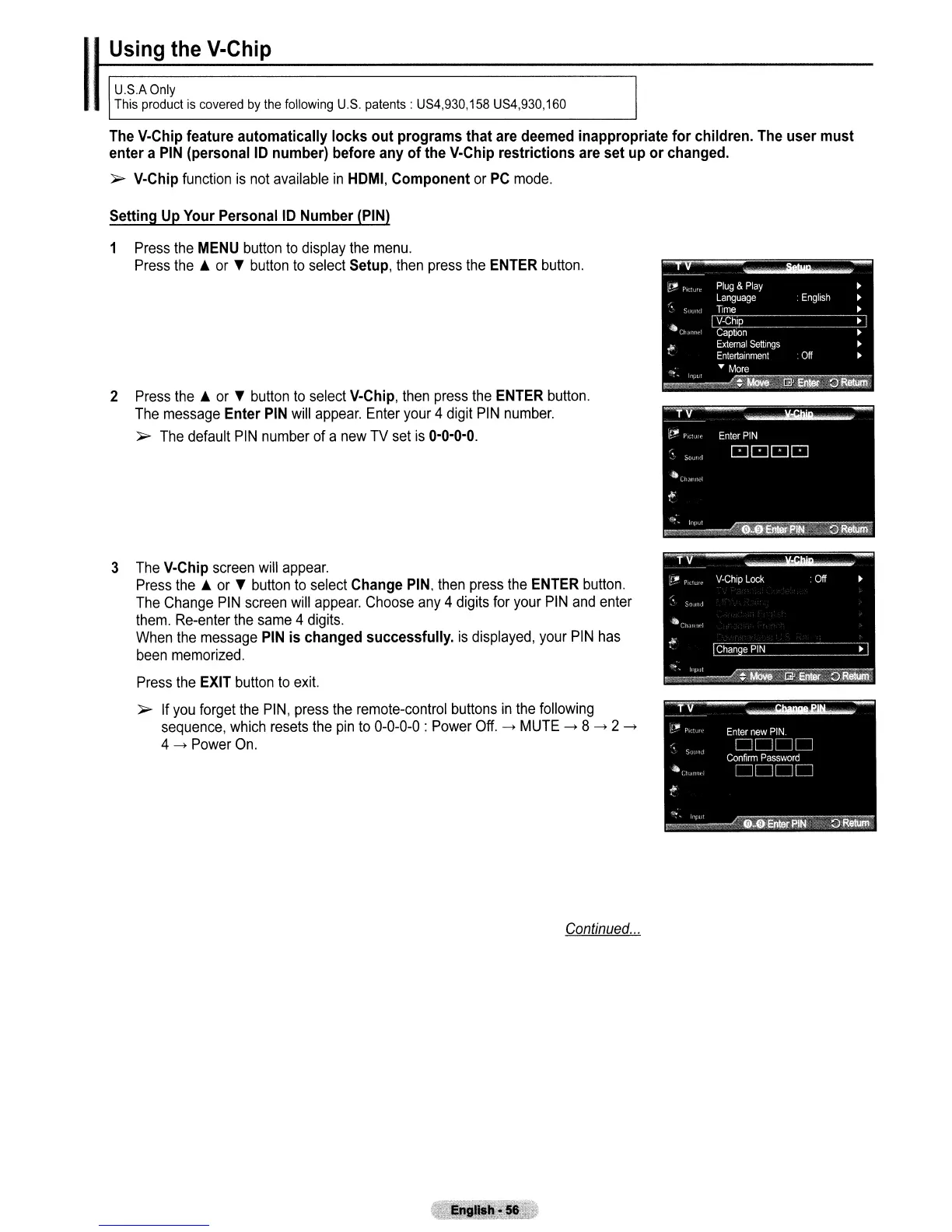
Using the V-Chip
U.S.A
Only
This product
is
covered
by
the
following
U.S.
patents: US4,930,158 US4,930,160
The
V-Chip
feature automatically locks out programs that
are
deemed
inappropriate for children.
The
user must
enter a
PIN
(personal
10
number) before
any
of
the
V-Chip
restrictions
are
set up or changed.
">
V-Chip
function
is
not
available
in
HOMI,
Component
or
PC
mode.
Setting
Up
Your
Personal
10
Number
(PIN)
1
Press
the
MENU
button
to
display
the
menu.
Press
the.
or
T
button
to
select
Setup,
then
press
the
ENTER
button.
2
Press
the.
or
T
button
to
select
V-Chip,
then
press
the
ENTER
button.
The
message
Enter
PIN
will
appear.
Enter
your
4
digit
PIN
number.
">
The
default
PIN
number
of
a
new
TV
set
is
0-0-0-0.
3
The
V-Chip
screen
will
appear.
Press
the.
or
T
button
to
select
Change
PIN,
then
press
the
ENTER
button.
The
Change
PIN
screen
will
appear.
Choose
any
4
digits
for
your
PIN
and
enter
them.
Re-enter
the
same
4
digits.
When
the
message
PIN
is changed successfully.
is
displayed,
your
PIN
has
been
memorized.
Press
the
EXIT
button
to
exit.
">
If
you
forget
the
PIN,
press
the
remote-control
buttons
in
the
following
sequence,
which
resets
the
pin
to
0-0-0-0
:
Power
Off.
---+
MUTE
---+
8
---+
2
---+
4
---+
Power
On.
Continued
...

Table of Contents

Other manuals for Samsung 450

Related product manuals