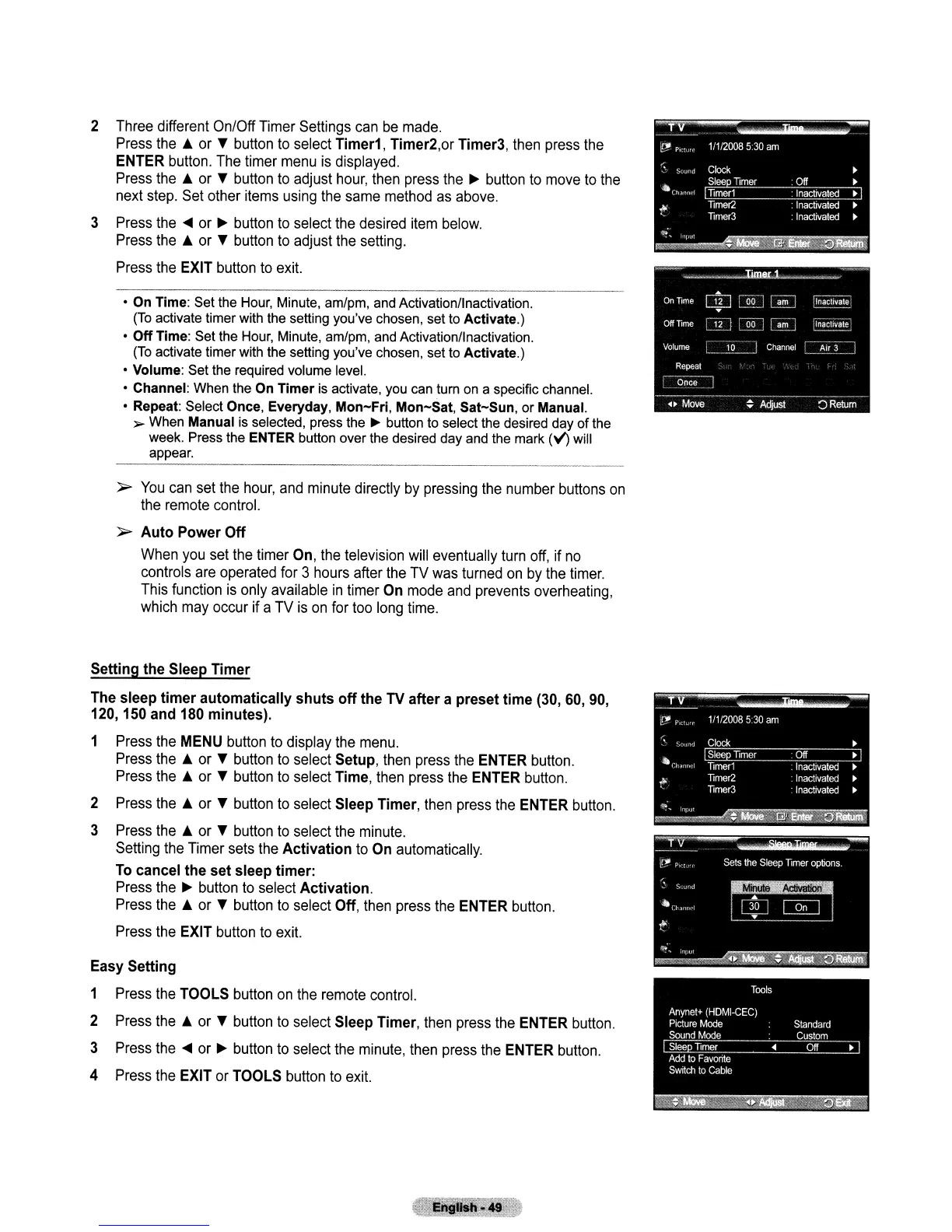
2 Three different On/Off Timer Settings can
be
made.
Press the A or
...
button to select Timer1, Timer2,or Timer3, then press the
ENTER button. The timer menu
is
displayed.
Press the A or
...
button to adjust hour, then press the
~
button to move to the
next step. Set other items using the same method as above.
3 Press the
..
or
~
button
to
select the desired item below.
Press the A or
...
button to adjust the setting.
Press the EXIT button to exit.
• On Time: Set the Hour, Minute, am/pm, and Activation/lnactivation.
(To
activate timer with the setting you've chosen, set to Activate.)
•
Off
Time: Set the Hour, Minute, am/pm, and Activation/Inactivation.
(To
activate timer with the setting you've chosen, set to Activate.)
• Volume: Set the required volume level.
• Channel: When the On
Timer
is activate, you can turn on a specific channel.
• Repeat: Select Once, Everyday,
Mon-Fri,
Mon-Sat,
Sat-Sun,
or Manual.
~
When Manual
is
selected, press the ~ button to select the desired day
of
the
week. Press the ENTER button over the desired day and the mark
(V')
will
appear.
}>
You
can set the hour, and minute directly by pressing the number buttons
on
the remote control.
}>
Auto
Power
Off
When you set the timer On, the television will eventually turn off, if
no
controls are operated for 3 hours after the TV was turned
on
by the timer.
This function
is
only available
in
timer On mode and prevents overheating,
which may occur if a TV
is
on
for too long time.
Setting the Sleep
Timer
The sleep
timer
automatically
shuts
off
the TV after a preset
time
(30,
60,
90,
120,150
and 180 minutes).
1 Press the MENU button to display the menu.
Press the A or button to select Setup, then press the ENTER button.
Press the A or button to select Time, then press the ENTER button.
2 Press the A or button to select Sleep Timer, then press the ENTER button.
3 Press the A or button to select the minute.
Setting the Timer sets the
Activation
to On automatically.
To
cancel
the
set sleep timer:
Press the
~
button to select Activation.
Press the A or
...
button to select Off, then press the ENTER button.
Press the EXIT button
to
exit.
Easy Setting
1 Press the TOOLS button
on
the remote control.
2 Press the A or
...
button
to
select Sleep Timer, then press the ENTER button.
3 Press
the"
or
~
button to select the minute, then press the ENTER button.
4 Press the EXIT or TOOLS button to exit.



 To Next Page