9
For further information, visit videotron.com/terminal-support.
oTHER CoNNECTIoN pRoCEDURE
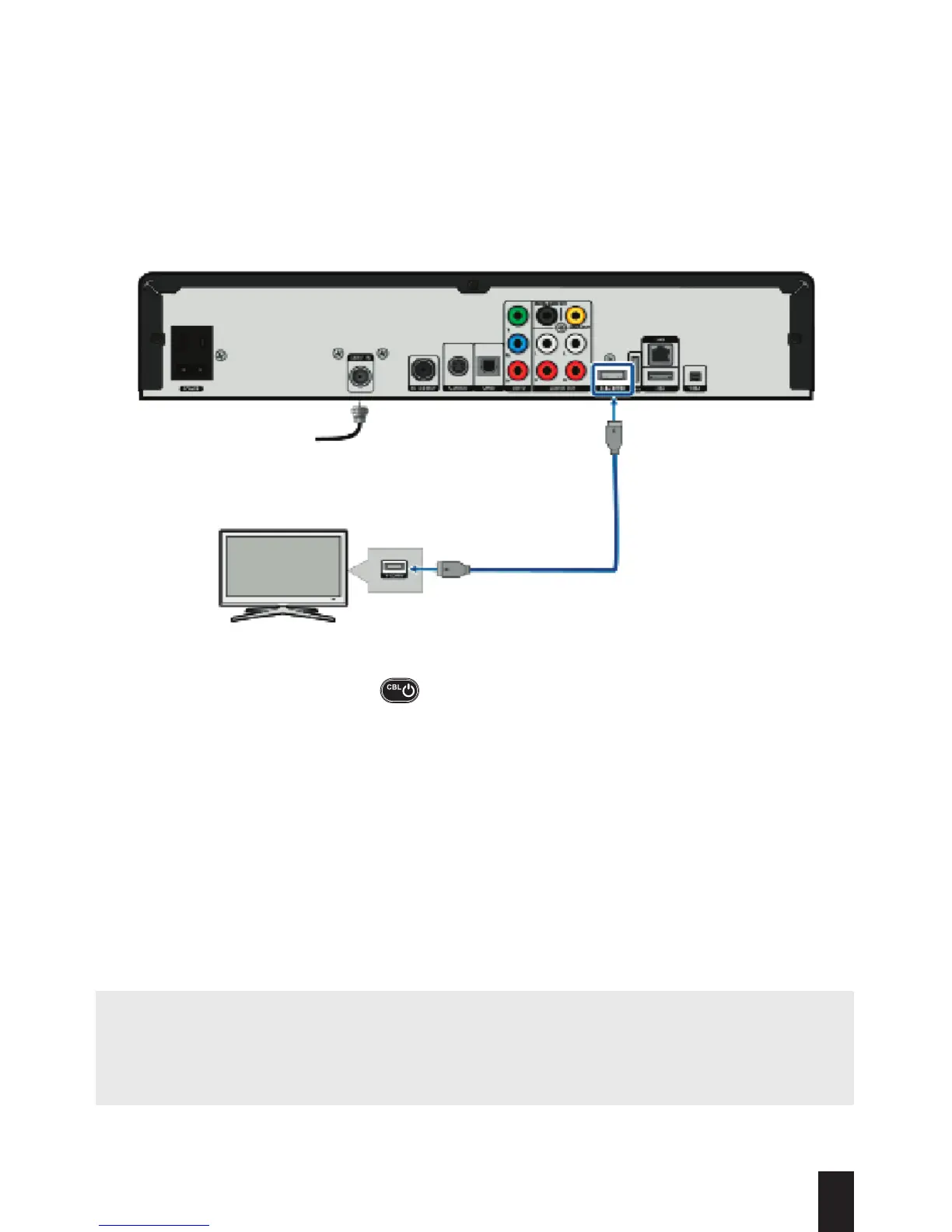
Use this configuration if you are connecting your terminal with an HDMI cable (HDMI cable
not included).
For optimal sound quality, this type of connection does not allow you to control the volume
on your terminal. You must therefore program your remote to your TV by following the
instructions on page 13.
NOTE: We strongly recommend that you follow the Quick-Start Wizard that will automatically
pop up when you turn on your terminal for the first time.
WARNING: If you see “WIZ 502” (error message) on your screen, please contact Technical
Support (see page 45) immediately as certain applications will not work.
1. Connect your equipment by following the diagram above.
2. Turn on the terminal by pressing on your remote control.
3. Turn on your TV and select the corresponding AUDIO/VIDEO input (Input 1/2/3 or
HDMI 1/2/3) to display content on-screen.
4. Program your remote to your TV by following the instructions on page 13.
5. Use the remote control that came with your terminal to switch to the channel or service of
your choice.
Cable
HDMI
TV


 To Next Page