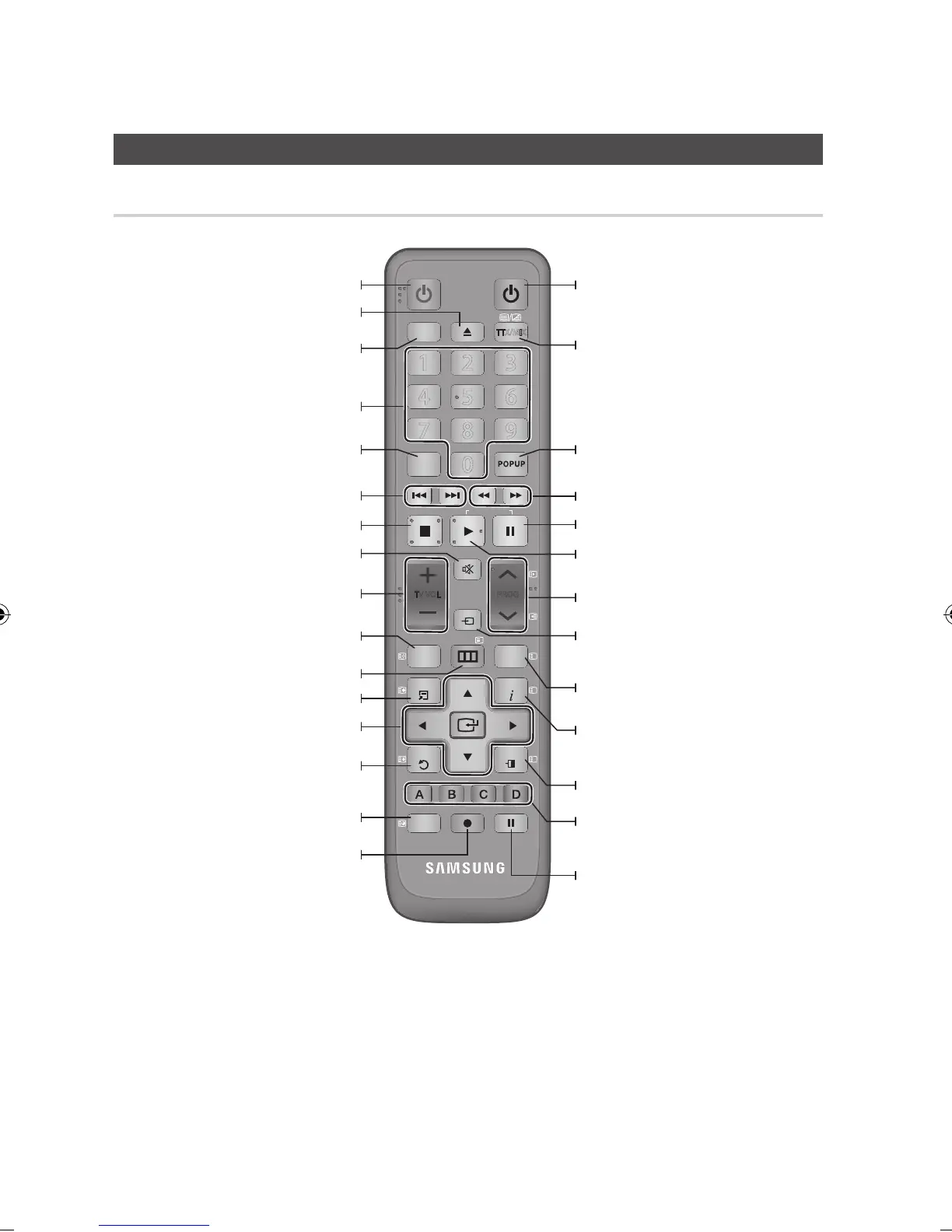
Remote Control
Tour of the Remote Control
Press to search backwards or forwards.
Turn the TV on and off.
(To operate your TV, please refer to page 21)
Press this to exit the menu.
Alternately selects Teletext, Double or Mix.
Press this to enter the popup menu/title
menu.
Press this to pause a playback or pause the
Time Shift function.
Press this to play or start the Time Shift
function.
Press this to see the full screen on a TV./
After setup, allows you to set the input
source on your TV.
Press this to display the playback information
during playing a Blu-ray/DVD disc or display
the information of TV channel.
These buttons are used both for menus on
the product and also several Blu-ray Disc
functions.
Press this to select a TV channel.
To open and close the disc tray.
Turn the product on and off.
Press this to use Tools menu.
Return to the previous menu.
Press numeric buttons to operate options.
Press this to enter the disc menu.
When the button is pressed, the button
color is toggled. (Orange colour :
BD-HDD Combo, Green colour : TV)
Press to skip backwards or forwards.
Stops playback or recording.
Press this to link to various Internet@TV
services.
TV volume adjustment.
Mutes the speakers of your TV.
Displays channel lists on the screen.
Press this to move to the home menu.
Select menu items and change menu value.



 To Next Page