Press the ENTER button.
The CD information will be displayed and the
first track will be played automatically.
NOTE
When the product is disconnected from the network,
it may not retrieve the CD information from the Audio
CD (CD-DA) if it's the latest version.
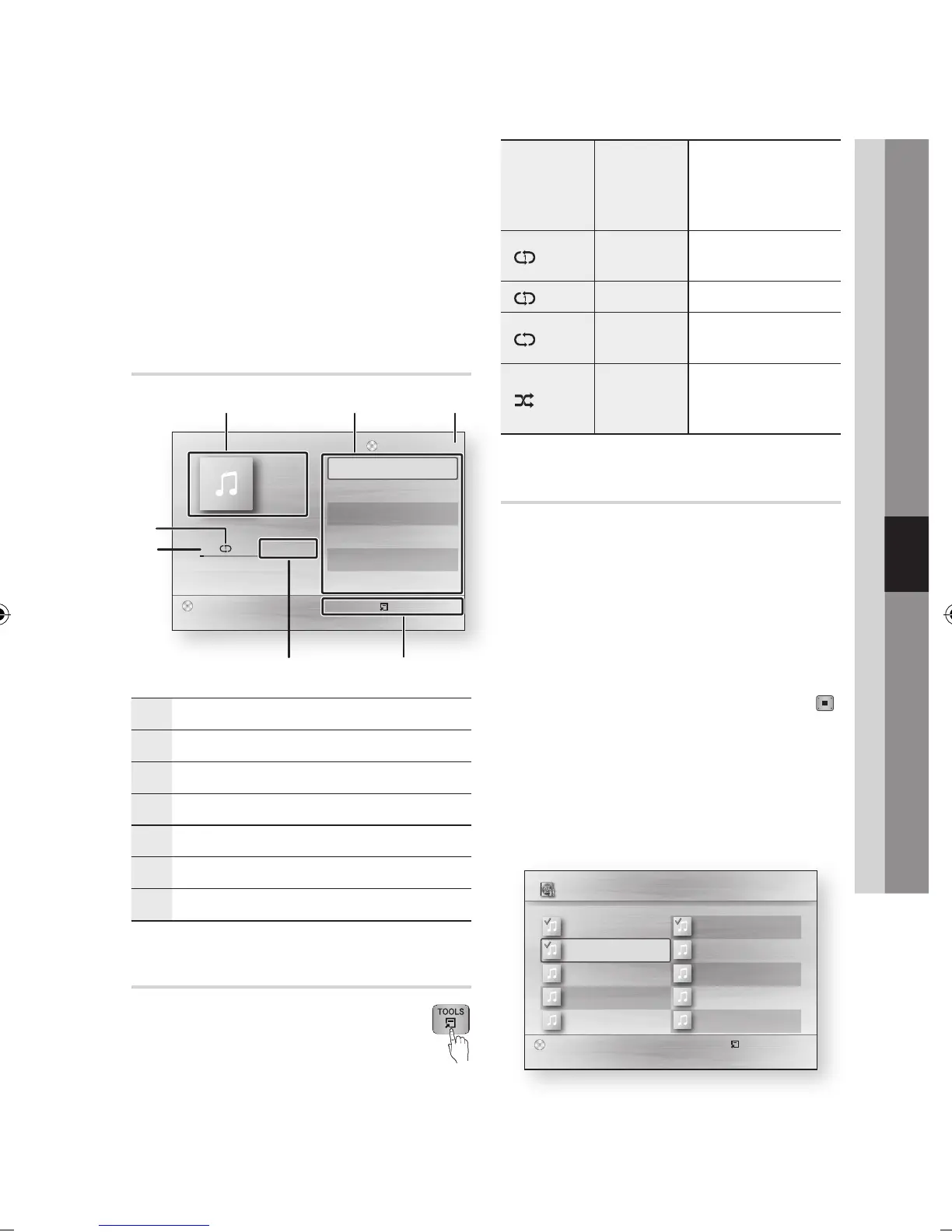
Audio CD (CD-DA)/MP3 Screen
Elements
1
Displays the music information.
2
Displays the playlist.
3
Display the current track/total tracks.
4
Displays buttons available.
5
Shows the current play time/total play time.
6
Displays the current playback status
7
Displays the repeated playback status.
Repeat an Audio CD (CD-DA)/MP3
During the Playlist playback, press the
TOOLS button.
Press the ◄► buttons to select
the desired Repeat Mode, then press the
ENTER button.
2.
✎
▪
1.
2.
Off
Audio CD
(CD-DA)/MP3
Tracks on a disc are
played in the order in
which they were recorded
on the disc.
(
) Track
Audio CD
(CD-DA)
Current track is repeated.
(
) One MP3 Current track is repeated.
(
) All
Audio CD
(CD-DA)/MP3
All tracks are repeated.
( ) Shuffle
Audio CD
(CD-DA)/MP3
The random option plays
a disc’s track in random
order.
Playlist
Insert an Audio CD (CD-DA) or an MP3 Disc
into the disc tray.
For an Audio CD (CD-DA), the first track will
be played automatically.
For an MP3 disc, press the ENTER button
to select the Media Play.
Then press the ◄► buttons to select
Music, then press the ENTER button.
To move to the Music List, press the STOP ( )
or RETURN button.
The Music List screen is displayed.
Press the ▲▼◄► buttons to move desired
track, then press the YELLOW(C) button to
check desired tracks.
Repeat this procedure to select additional
tracks.
1.
•
•
2.
3.
"
Pause
Tools
'
Return
+ 00:08 / 05:57
1/6
TRACK 001
05:57
TRACK 002
04:27
TRACK 003
04:07
TRACK 004
03:41
TRACK 005
03:17
TRACK 006
03:35
Playlist
TRACK 001
CD
31 2
6
7
45
Select
()
Jump page Tools ' Return
3 files selected 1/2 Page
TRACK 002
00:04:27
TRACK 004
00:03:41
TRACK 006
00:03:35
TRACK 008
00:03:49
TRACK 010
00:03:45
TRACK 001
00:05:57
TRACK 003
00:04:07
TRACK 005
00:03:17
TRACK 007
00:03:47
TRACK 009
00:03:53
Music TRACK 003
CD



 To Next Page