10 Appendix
Troubleshooting
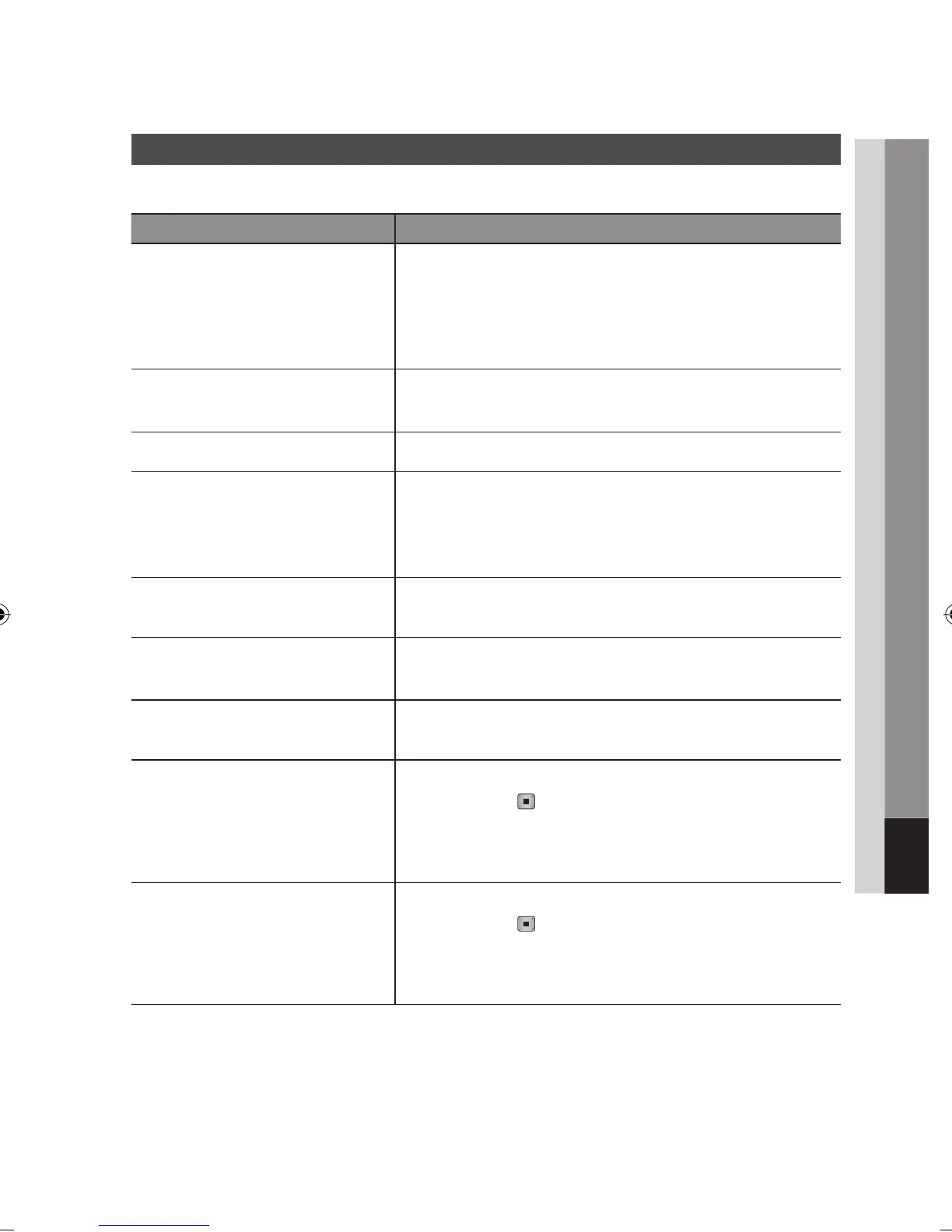
Before requesting service, please check the following.
PROBLEM SOLUTION
No operation can be performed with the
remote control.
Check the batteries in the remote control. They may need replacing.
Operate the remote control at a distance of no more than 6.1m.
Remove batteries and hold down one or more buttons for several minutes
to drain the microprocessor inside the remote control to reset it. Reinstall
batteries and try to operate the remote control again.
•
•
•
Disc does not play. Ensure that the disc is installed with the label side facing up.
Check the region number of the Blu-ray Disc/DVD.
•
•
Disc Menu does not appear. Ensure that the disc has disc menus.
•
The prohibition message appears on the
screen.
This message appears when an invalid button is pressed.
The Blu-ray Disc/DVD’s software doesn’t support the feature (e.g., angles)
You’ve requested a title or chapter number or search time that is out of
range.
•
•
•
Play mode differs from the Setup Menu
selection.
Some of the functions selected in the Setup Menu may not work properly if
the disc is not encoded with the corresponding function.
•
The screen ratio cannot be changed. The Screen Ratio is fixed on your Blu-ray Disc/DVDs.
This is not a problem with the product.
•
•
No audio. Make sure you have selected the correct Digital Output in the Audio Options
Menu.
•
The screen is blocked Press the MENU button to display home menu.
Press the STOP ( ) button on the front panel of the product for more
than 5 seconds with no disc inserted.
When the factory default settings are restored, all the user data stored in
the BD data will be deleted.
•
•
If the HDMI output is set to a resolution your
TV cannot support (for example, 1080p), you
may not see a picture on your TV.
Press the MENU button to display home menu.
Press the STOP ( ) button on the front panel of the product for more
than 5 seconds with no disc inserted.
When the factory default settings are restored, all the user data stored in
the BD data will be deleted.
•
•
Appendix



 To Next Page