03233A(E)-CHAPTER 3 10/30/03 4:04 PM Page 12
TV OPERATION
Fine Tuning Channels
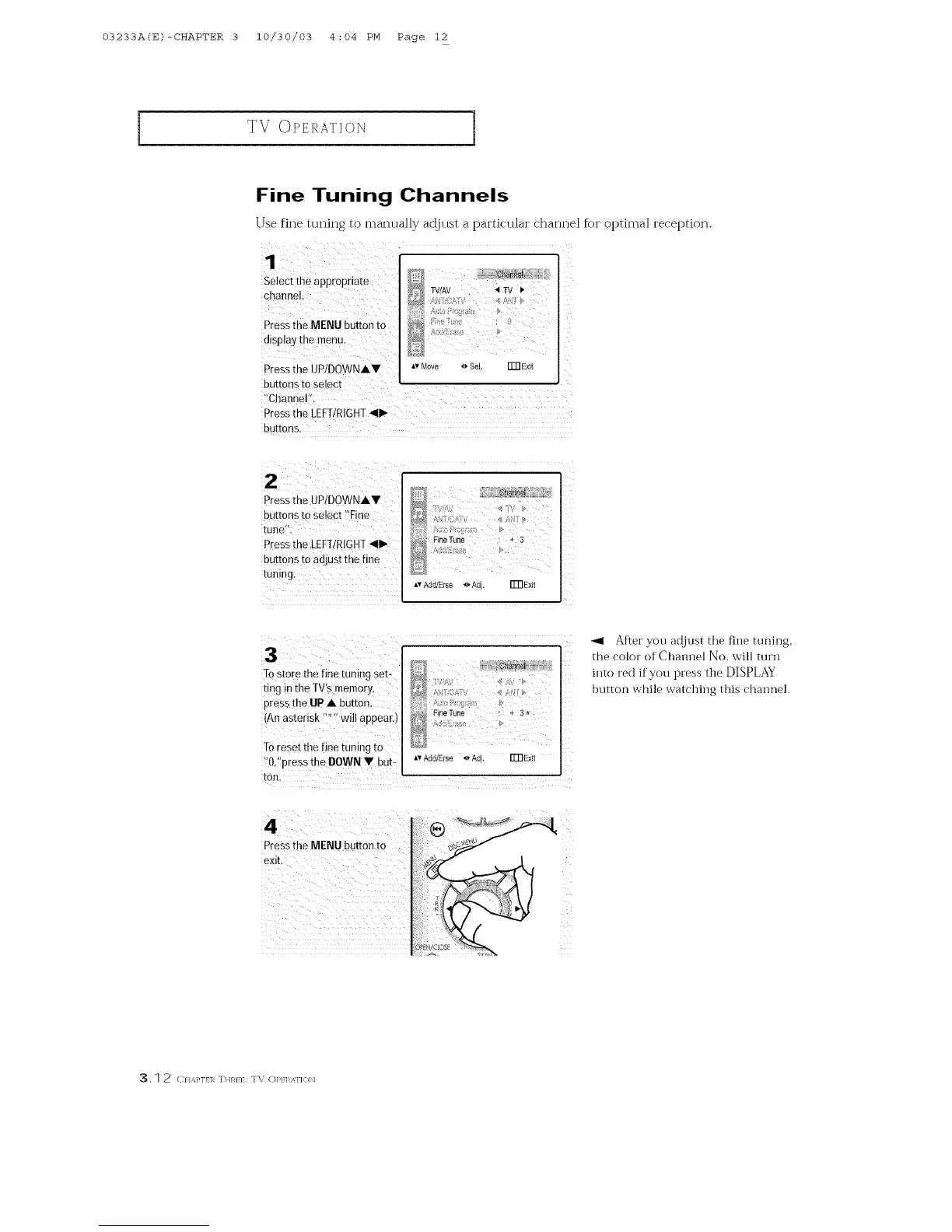
Use fine tuning to0manually adjust a particular channel fk)r optimal reception.
Select th 9 appropriat e
channel,
Pressthe MENU button to
disp!ay the menu,
Av Move o SeL Fm Exit
Press the UP/DOWN•V
buttons to select
_!Chaene[':
Pressthe LEFTIRIGHT_II1_
buttons,
z
Pressthe UP/DOWN•Y
buttons to Select !]Fine
tune".
PresstheLEFT/mOHT<1_
buttons to adjust the fine
Z
N
FineTune : + 3
I
Av Add/Else _ Adi. FmExit
3
Tostore the fine tuning set-
ring inthe TV's memory,
press the UP • button.
(An asterisk _'_"will appear.)
To reset the fine tuning to
:'Oi!press the DOWN T but: A,Add/Erse4, Adj. FmExit
ton. r
Pressthe MENU button to
exit.
i
<
L
Z
_1 After you adjust the fine tuning,
the color of Channel No. will turn
into red if you press the DISPLAY
button while watching this channel.
_, 1 2 CI/&}'I}I_ THRI} : TV OP/I_AF](}]_]



 To Next Page