03233A(E)-CHAPTER 4 10/30/03 4:07 PM Page 12
[
DVD OPERATION
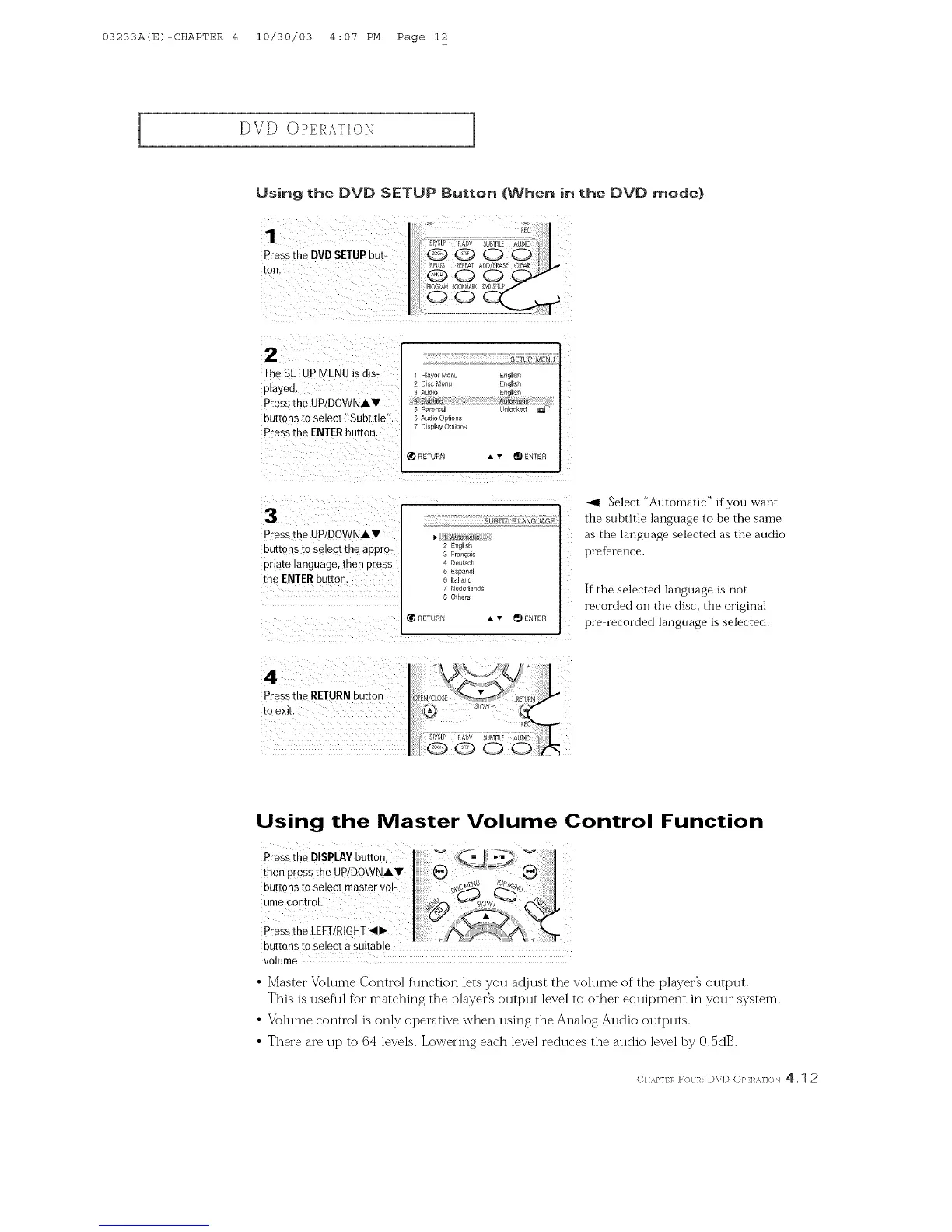
Using the DVD SETUP Button (When in the DVD mode)
1
Press[he DVD SETUPbut-
Ton
2
The SETUPMENU isdis-
played
Pressme UP/DOWNAV
nu[rons to select "Subtitle
Pressme ENTERbutton
Player Menu
O sc Menu
b ParentaJ
6 Audio OPt ons
D SDlaVOPtions
SETUP MENU
Enals#
EnrJls
unlocKeo
HE] URN • v _ ENTER
3
Pressthe UP/DOWNAV
DU[[OnS to select [Re appro-
priate language, then Dress
the ENTERbutton
_UBnTJE LANGUAGE
I- _ AJatom_{tc
2 Engl sh
3 Er_ ;aEs
4 Deut_c
5 Esoaho
Ital _no
7 NededaPd_
8 _helE
RETURN A v _) ENTER
_1 Select "Automatic" if you want
the subtitle language to be the saine
as the language selected as the audio
preference.
If the selected language is not
recorded Oilthe disc, the original
pre recorded language is selected.
4
Pressthe RETURNDUEOR
[0 exit
Using the Master Volume Control Function
Press the DISPLAYbutton,
thee
buttons to select master vol-
ume control.
Press the LEFT!RIGHT
buttons to select a suitab!e
volume.
• Master Volume Control flmction lets you at!just the volume of the playerh output.
This is useflfl for matching the playerZ output level to other equipment in your system.
• Volume control is only operative when using the Analog Audio outputs.
• There are up to 64 levels. Lowering each level reduces the audio level by 0.5dB.
C}I,_,}'If1_ F(/]/R: DVD (:)}q:l _,]]()N 4. 1 2



 To Next Page