03233A(E)-CHAPTER 5 10/30/03 4:10 PM Page 14
VCR OPERATION
Using True Repeat
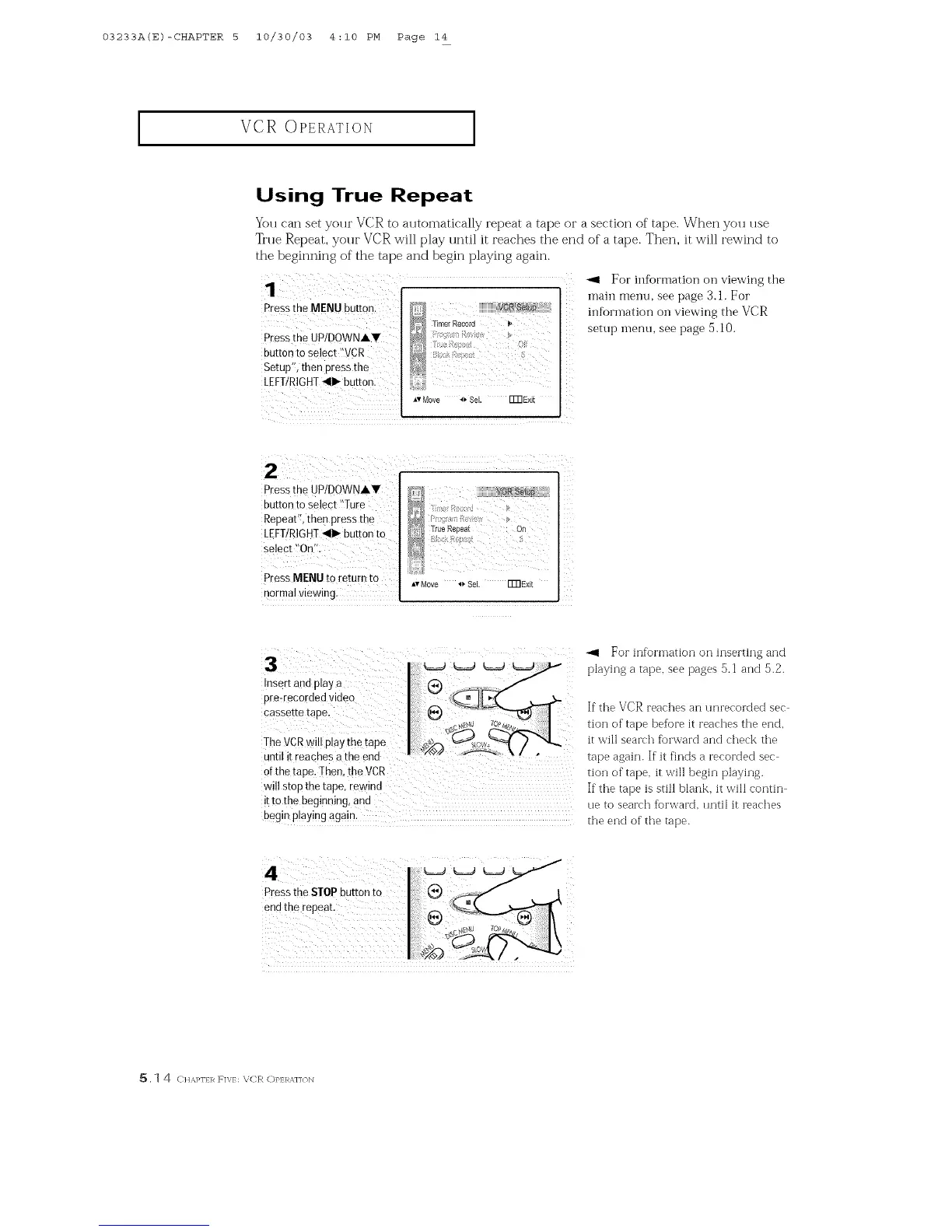
You can set your VCR to automatically repeat a tape or a section of tape. When you use
True Repeat, your VCR will play until it reaches the end of a tape. Then, it will rewind to
the beginning of the tape and begin playing again.
1
Press the MENU button:
Presstbe UP/DOWNAV
button to select "VCR
Setup'_,then press the
LEFT/RIGHT<1_ button:
z
**Move 4_ Sel. FmExit
"_ For information on viewing the
main menn, see page 3.1. For
inforlnation on viewing the VCR
setup menu, see page 5.10.
Press the UPIDOWNAV
button to select "Ture
RepeaU, then press the
LEFT/RIGHT_11_button to
Press MENU tOreturn to *,Move _ Sel. []]]Exit
normal viewing.
For information on inserting and
3 I_ _ _ _-_ p_ay,-,gatape,_eepage_s._an_S.2.
Insert and play a I (_
prertecorded video . x.
Cassette tape If the VCR reaches an unrecorded sec
• -- T
c_,m_ T.o.%z,v,,- ] tio ] of tape )efo "e t reac ]est ]e end
TheVCRw Dlavthetaee _"_Jo,,, _'_ ) "_,_ it,',' seaFc]foFWaF( a]( c]etkt]e
• . I _ _ k/ . - ....
Unt,I !t reaehes a the end tape again. If it finds a recorded sec
Ofthe tape. Then, the VCR tion of tape. it will begh] playing.
wi!l stop the tape, rewin d If the tape is still blank, it ,,'ill eontin
ittothe begmmng and
, ue to search forvvaFd, until it teaches
begin P!aying again the end of the tape.
4
Press the STOPbutton to
end the repeat.
5,1 4 CHM_I] R F]V/: \;('R C)P]:R_J]<)N



 To Next Page