03233A(E)-CHAPTER 5 10/30/03 4:10 PM Page 13
VCR OPERAT]ON
Using Program Reviev_
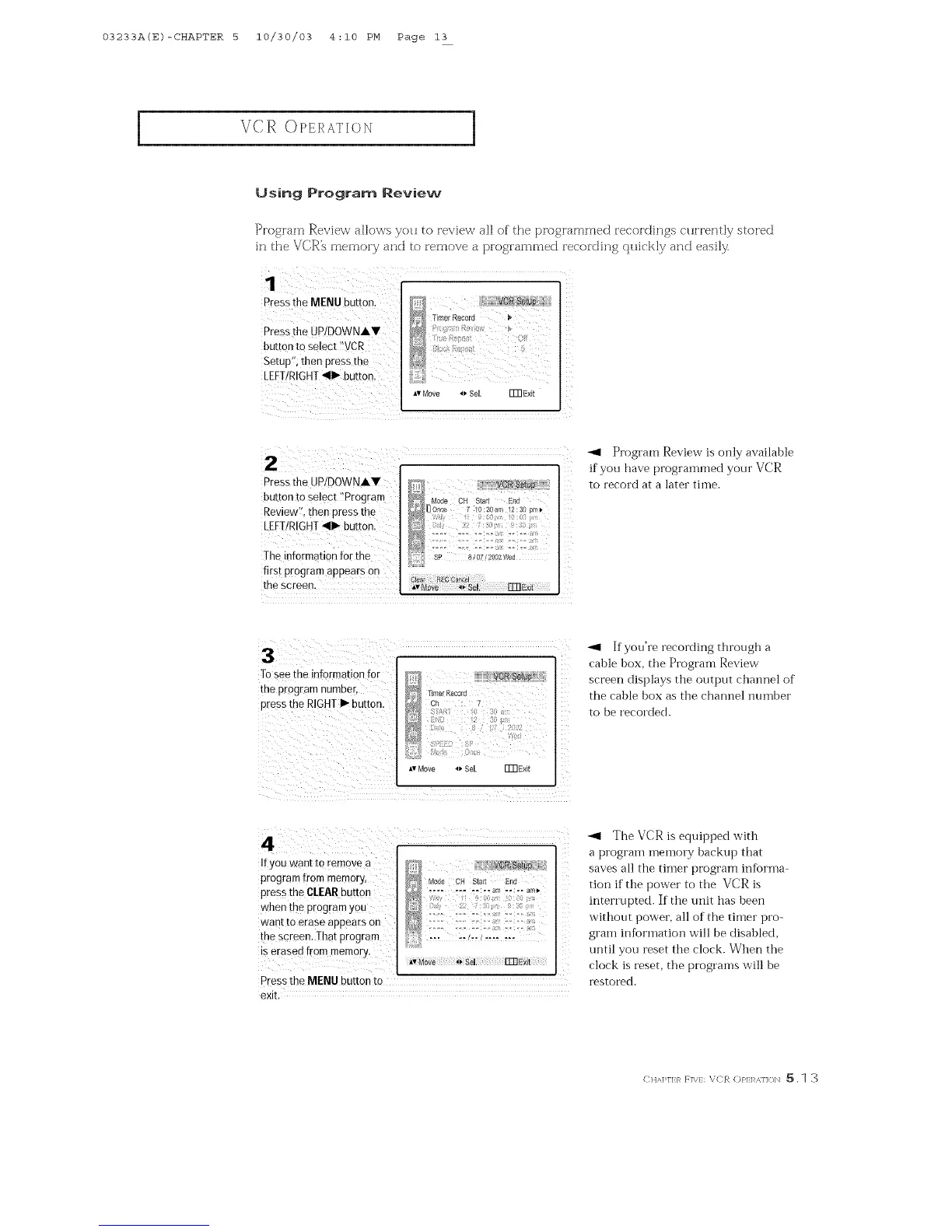
Progiam Revie\_ allo\_s you to revie\_ all ofthe [)rogiammed recordings C_lH'ently stored
in the VCR',s memory and to remove a progiammed iecoiding qHickly and easil_
Pressthe MENU button,
Pressthe UPiDOWNAW
button to select IIVCR
Setup"; then press the
LEFT/RIGHT.,II1_button.
1
_ Timer Record
*v Move _ Sel. FmExit
Press the UP/DOWNAY
button to se!ect ?Program
Review1!, then press the
LEFTIRIGHT_111_-buttonl
The information for the
first program appears on
the screen.
-gt Program Review is only available
if you have programmed your VCR
to record at a later time.
Tosee the information for
the p[0gram numbeB
pres s the RIGHTI_ button
_" T_merReco}'4
CK : 7
AvMove _ SeL FFRE×it
-_1 If you're recording through a
cable box, the Program Review
screen displays the output channel of
the cable box as the channel number
to be recorded.
If you want to remove a
program from memory,
press the CLEARbutton
when the program you
want to erase appears on
the screen. ]hat program
is erased rE0m memory.
_1 The VCR is equipped with
a program memory backup that
saves all the timer program informa
tion if the power to the VCR is
interrupted. If the unit has been
without power, all of the timer pro-
gram information will be disabled,
until you reset the clock. When the
clock is reset, the programs will be
Pressthe MENU button to restored.
exit.
(: HA]q'I:/_ F]\/: VCR (:)/'1:1 _.]]<_N _. 1 3



 To Next Page