03233A(E)-CHAPTER 4 10/30/03 4:07 PM Page 22
DVD OPERAT]ON
]
Setting up the Audio Options
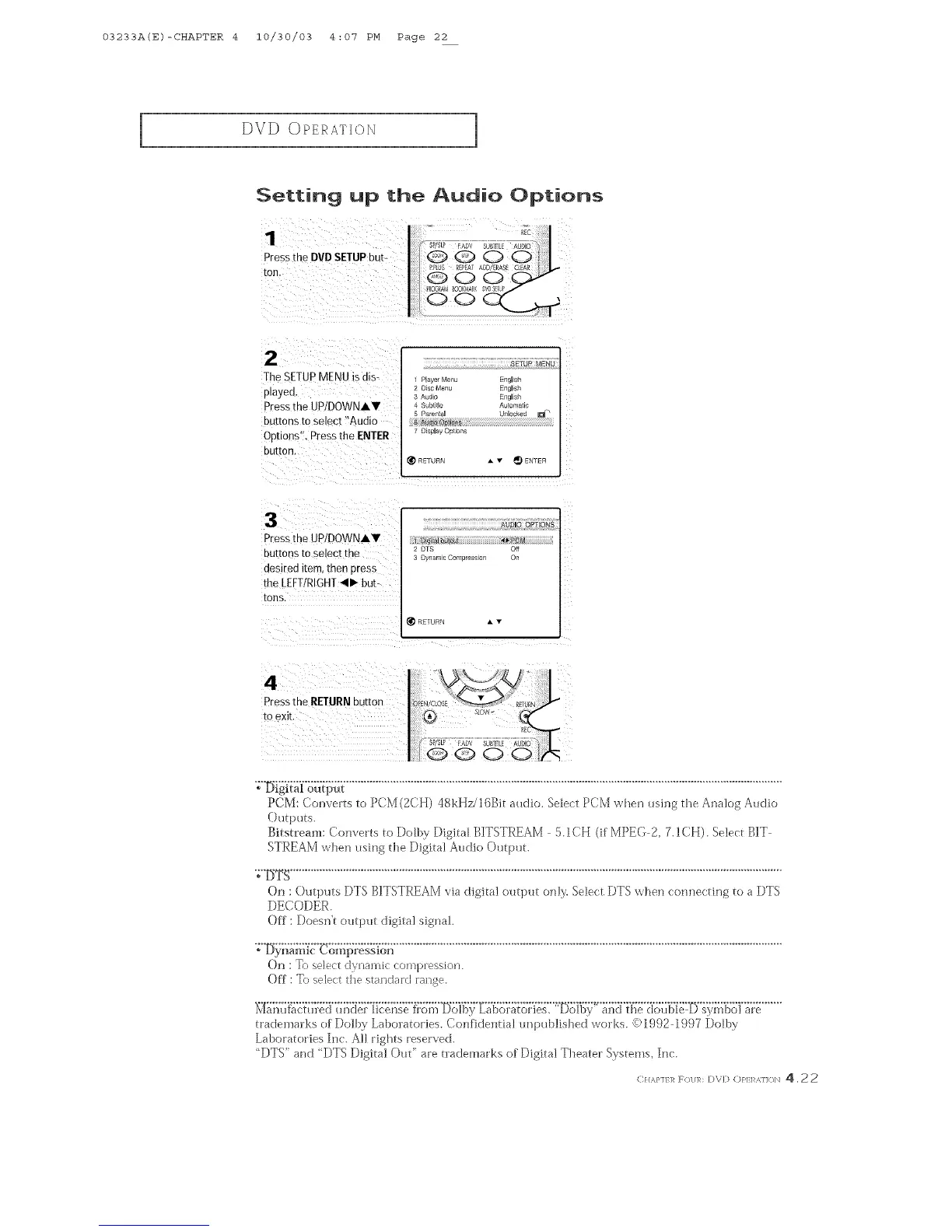
Pressthe DVDSETUPbut-
[oN
2
TheSETUPMENUisats-
played
PresstheUP/DOWNAV
buttonsto select"Aualo
OPtions',PresstheENTER
DUI[OR.
SETUP MENU
Ph_ ErMenu Engl sh
2 Disc Menu Engl sh
3 Au_lo Engl sh
S_bt _le _ummm c
5 ParenmJ unlouKe_ U
Ois_l_ OutJon_
RE1URN A v _ ENTER
Pressme UPIDOWNAY
buttons tOselect the
desired item, then Dress
the LEFTIRIGHT41_ but-
tons.
AUDUO OPTIONS
DTS Off
Dvnam c Comoress o Oi
RE_URN • •
PCM: Co_lverts to PCM (2CH) 48kHz/] 6Bit audio. SeJect PCM when using the Analog Audio
()utputs.
Bitstream: Converts to Dotby Digital BITSTREAM 5.1CH (if MPEG 2, 7. ]CH). Select BIT
STREAM when using d_eDigita] Audio Ou{ptm
Oi]: Outputs DTS BITSTREAM via digital output cm]_:Select DTS when connecting to a DTS
DECODER.
Off : Doesn[ output digital signal.
";'IS_)_'ia;_7_{:'Co';;{i:;_:&s'fdl...................................................................................................................................
On : T{) selectd)/*Jamiccom])l:ession.
Off : To selectthe standard rauge.
trademarks of Dolby Laboratories. Confidentia] rmpublished works. <)1992 1997 Dotby
Laboratories Inc. A!] rights reserved.
"DTS" and "DTS Digital Out" are tlTademarks of Digital Theater Sys[ems, Inc.
(}/,_,P1/R F//1/],N D\D (:)PLI _J](/N 4.2 2



 To Next Page