03233A(E)-CHAPTER 4 10/30/03 4:07 PM Page 23
I
DVD OPERAT]ON
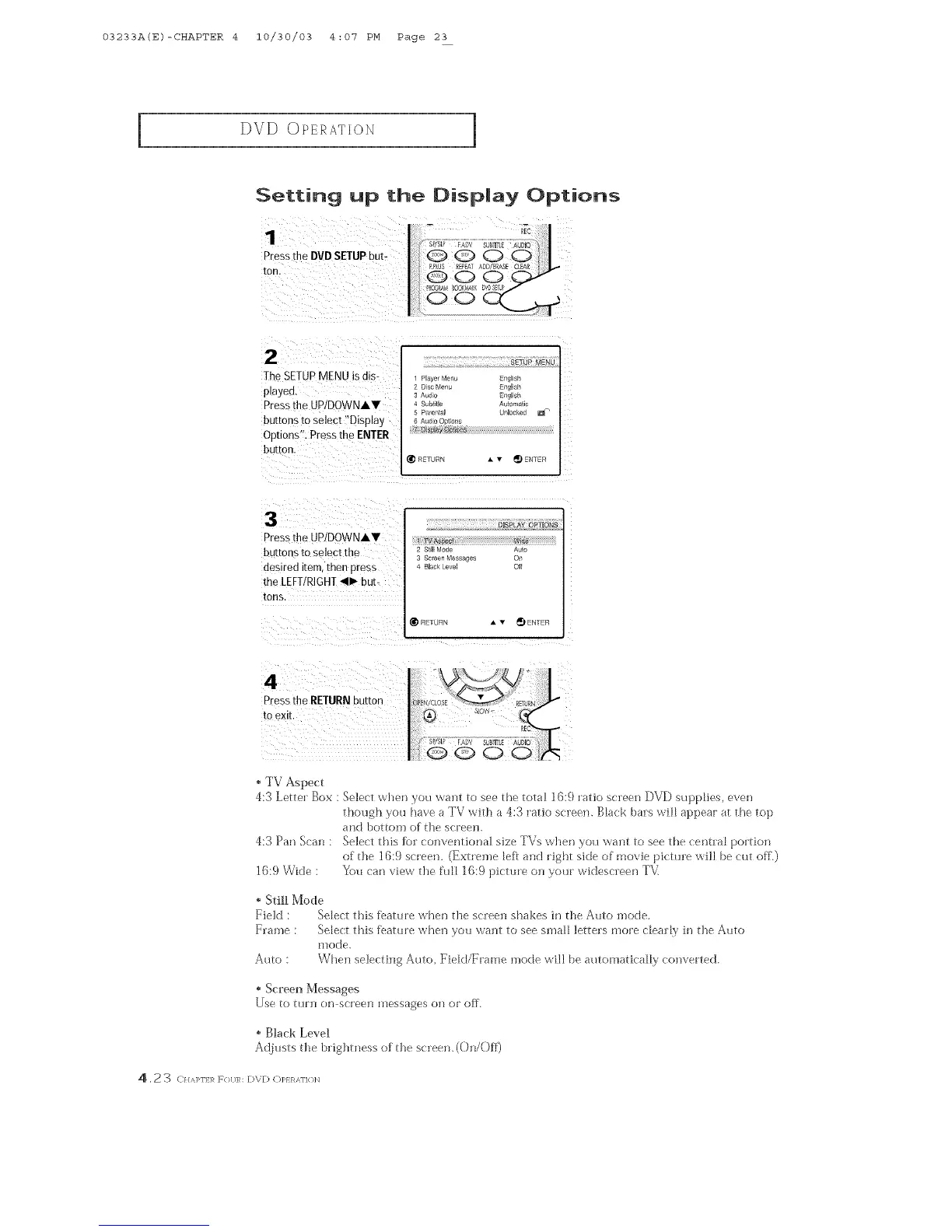
Setting up the Oisplay Options
Pressthe DVD SETUPbut-
ton.
2
The SETUPMENU is als-
playea
Pressthe UDIDOWNAY
buttons to select "Disptay
Options". Press the ENTER
button
SETUP MENU
Plave_ Menu Enahs
2 D sc Menu EnalisP
3 Aud,o Enplish
Subtitle Au_om_
S Pmental Unlocked
R_TURN • v _ ENTER
Pressthe UP/DOWNAV
buttons to select the
desired iterr men press
the LEFT/RIGHT_11_but-
tons,
DISPLAY OPTIONS
2 StEI[ Mode
Screen Messaaes c
4 Bbck Leve OI
REIURN A v _) ENTER
4
Press the RETURN ou[ron
to exE
.N/CLOSE RETJ_
, TV Aspect
4:3 Letter Box : Select when you want to see tbe total 16:9 ratio screen DVD supplies, even
tbough you bare a TV with a 4:3 ratio screen. Black bars wilt appear at the top
and bottom of {]_escreen.
4:3 Pan Scan : Select tbis fk_l"ccmventioria] size TVs when you want to see tbe central portion
of the 16:9 screen. (Extreme left and right side of movie picture will be cut off.)
16:9 Wide : You can view the fuH 16:9 pictm'e on your widescleen T\<
, Still Mode
Field : Select this %atm'e when die screen shakes in the Auto mode.
Frame : Select this lbatm'e when you want to see small letters more dealt},' in {]_e Auto
mode.
Auto : When selecting Auto, FieM/Erame mode will be automadcaH},' converted.
Screen Messages
Use to mrn on screen messages cm or off.
" Black Level
Adiusts {he brightness of the screen, (On/Off)
4 , 2 3 C}//q>l] ],! F{}[/R: DVD Ol>} R,M]{ }N



 To Next Page