03233A(E)-CHAPTER 4 10/30/03 4:07 PM Page 19
I
DVD OPERATION
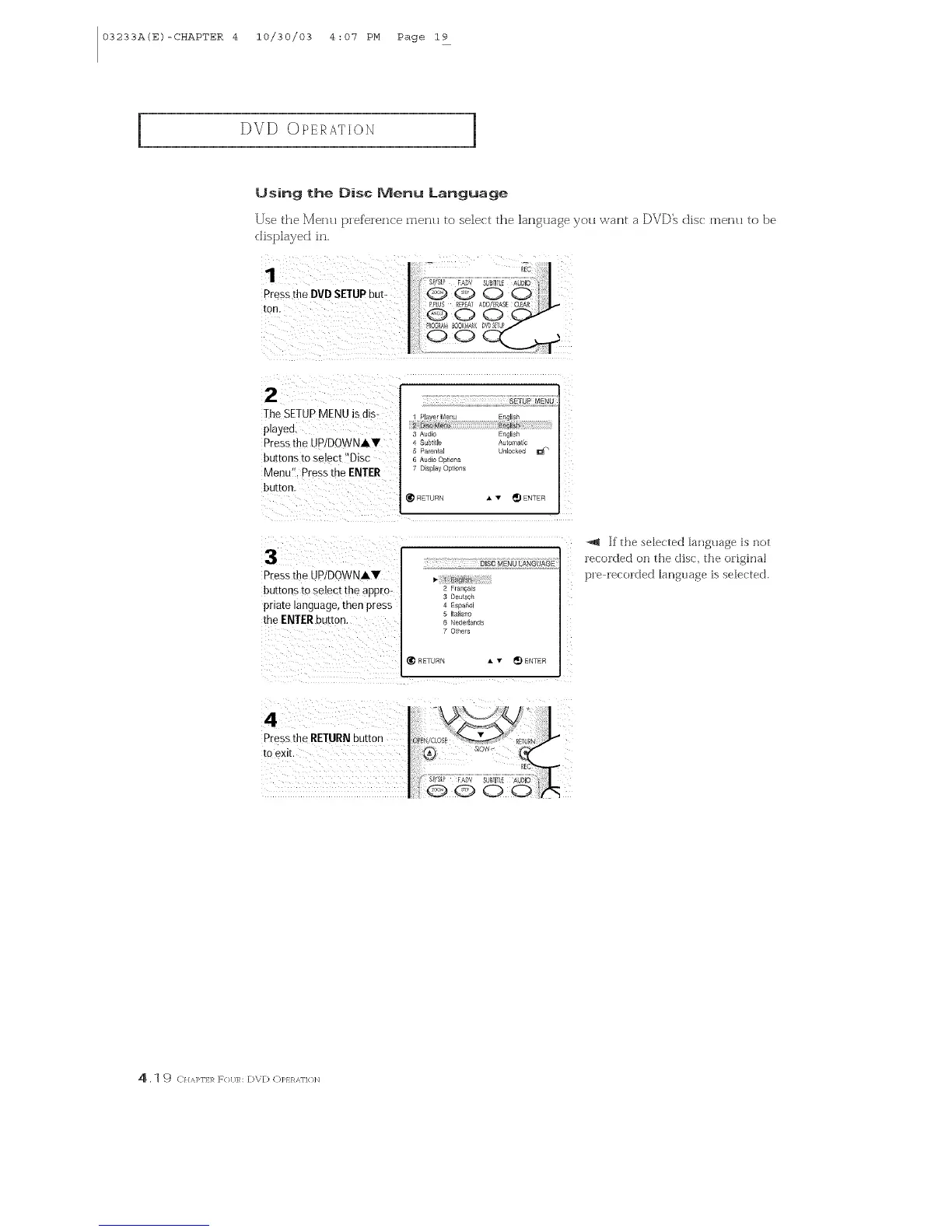
Using the Disc Menu Language
Use the Menu pief'eien_ e menu to select the language you \s, ant a DVD_ dis( menu to be
displayed in.
Pressthe DVD SETUPbut-
toil,
2
The SETUPMENU is dis-
playea.
Pressthe UPIDOWNAY
buttons to select "Disc
Menu". Press the ENTER
button
Pressthe UPIDOWNAY
buttons to select the @pro-
pna_e tanguage,men press
the ENTERnur_on
4
Press the RETURN DU_[On
tO eXE
SETUP MEN_
3 Aud£ :ngl sh
_ubtIle _ulomallc
5 Parenla[ un_ocKe( _1__
6 Aud o Oat ons
7 D_s_lav OD/ons
I_ qEqURN • • _) ENTER
DiSC MENU LANGUAGE
2 Pr_ _cas
3 Deutsct
4 Es[_a6o
5 Htallarlo
6 Nederlsnd!
7 Others
RETURN A v _ ENTER
"_ If the sebcted language is not
recorded on the (Hsc, the original
pre recorded language is selected.
4,1 9 CI/,'q>rLR F{}[IR: DVD C)P} RAr]{ flq



 To Next Page