03233A(E)-CHAPTER 4 10/30/03 4:07 PM Page 20
[
DVD OPERAT]O]_
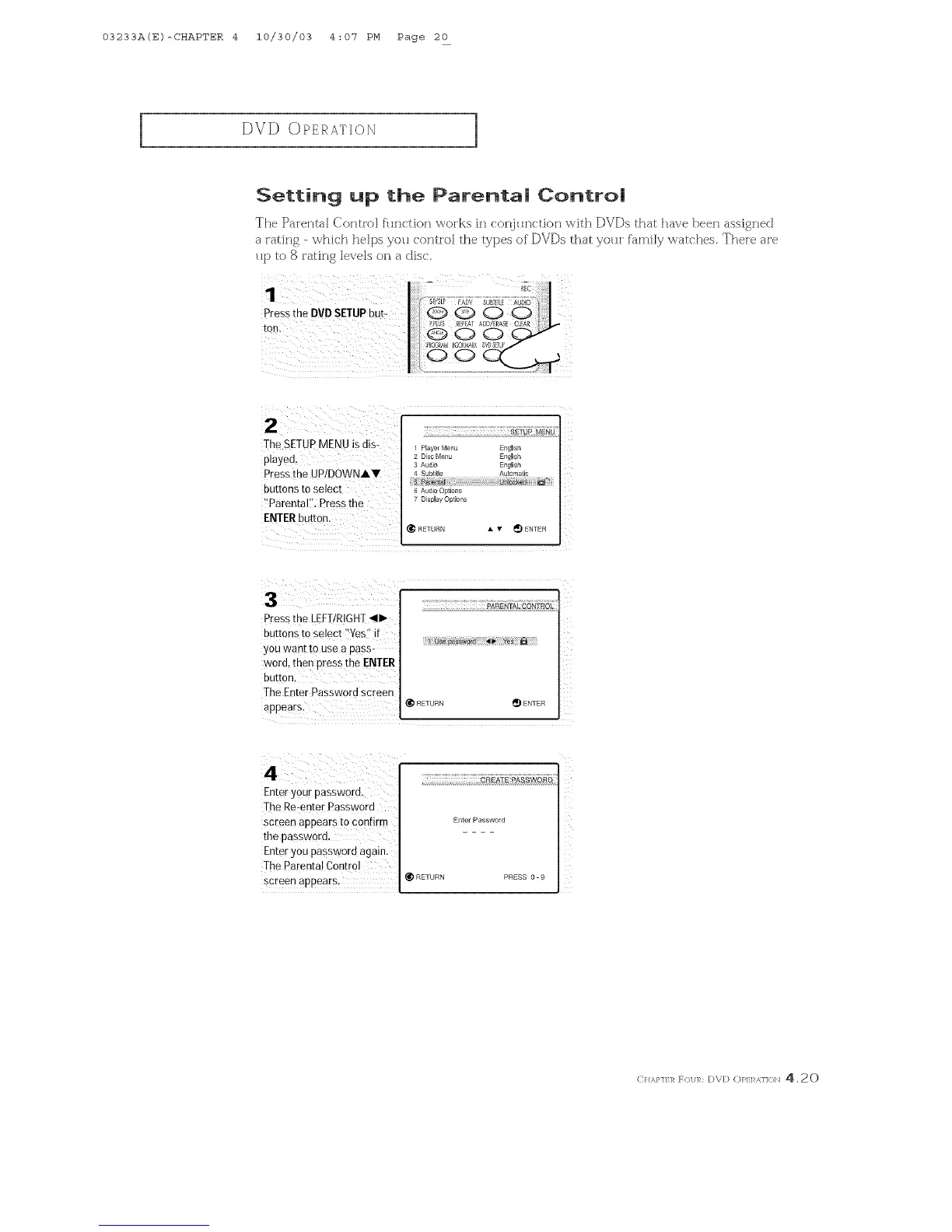
Setting up the Parenta| Control
The Parental Co:rltrol flln(tion works in (onj_mction \_ith DVDs that have beer] assigned
a rating - "whk:h helps yoH conti'o_ the types of DVDs that yoHi fh:n-fi[y wat( hes. Theie are
Hp to S rating levels on a disc.
The SETUPMENU is dis-
played,
Press the UP!DOWNAY
buttons to select
!'Parental:': Press the
1 Player Menu EngHish
2 Disc Menu EngHish
3 Audio EngU_sh
4 Subtitle Au_0matic
6 A_dio Options
7 DispHay Option£
RETURN • 'lv _ ENTER
Press the LEFT/RIGHT_11_
buttons to select !'Yes" if
you want to use a pass-
word, then press the ENTER
button.
The Enter Password screen
@pears:
Z
RETURN _ ENTER
4_
Enter your password.
The Re-enter Password
screen appears to confirm i E_terPassword
the password, i
Enter you password again.
The Parental Control
screen appears: @RETURN PRESS0- 9
(: H,_,},]}]_ F_/]/R: D\D (:)1:,1:1_,]](/]/ 4.20



 To Next Page