03233A(E)-CHAPTER 4 10/30/03 4:07 PM Page 8
DVD OPERAT]ON
Using the Disc View Function (VCD)
Track View/Index View
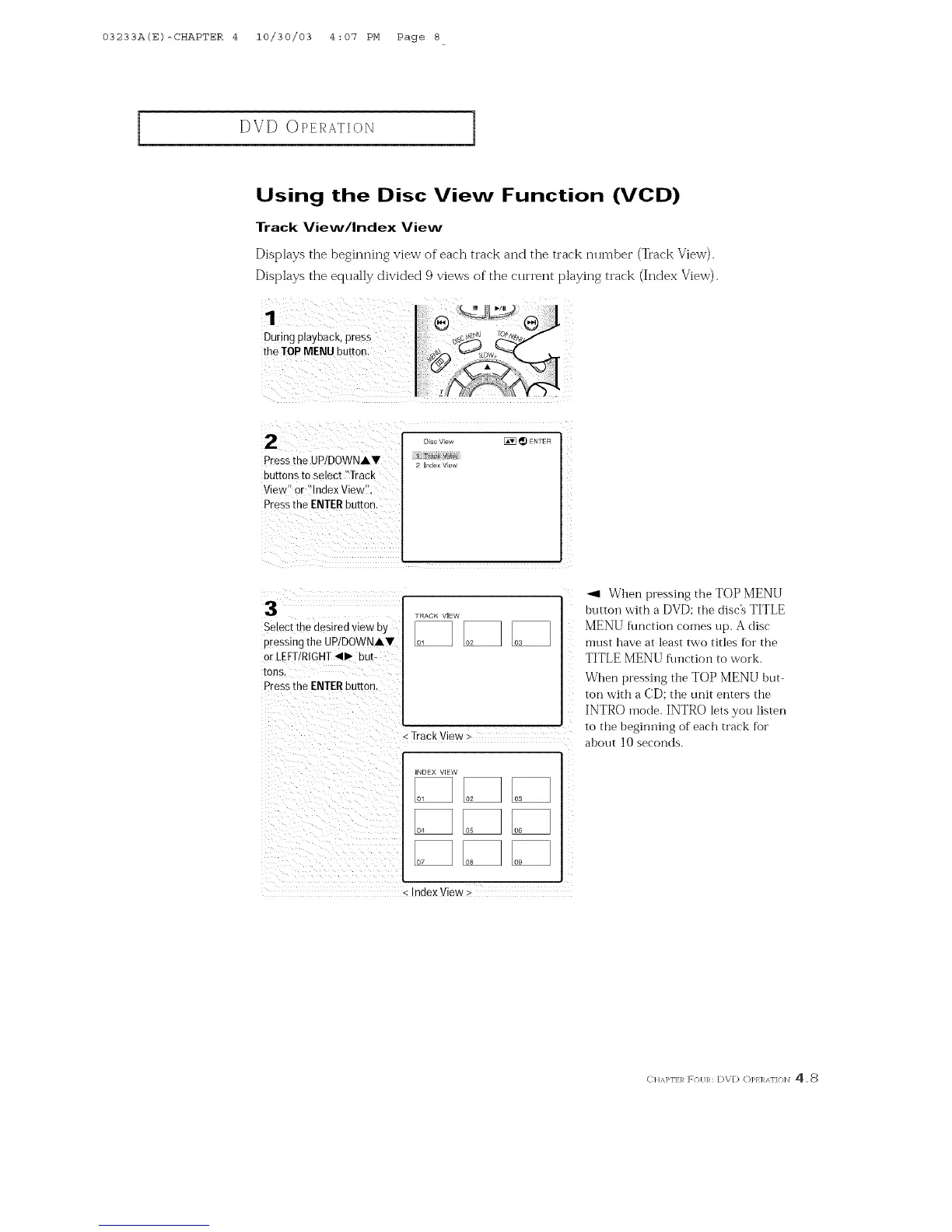
Displays the beginning view of each track and the track number (Track View).
Displays the equally divided 9 views of the current playing track (Index View).
During playback, press I; _s'_
the TOP MENU button: _s_ow_
]
2
Press[he UPIDOWNAY
buttons to select "Track
View" or "Index View
Pressthe ENTERbutton
Select the desired view by
pressing the UP/DOWNAV
or LEFT/RIGHT <11_ bUt=
tons.
Press the ENTER button
DIsc View _ _) ENTER
2 Index Vlew
TRACK VIEW
- Track View >
HNDEX ViEW
07
ndex View >
_1 When pressing the TOP MENU
buttoi_ with a DVD: the disc's TITLE
MENU flmction comes up. A disc
must have at least two titles for the
TITLE MENU function to work.
When pressing the TOP MENU but-
ton with a CD: the unit enters the
INTRO mode. INTRO lets you listen
to the beginning of each track for
ahout 10 seconds.
CItA]>I'I:/R F(H/R: DVD (])p} ]RAI'I(}IN 4,8



 To Next Page