03233A(E)-CHAPTER 4 10/30/03 4:07 PM Page 10
DVD OPERAT]ON
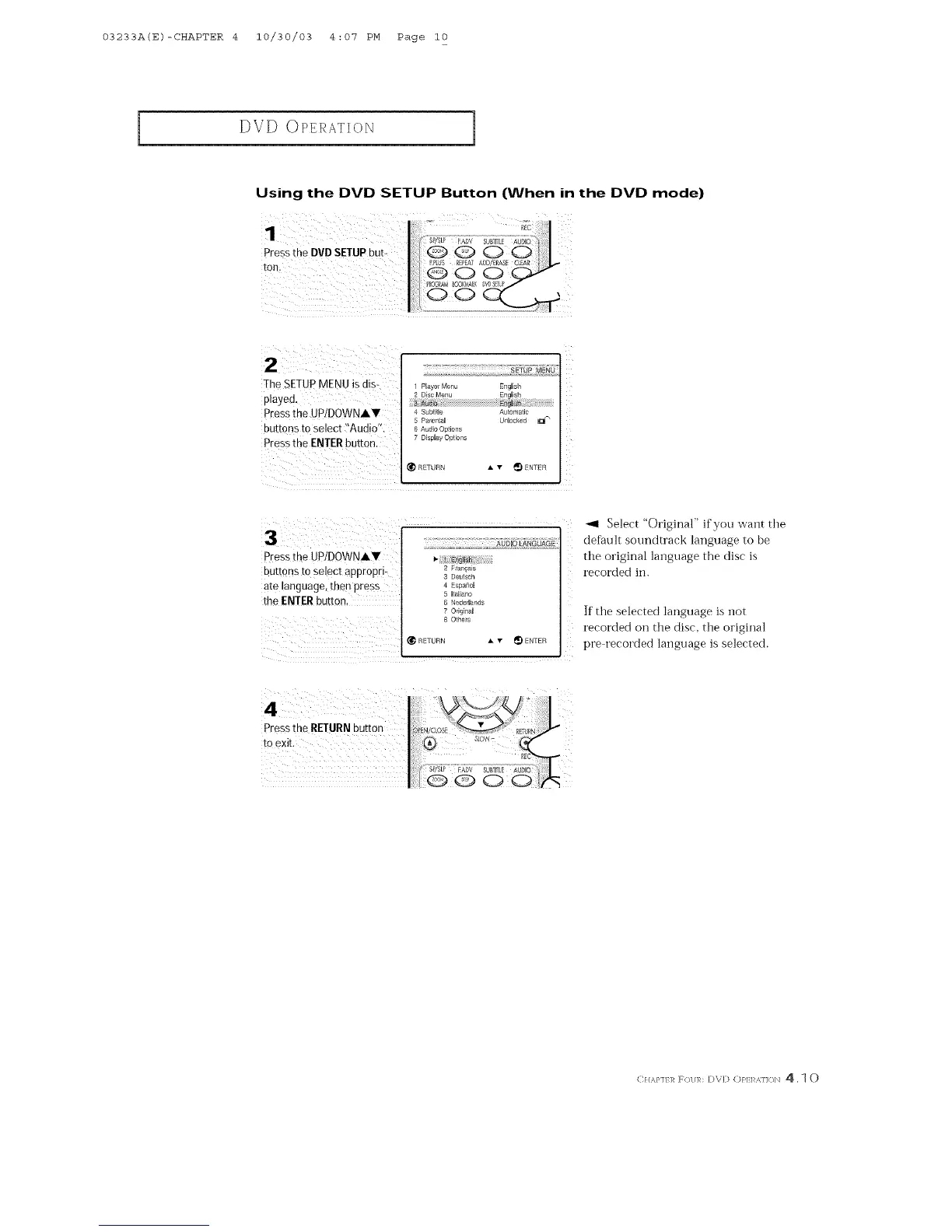
Using the DVD SETUP Button (When in the DVD mode)
Pressthe DVDSETUPbut-
ton.
\
2/;! O? ¸¸¸¸¸¸¸¸¸¸¸
The SETUPMENU is dis-
played.
Pressthe UP/DOWNIV
butt
Press the ENTER butte
1 Player Menu English
4 Subtile Automatic
5 Parerl_al Unlocked _l_ _
6 Audio OptiorlS
7 Display Options
press the UP/DOWNIY
buttons to select appropri_
ate language,then press
the ENTERbutton,
2 Franqais
3 Deutsch
4 Espa¢*oJ
5 Italiano
6 Nederlands
7 Original
8 Others
_1 RETURN • • _) ENTER
_1 Select "Original" ifyou want the
default soundtrack language to be
the original language the disc is
recorded in.
If the selected language is not
recorded on the disc. the original
pre recorded language is selected.
(]}TAP]f 17 F()l/1,h I;)\ I;) O/'l:l _,H</N 4. 10



 To Next Page