03233AIE)-CHAPTER1 10/30/03 3:58PH Page3
YOUR NEW 3WAY COk,,[BINAT]ON UNIT
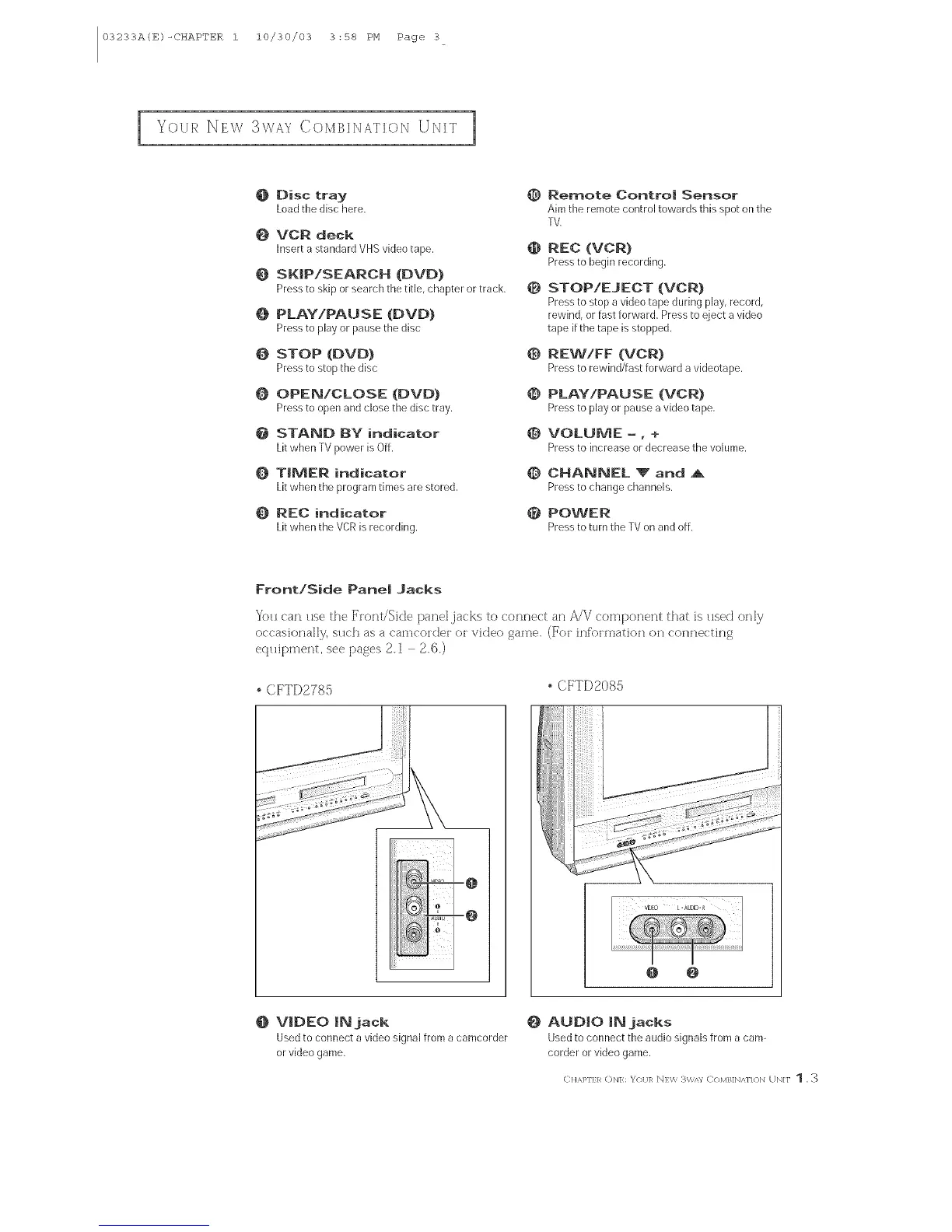
@ Disc tray @
Loadthedisc here.
@ VCR deck
Inserta standardVHSvideotape,
@ SKIP!SEARCH (OVO)
Pressto skiporsearchthetitle, chapteror track,
O PLAY/PAUSE (OVD)
Pressto playor pausethedisc
@ STOP (DVD) 0
Pressto stopthedisc
@ OPEN!CLOSE (DVD} @
Pressto openandclosethedisctray.
@ STANB BY indicator @
LitwhenTVpowerisOff.
@ TIMER indicator @
Litwhentheprogramtimesarestored.
@ REC indicator @
LitwhentheVCRis recording.
Remote Control Sensor
Aim the remote control towards this spot on the
TV.
REC (VCR)
Pressto beginrecording.
STOP/EJECT (VCR)
Pressto stop a video tape during play, record,
rewind, or fast forward. Press to eject a video
tape if the tape is stopped,
REW/FF (VCR)
Pressto rewind/hst forward _ videotape.
PLAY/PAUSE (VCR)
Pressto playorpausea videotape,
VOLUME -, +
Pressto increase or decrease the volume,
CHANNEL '_" and A
Pressto changechannels.
POWER
Pressto turn the TVon and off.
Front/Side Pane| .Jacks
You (:ar_ use the [_'['ont/Side parcel,jacks to connect an A/V corTlponent that is used only
occasionally, such as a ('am(:oi'der oi video game. (For inf'oimatiori ()_ ('o_l_e(:ting
ecluipment, see [)ages 2,1 2,6,)
CFTD2785
CFTD2085
@ @
@ VIDEO IN jack
Usedto connect a video signal from acamcorder
or video game.
_} AUDIO IN jacks
Used to connect the audio signals from a cam-
corder or video game.
C]{APFER (DN]: _'()I/]R N]W 3W,'_/ C/)MB]N/_N{}]q UN]F 1, 3



 To Next Page