03233A(E)-CHAPTER6 10/30/03 4:12PH Page1
TROUBLESHOOTING
If the TV seems to have a problem, first try this list of possible problems and sohltions.
If none of these troubleshooting tips apply, then call your neal_st service center.
Identifying TV Problems
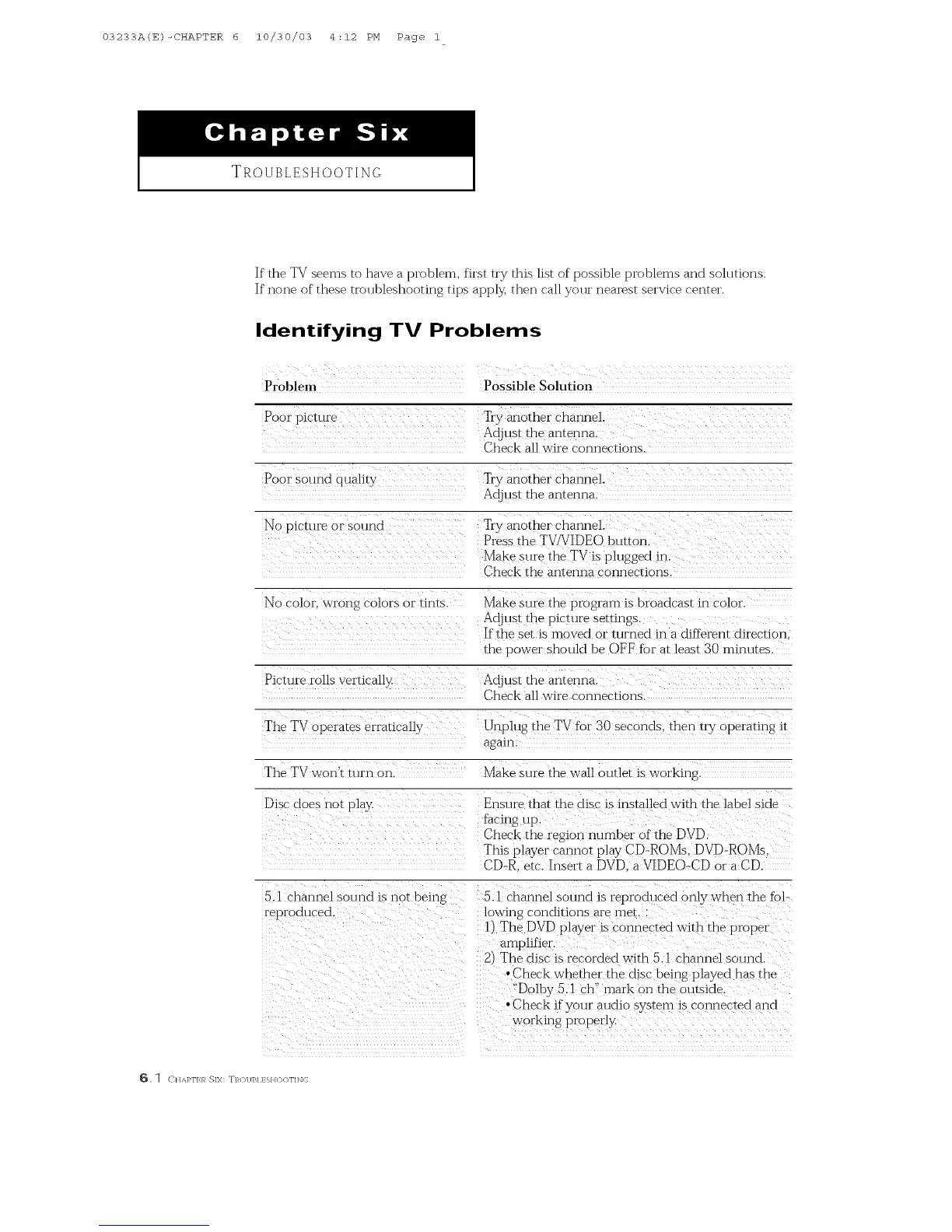
Problem Possible Solution
Pool picture Wly another channel.
Adjust the antenna.
Check all wire connections.
Poor sound quali b T1y another channel.
Adjust the anrennK
No picture nrsound T1yanother channel.
Press the TV_5!IDEO button
Make sure the TV is plugged in ....
Check the antenna connections.
No color, wrong colors or tints. Make sure the program is broadcast in color
Adjust the picture settings.
If the setis moved or turned in a different direction
the power should be OFF forat least 30 minutes.
Picture rolls vertically Adjust the antenna.
Check all wire connections.
]"he TVoperares erraticaD_
Unplug the TV for 30 seconds, then tO_ operanng it
again
Fhe TVwofft mm on.
Make sure the wall outlet is working
Disc does not play.
Ensure that the disc is installed with the label side
Iadng up.
Check the region number of the DVD.
This player carmor play CD-ROMs. DVD-ROMs.
CD-R. etc_Insert a DVD. aVIDEO-CDor a CD.
5A channel sound is not bring
reproduced.
5 A channel sound is reproduced only when the %l-
bwing conditions are met. :
1t The DVD player is connected with the propel
amplifier
2/The dis( is recorded with 5Ac hannel sound.
• Check whether the disc being played has the
"Dolby5.1 ch" mark on the outside.
• Check if your audio system is connected and
workFlg properly.
_. ] (:HAKFIR SIX: TROUBLESHOOTING



 To Next Page