OPERATION
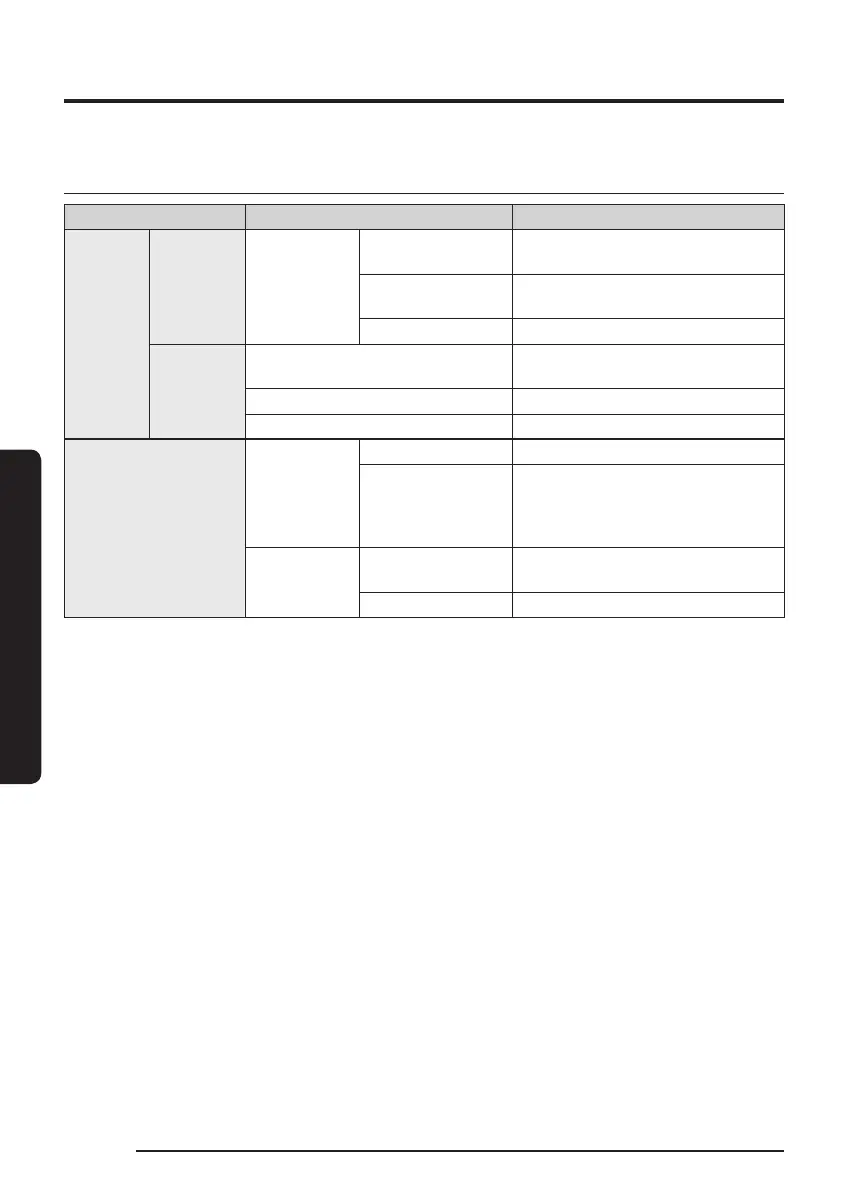
Operation status on the LED Status Indicator
Classication Color Meaning
Jet Bot
While
operating
Red
Blinking without
moving
An error occurs.
Blinking while
moving
Auto returning to the Clean Station
due to low battery
On Operating stops due to low battery
While
charging
Red, orange, or yellow
(depending on charging progress)
While charging
Green Charging is complete.
Violet Software is being updated.
Clean Station
White
On (5 seconds) Clean Stations’ power is on.
On
Jet Bot’s Empty Dust function
is working, Jet Bot is docked
(1minute after the docking, it is
off.).
Red
Blinking
Clean Station’s cover is open. The
suction motor has a problem.
On Clean Station’s Dust Bag is full.
If the Jet Bot starts charging from the depleted status, the Status Indicator turns red and
slowly blinks for about 20minutes.
18
1_VR8500_EN_00858C-02_SW.indd 18 2022-10-13 오후 6:06:12













 To Next Page