EasyManua.ls Logo

Samsung Jet Bot - Clean Station Maintenance

Samsung Jet Bot
192 pages
Print Icon
To Next Page IconTo Next Page
To Previous Page IconTo Previous Page
Loading...
MAINTENANCE
Cleaning the Clean Station
Before cleaning the Clean Station, unplug the power cord from the electrical outlet.
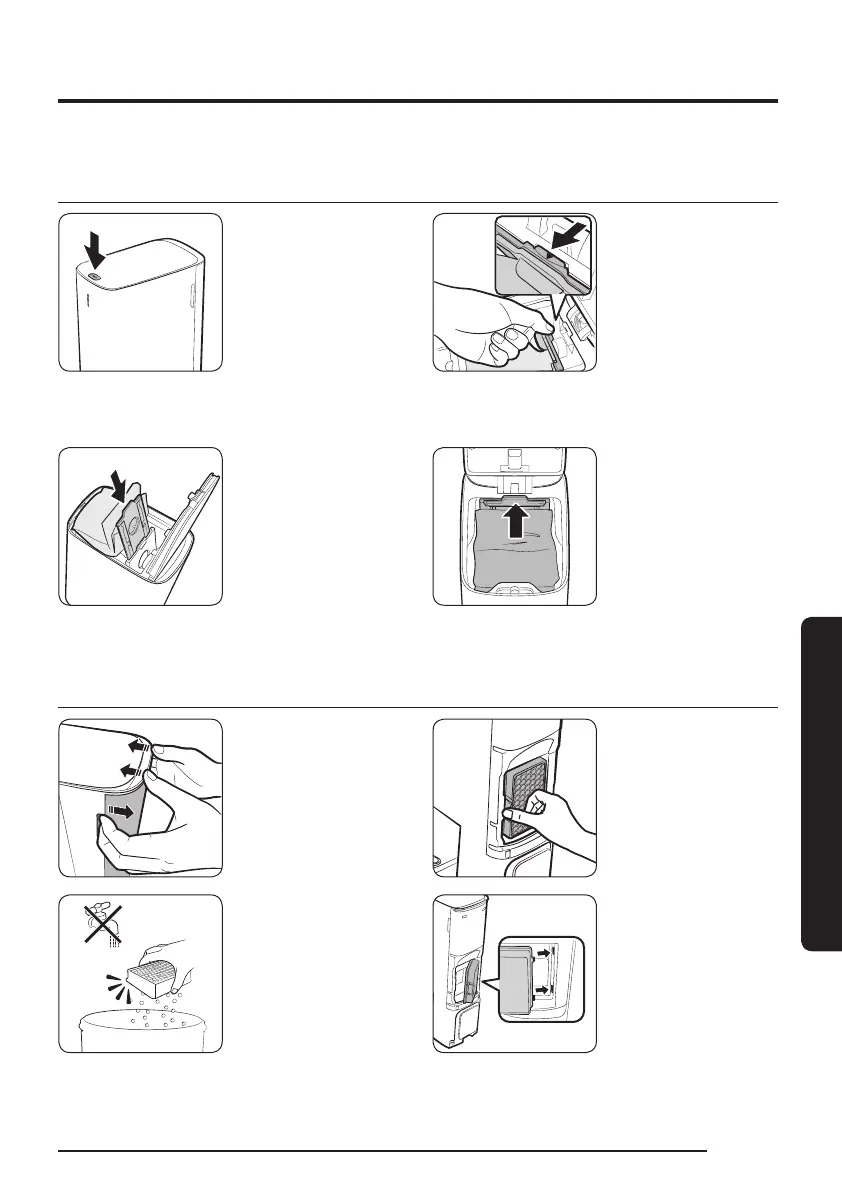
Replacing the Dust Bag
1 Press the [PUSH]
button on the top
of the Clean Station
to open its cover.
2 Pull the top of the
Dust Bag holder
gently.
If you do not
pull the Dust
Bag holder, you
cannot replace
the Dust Bag
due to the safety
device.
3 Remove the old
Dust Bag and put
a new Dust Bag
into the Dust Bag
holder by tting
into the grooves on
the holder.
Push the Dust
Bag to the end.
4 Push the top of the
Dust Bag holder
gently until you
hear it click.
5 Close the Clean
Station’s cover.
Cleaning the Fine dust Filter
1 Grasp the grooves
at the rear of the
Clean Station and
detach the Fine
dust Filter cover.
2 Detach the Fine
dust Filter.
3 Clean the Fine dust
Filter.
Do not clean the
Fine dust Filter
with water.
4 Attach the Fine
dust Filter and the
Fine dust Filter
cover.
English
27
1_VR8500_EN_00858C-02_SW.indd 27 2022-10-13 오후 6:06:25

Table of Contents

Related product manuals