English-13
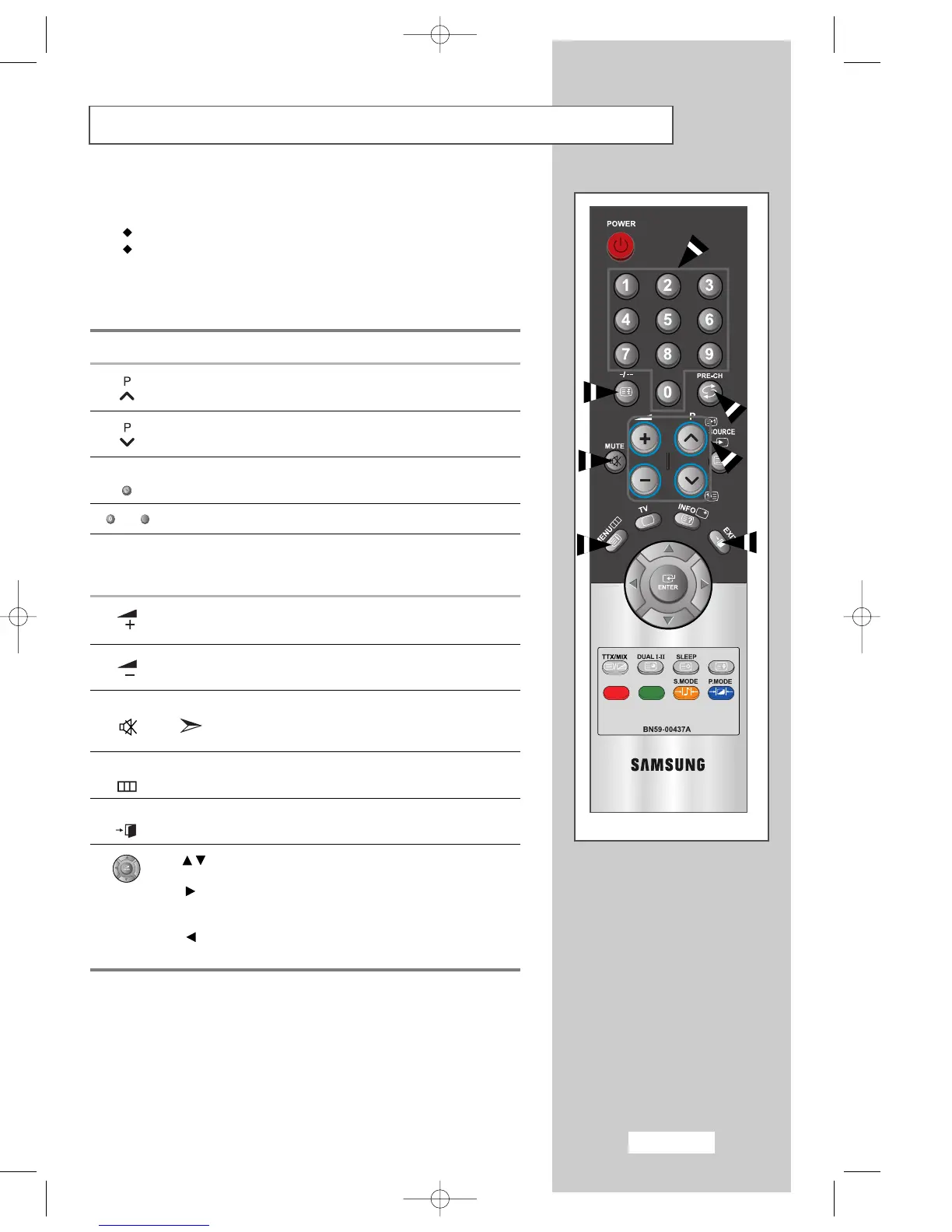
Becoming Familiar with the Remote Control
The remote control is used mainly to:
Change channels and adjust the volume
Set up your set using the on-screen menu system
The following table presents the most frequently used buttons and their
functions.
Button Viewing Function Menu Function
Used to display the next
-
stored channel.
Used to display the
-
previous stored channel.
PRE-CH Used to switch repeatedly between the last two channels
displayed. (PRE-CH; Previous Channel)
- Used to display the corresponding channels.
-/--
Used to select a channel numbered ten or over.
Press this button, and the “--” symbol is displayed.
Enter the two-digit channel number.
Used to increase the
-
volume.
Used to decrease the
-
volume.
MUTE Used to switch the sound off temporarily.
To turn the sound back on, press this button again,
or press the + or - button.
MENU Used to display the Used to return to the previous
on-screen menu system. menu or normal viewing.
EXIT Used to exit the menu system and return directly to normal
viewing.
Used to move among the menu items.
Used to select a menu item or increase
the value of the selected item.
Used to return to the previous menu item or decrease
the value of the selected item.



 To Next Page