English-52
Installing the Wall Mount Kit
(LW15M23C/LW17M24C)
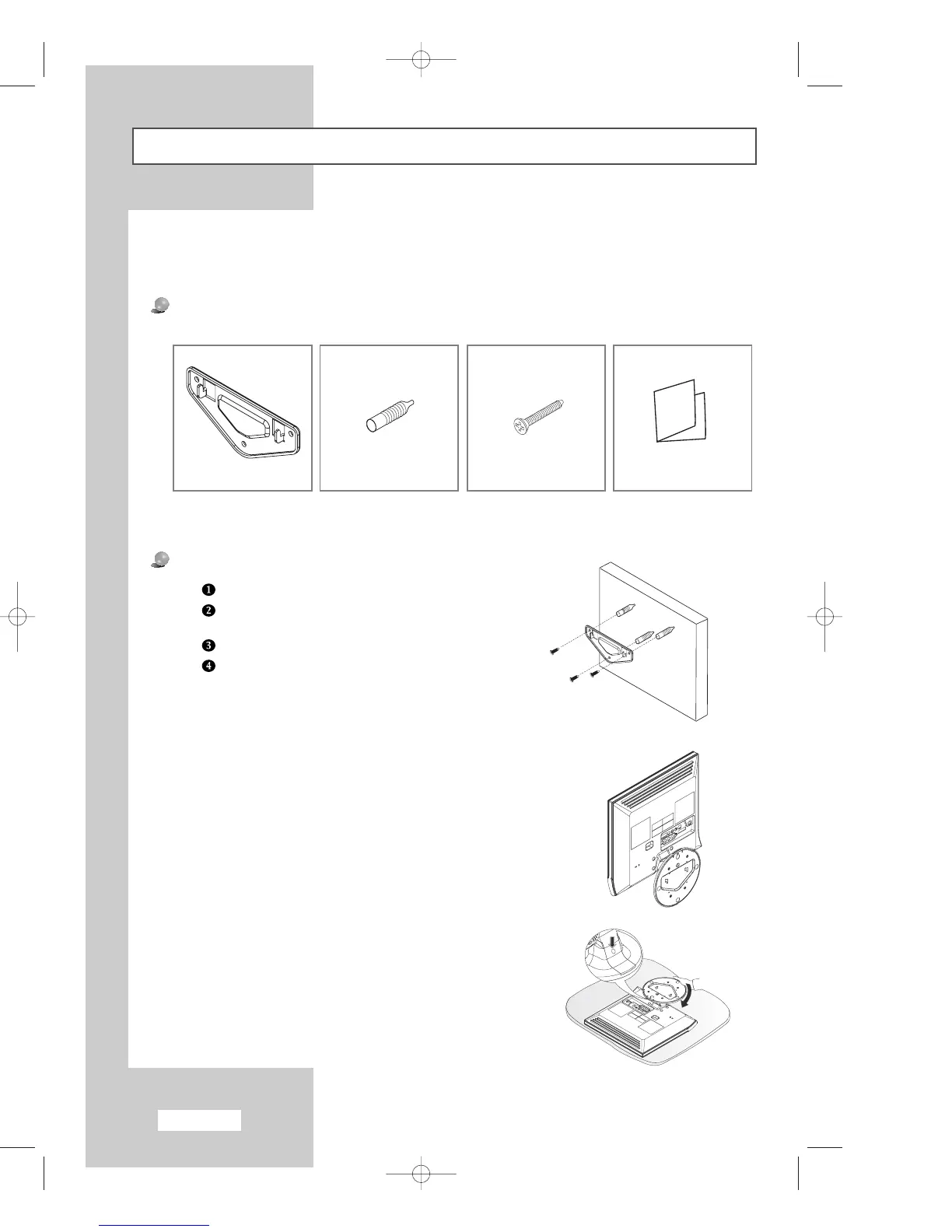
Components
Please use provided components or parts to install the Wall Mount Kit.
Mark the location of hole on the wall using installation guide.
Make over 35mm- depth- hole on the marked location using
5.0-diameter drill.
Fix anchors on each hole on the wall.
Connect bracket to the wall with screws after fitting anchors
into the bracket holes.
Note : If the bracket is not firmly fixed to the wall, LCD TV can fall off.
Note : This installation is to be used when attaching the wall mount to a concrete wall.
When attaching to other building materials, please contact your nearest dealer.
How to assemble the Wall Mount Kit
Bracket Anchors : 3EA Screws : 3EA Installation Guide
1
You may use LCD TV right after fixing it to the wall since stand is
wrapped already turned over as shown in the picture below.
2
When using LCD TV in stand-based form, place the product on a
cushion or other soft materials. Then turn over stand following the
arrow direction below only after pressing button on the connected part
where LCD TV is attached to stand.
(Turn over stand in the opposite direction after pressing button when
using LCD TV in wall-mounted form as well.)
3
04-BN68-00633E-02Eng.qxd 7/25/04 3:00 PM Page 52



 To Next Page