English-24
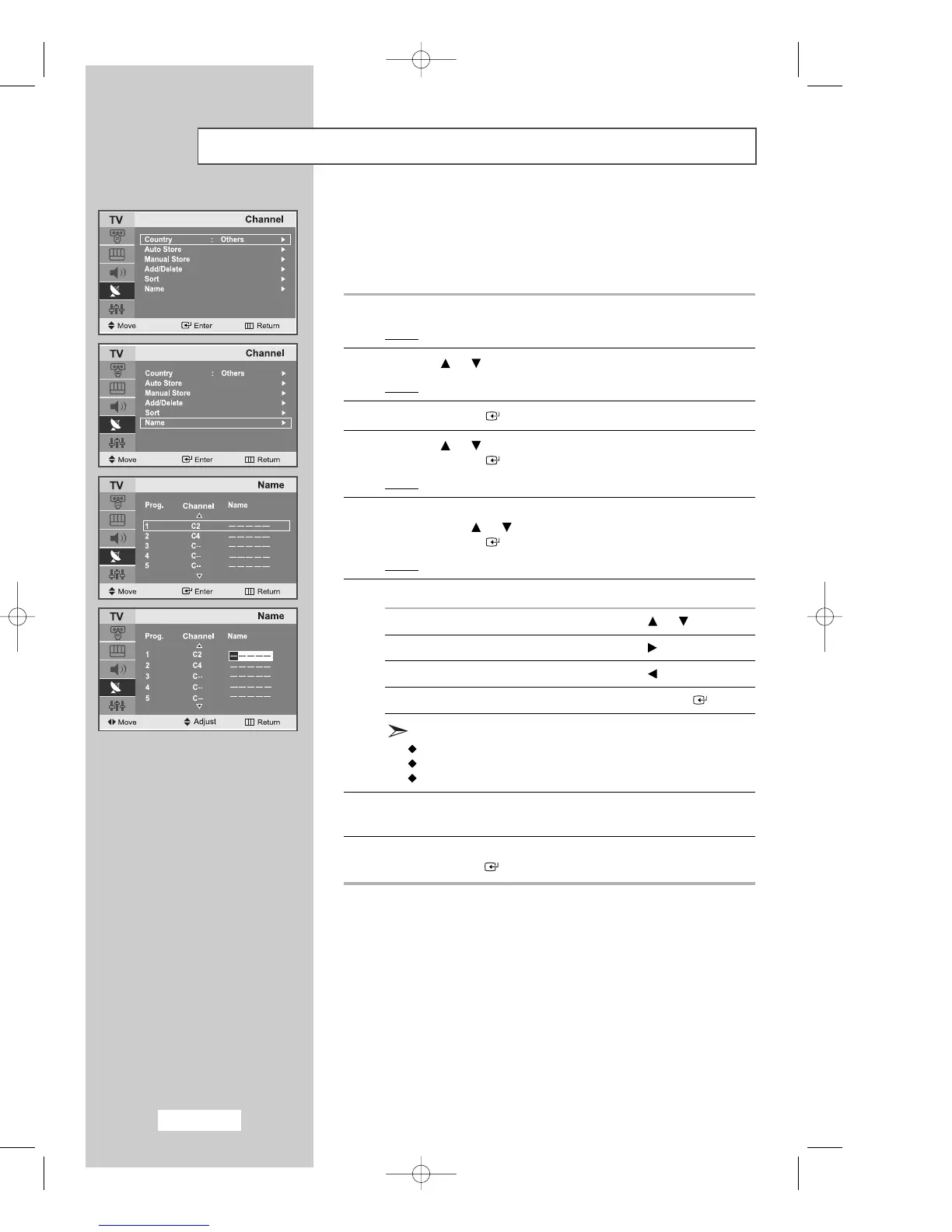
Giving Channels Names
If channel name information is broadcast when you store the channels
either manually or automatically, the names are assigned to the
channels directly. You can however change these names or assign
new names as required.
1
Press the
MENU
button.
Result
: The main menu is displayed.
2
Press the or button to select the
Channel
.
Result
:
The options available in the
Channel
group are displayed.
3
Press the
ENTER
button.
4
Press the or button to select the
Name
.
Press the
ENTER
button.
Result
: The current
Prog., Channel
and Name are displayed.
5
If necessary, select the channel to be assigned to a new
Name
by pressing the or button.
Press the
ENTER
button.
Result
: The selection bar is displayed around the name box.
6
To... Then...
Select a letter, number or symbol Press the or button
Move on to the next letter Press the button
Move back to the previous letter Press the button
Confirm the name Press the
ENTER
button
The characters available are :
Letters of the alphabet (A~Z)
Numbers (0~9)
Special characters (space, _ )
7 Repeat Steps
5
to
6
for each channel to be assigned to a
new name.
8 When you have finished entering the name,
press the
ENTER
button to confirm the name.
02-BN68-00633C-00Eng.qxd 4/18/04 7:35 AM Page 24



 To Next Page