English-17
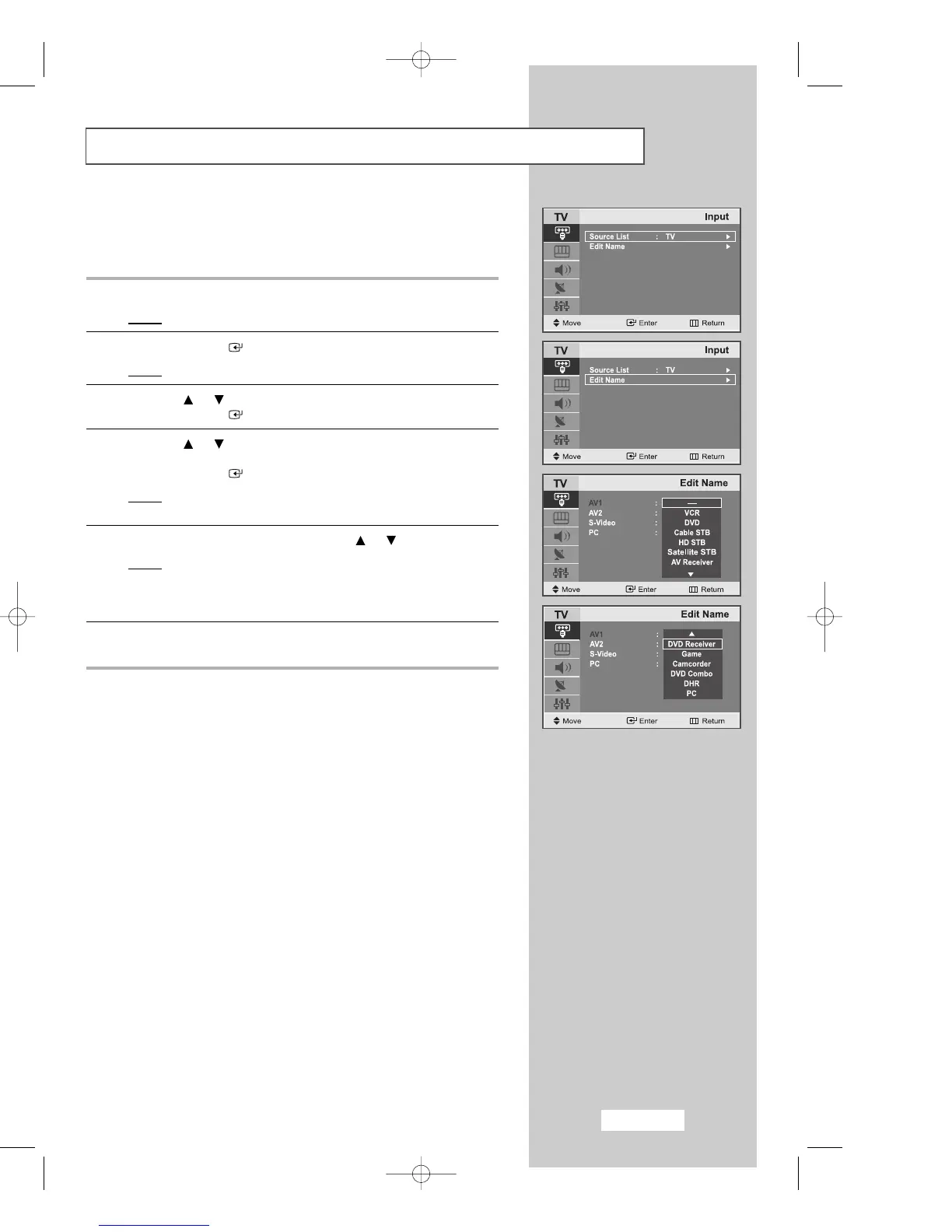
Editing an Input Source Name
Entering the names of the input source devices connected to the input
ports on the TV set allows you to find and choose an input source that
you would like to watch in a quick and convenient manner.
1
Press the
MENU
button.
Result
: The main menu is displayed.
2
Press the
ENTER
button to select the
Input
.
Result
:
The options available in the
Input
group are displayed.
3
Press the or button to select the
Edit Name
.
Press the
ENTER
button.
4
Press the or button to move to the input source that
you wish to edit.
Press the
ENTER
button.
Result
: The following options are available:
5
Select the required device by pressing the or repeatedly.
Result
: The following options are available:
---- - VCR - DVD - Cable STB - HD STB - Satellite STB -
AV Receiver - DVD Receiver - Game - Camcorder - DVD
Combo - DHR - PC.
6
When you are satisfied with your choice, press the
EXIT
button to
return to normal viewing.
02-BN68-00633C-00Eng.qxd 4/18/04 7:35 AM Page 17



 To Next Page