English-40
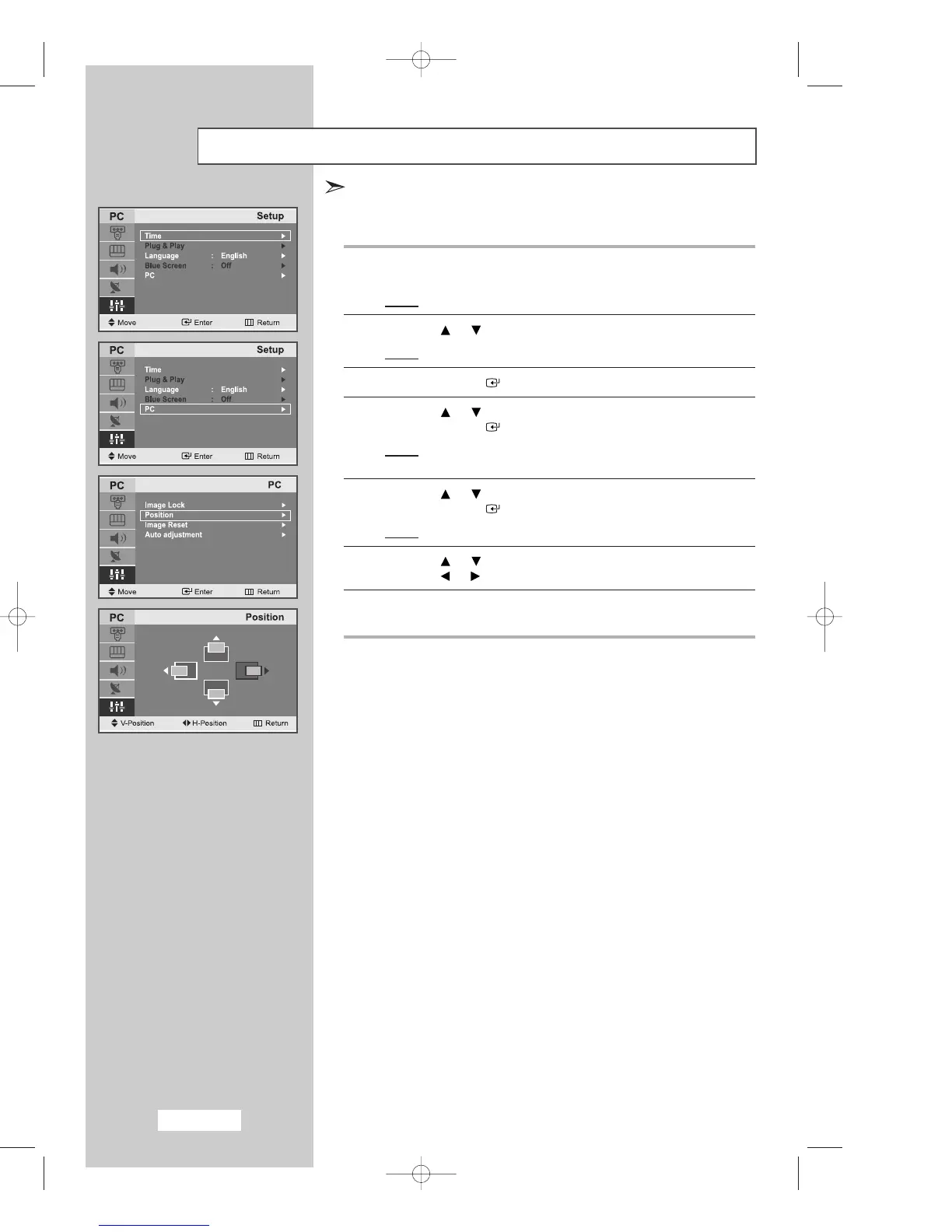
Changing the Image Position
1
Press the
MENU
button.
Result
: The main menu is displayed.
2
Press the or button to select
Setup
.
Result
: The options available in the
Setup
group are displayed.
3
Press the
ENTER
button.
4
Press the or button to select
PC
.
Press the
ENTER
button.
Result: The options available in the
PC
menu
are displayed.
5
Press the or button to select
Position
.
Press the
ENTER
button.
Result
: You can adjust the image
Position
.
6 Press the or button to adjust the vertical position.
Press the or button to adjust the horizontal position.
7
Press the
MENU
button to return to the previous menu or
press the
EXIT
button to return to normal viewing.
Preset to PC mode by pressing the
SOURCE
button on the remote contol .
03-BN68-00633F-03Eng.qxd 6/12/04 6:24 PM Page 40



 To Next Page