English-23
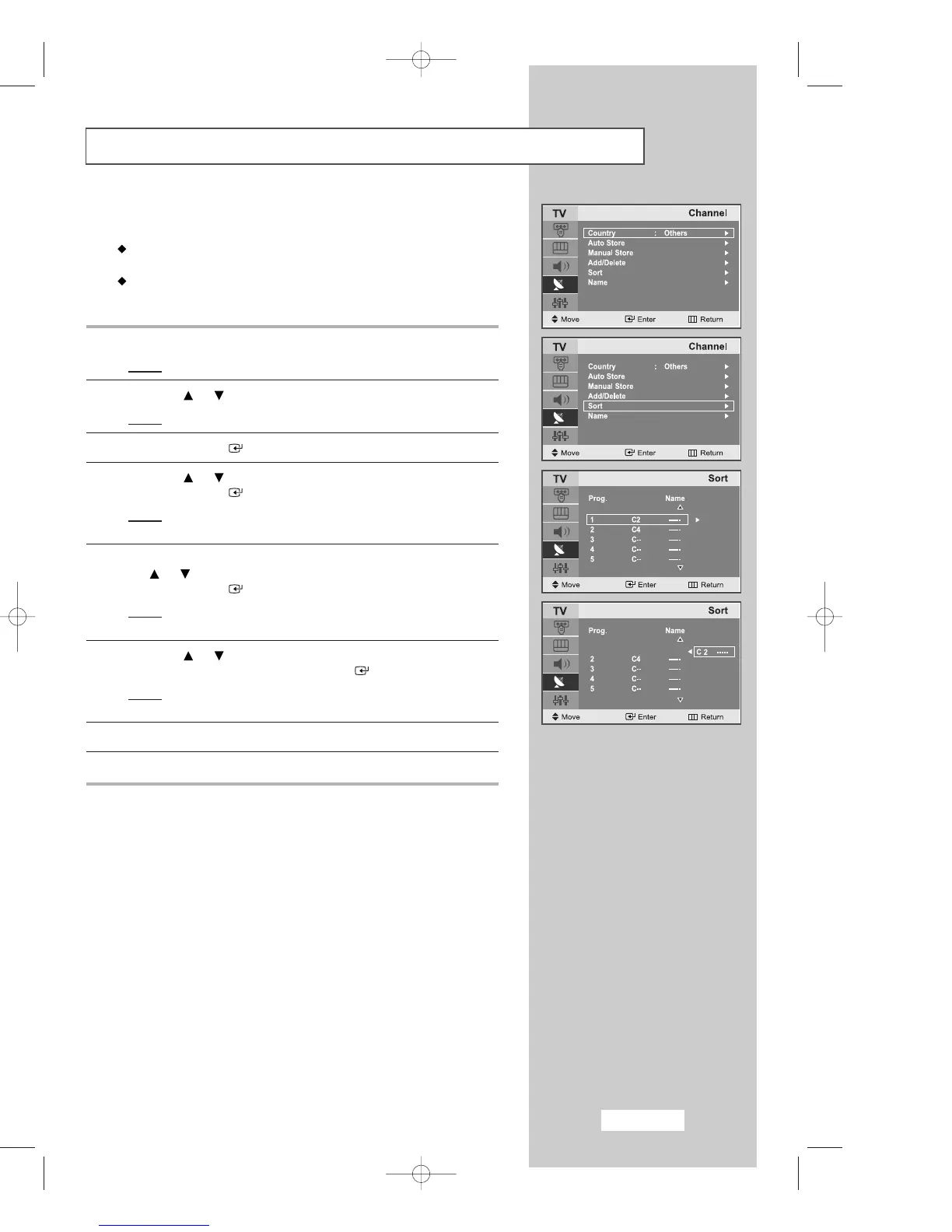
Sorting the Stored Channels
You can exchange the numbers of two channels, in order to:
Modify the numeric order in which the channels have been
automatically stored.
Assign easily remembered numbers to the channels that you watch
most often.
1
Press the
MENU
button.
Result
: The main menu is displayed.
2
Press the or button to select the
Channel
.
Result
:
The options available in the
Channel
group are displayed.
3
Press the
ENTER
button.
4
Press the or button to select
Sort
.
Press the
ENTER
button.
Result
: The current
Prog., Channel
and
Name
are
displayed.
5
Select the channel number that you wish to change by pressing
the or button repeatedly.
Press the
ENTER
button.
Result
: The selected Channel and
Name
are moved
to the right side.
6
Press the or button to move to the position which you would
like to change and then press the
ENTER
button.
Result
: The selected channel is exchanged with the one
previously stored to the chosen number.
7
Repeat step
5
to
6
for another channel to sort again.
8
Press the
EXIT button to exit
.
Channel
Channel
02-BN68-00633F-02Eng.qxd 5/21/04 5:28 PM Page 23



 To Next Page