42
Shortcut Keys
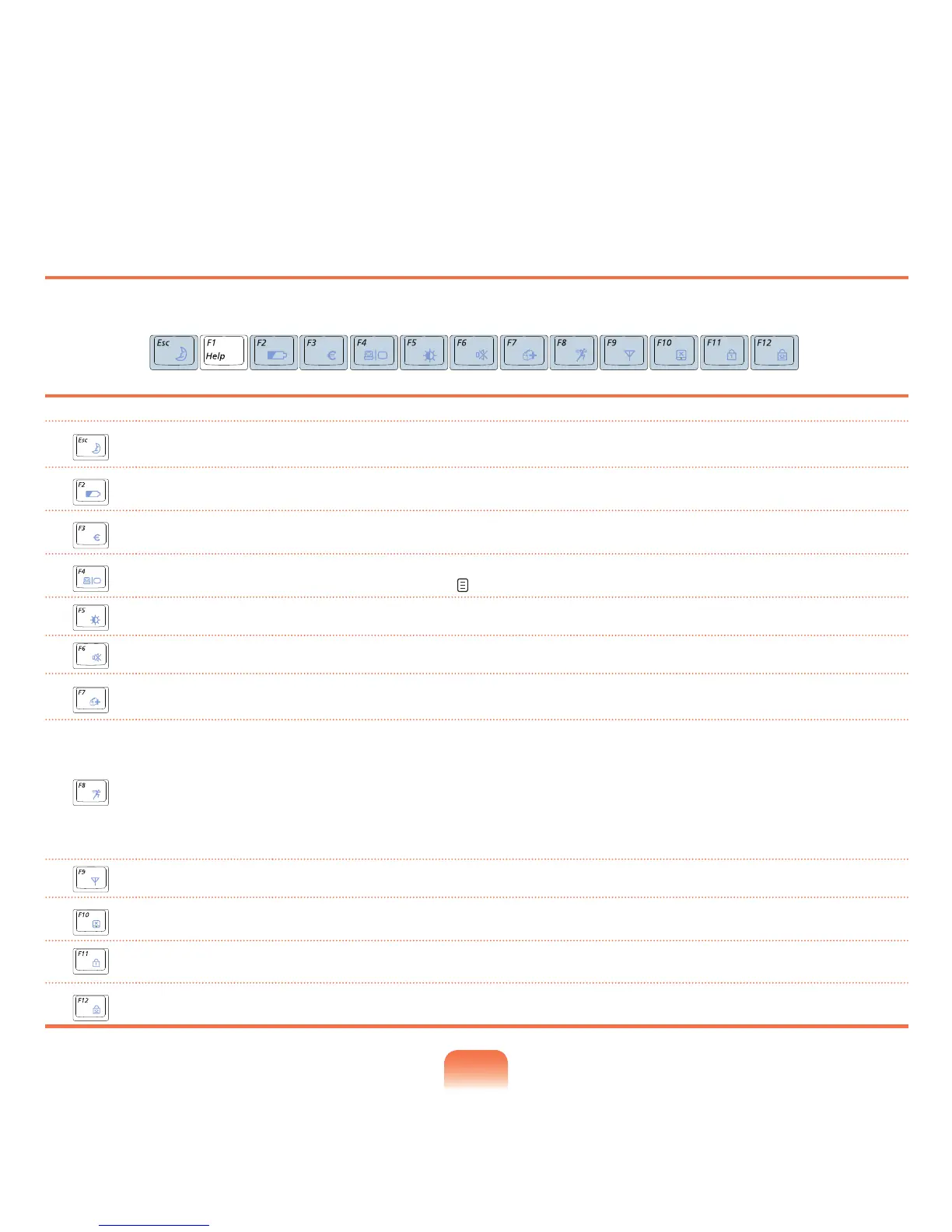
YoucanusethefollowingfunctionsbypressingthekeysbelowwiththeFn key.
Fn+ Name Function
REST
(Sleep Mode)
SwitchestoSleepmode.Towakethecomputerup,pressthePowerbutton.
Gauge
Showstheremainingbatterycharge.
YoucanonlyusethisfunctionwhentheEasyDisplayManagerprogramisinstalled.
Euro
EnterstheEuromonetaryunitsymbol.
Thiskeymaynotbeprovideddependingonthekeyboardtype.
CRT/LCD
SwitchesthescreenoutputtotheLCDorexternalmonitorwhenanexternalmonitor(orTV)is
connected to the computer. p. 59
Backlit
TurnstheLCDbacklightonoroff.
Mute
Mutes or cancels mute.
Samsung Magic
Doctor
Systemdiagnosis,recoveryandInternetconsultationprogram,SamsungMagicDoctor,willbe
launched.
Easy SpeedUp
Manager
Youcanselectoperationmodewhenyouneedmaximumsystemperformanceorlow-noise/low
powerconsumptionwithone-click.
■ Silent:Low-noiseandlowpowerconsumptionmode
■ Normal:NormalMode
■ Speed:Maximumperformancemode.Thesystemoperatesinitsmaximumperformance,
andsystemresourcesareallocatedtothecurrentlyactiveprogramwithpriorityformaximum
performance.
Wireless LAN
TurnsthewirelessLANfunctiononoroffinmodelswithwirelessLANcapability.
Touchpad
Turns the Touchpad function on or off.
Whenusinganexternalmouseonly,youcanturntheTouchpadoff.
Num Lock
Turnsthenumerickeyboardonoroff.
Scroll Lock
If you turn the Scroll Lock on, you can scroll the screen up or down without changing the cursor
location in some applications.


 To Next Page