73
Window
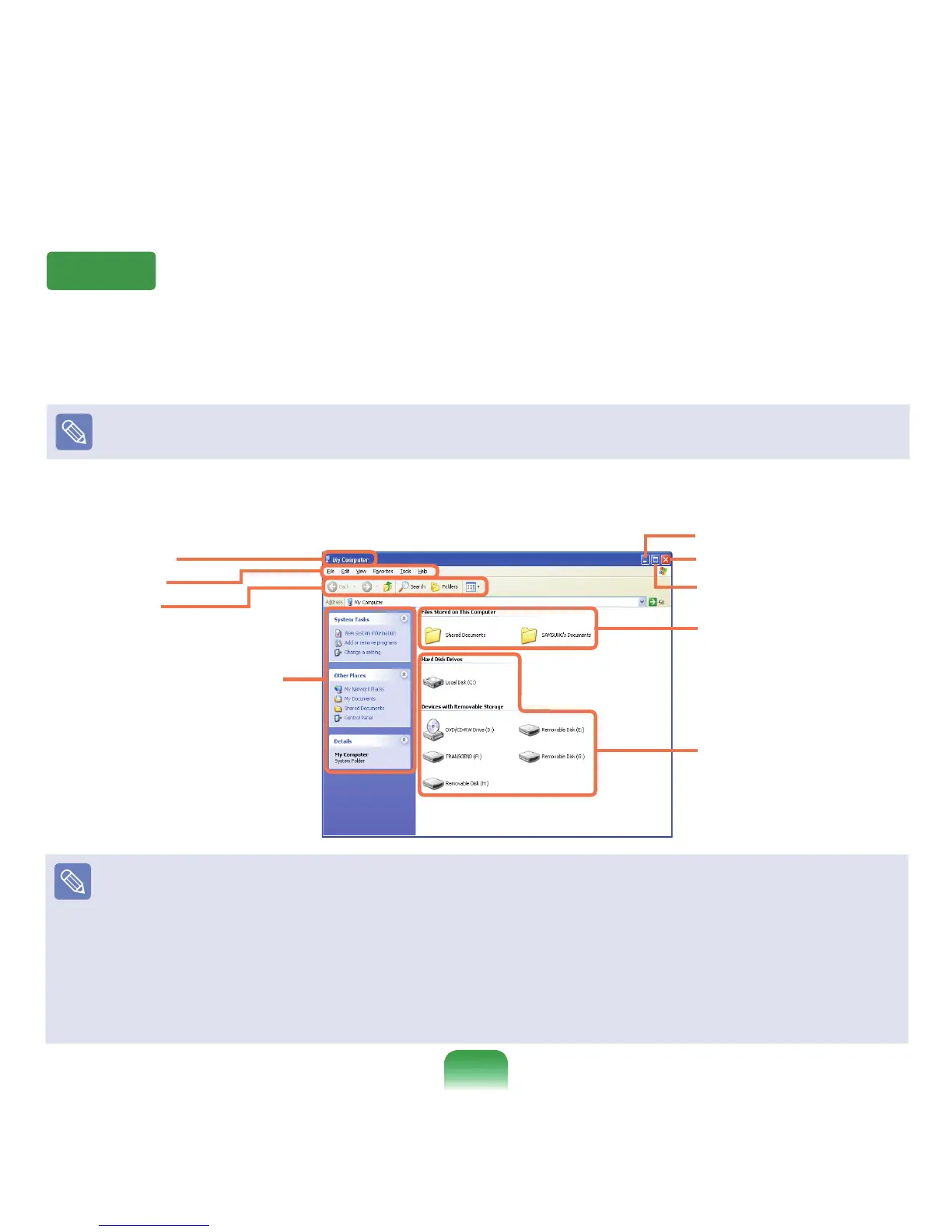
Awindowisabasicfoundationforoperatingyourcomputer.Forinstance,awindowofyourcomputerisconguredas
follows:
Click Start > My Computer.
Displayedmenusandnamesmaybevaried.
Double-clickthe Local Disk,whichisaharddiskdrive,toviewthefoldersandlessavedinyourcomputer.
Ifanyfolderorleisnotshown,click
Show Folder Contents.
Title Bar
Menu Bar
Toolbar
What is a Drive?
Adriveisastoragedevicethatcanreadorwritedatasuchasfoldersandles.
What is a Folder?
Afolderisjustlikeacabinetthatkeepslesorfolders.Youcankeeplesorfoldersofsimilarkindsinafolder.
What is a File?
Aleistheminimumunitofmaterialscreatedbyusingaprogramandisalsocalleddata.
How to View the Entire Drive Structure
ClickthefoldericonfromtheToolbartoviewthedrivestructure.
Click the icon again to return to the Fast Operation window.
Fast Operation Window
Folder Icon
Drive Icon (Memory)
Minimize button
Maximize button
Close button



 To Next Page