7
Cable Connection
33.
3 Installation
3.3.1 Connecting Input and Output Cables
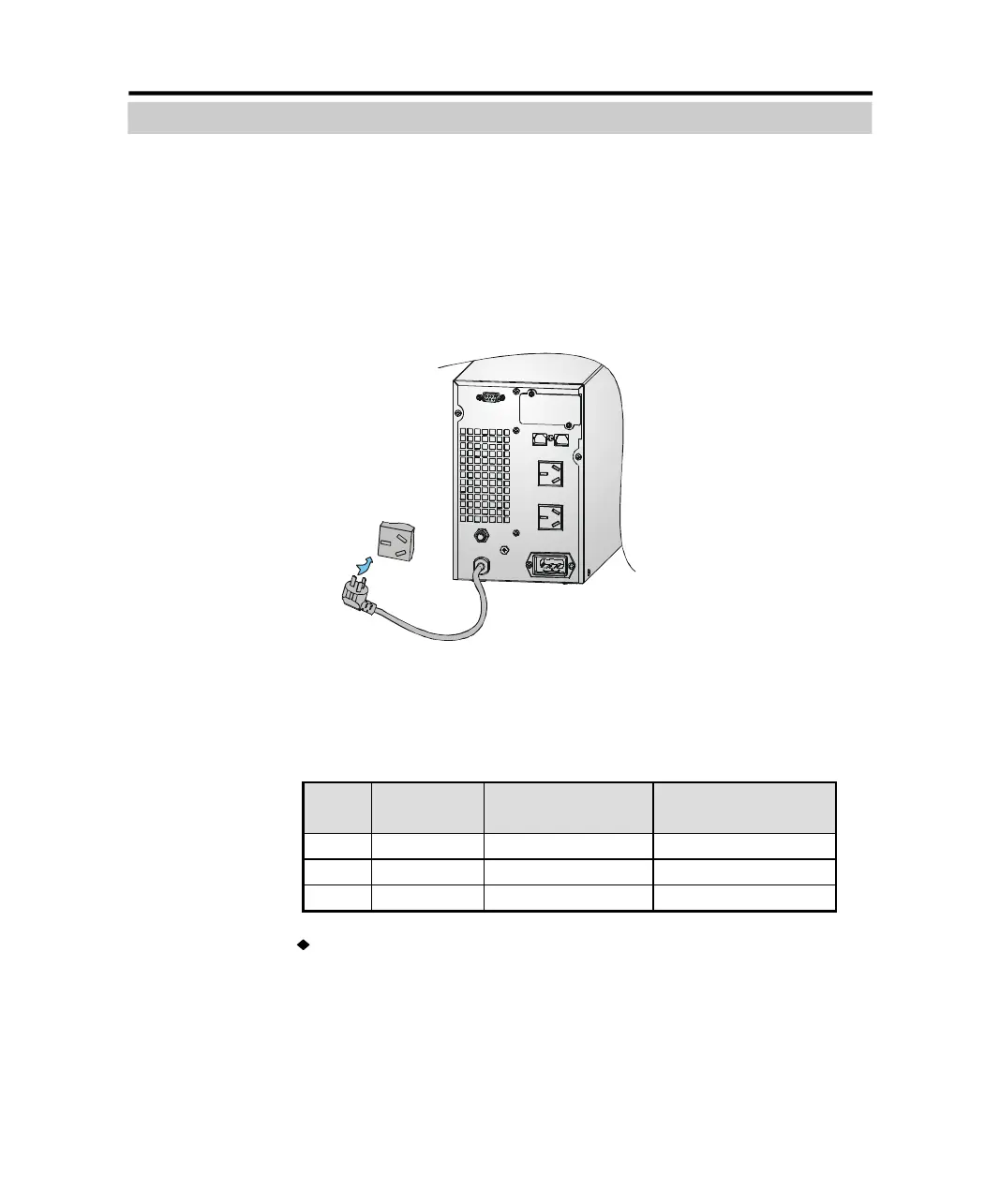
1. Input cable connection
If the UPS is connected via the power cable, please use a proper socket
with protection against electric current, and pay attention to the capacity
of the socket: over 10A for C1K(S) , over 16A for C2K(S) and C3K(S). The
wiring configuration is shown in the following diagram.
Figure 3-1 Connection Method of Input for C1K(S)~C3K(S)
2. Output cable connection
Table 3-2 Output way of UPS
Rating Model
Quantity of output
socket
Output Terminal Block
1kVA C1K/ C1KS 2 Nil
2kVA C2K/ C2KS 4 Nil
3kVA C3K/ C3KS 3 Available
The output of C1K(S)/ C2K(S)/ C3K(S) all available to uses sockets. The
total output power shall not exceed 1kVA/0.8kW, 2kVA/1.6 kW,3kVA/2.
4 kW. Simply plug the load power cable to the output sockets of UPS to
complete connection as shown in the following diagram.
PDF created with pdfFactory Pro trial version www.pdffactory.com



 To Next Page