SINUS MINI High performance Vector Control Inverter User Manual
19
Chapter 3 Keyboard Operation
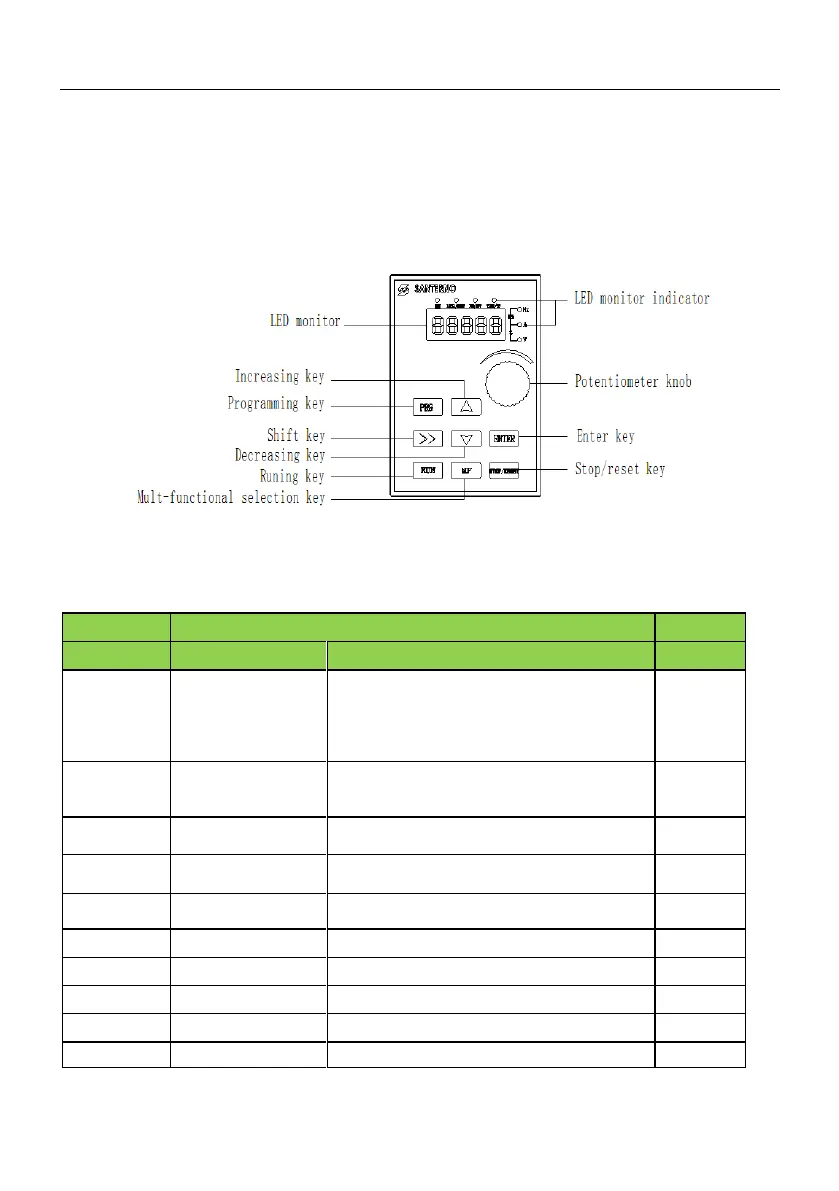
3.1 Keyboard introduce
Figure 3 - 1 Keyboard(SINUS MINI−DF01)
3.2 Descriptions of Indicators
Running command
reference mode
indicator
OFF Running command is given by keyboard
ON: Running command is given by terminal
operation
Flashing:Running command is given by host
computer
ON: running state
OFF: stop state
Flashing: stopping state
Positive and negative
indicator light
ON: forward running
OFF :reverse running
ON: Fault condition
OFF: Normal condition
ON Current display parameter is running frequency
ON: Current display parameter is current
ON: Current display parameter is voltage
ON: Current display parameter is rotating speed
ON: Current display parameter is time
ON :Current display parameter is percentage






 To Next Page