SINUS MINI High performance Vector Control Inverter User Manual
22
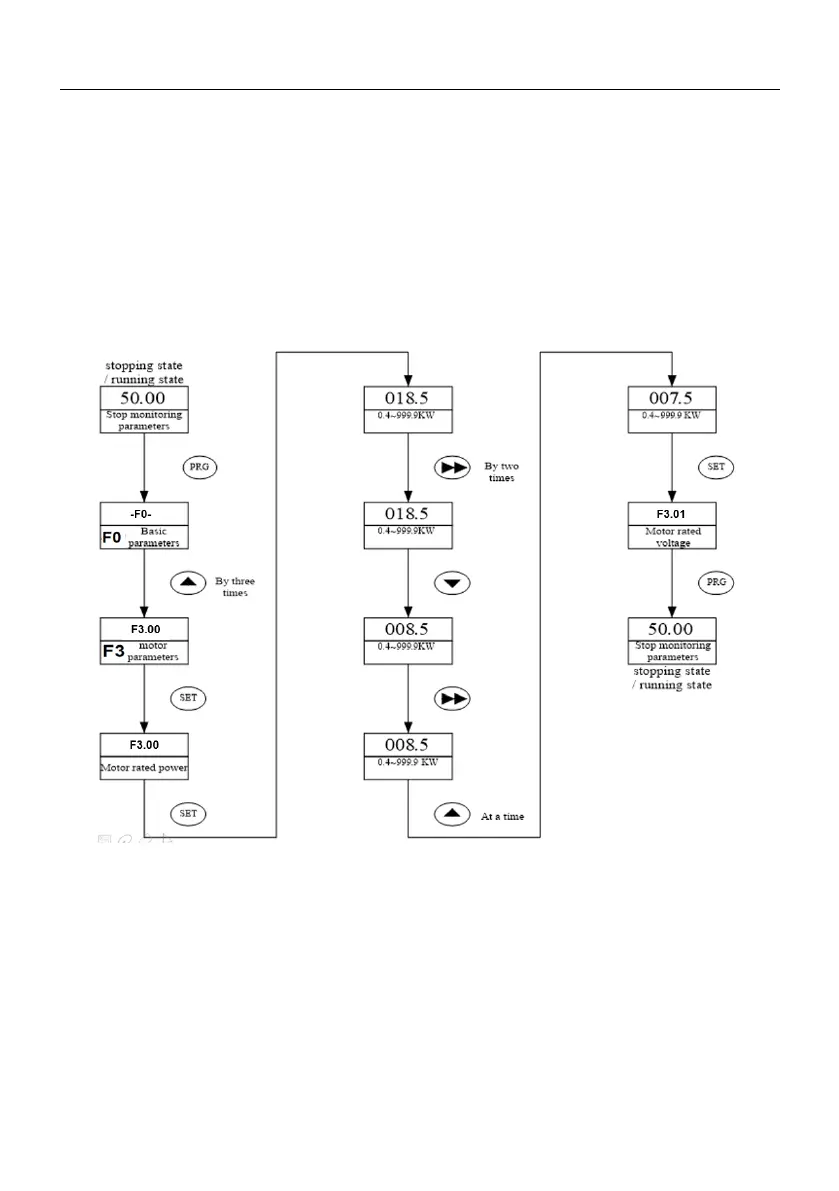
3.5.2 parameter setup
Setting parameters correctly is a premise for actualizing SINUS MINI’s performances. parameter setting
method via panel will be introduced in the following part with rated power as an example (Change 18.5kW
into 7.5kW).
Operation process is shown in Fig.4-2. Press the SHIFT key with single direction shifting function to shift
the flashing bit of parameters (that is modification bit). After finishing the parameters setup, press the MENU
key twice to exit programming state.
Fig 4-2 Procedure of parameter setup
3.6 Parameter Display
In stopping state or running state, various state parameters can be displayed by LED. The displayed
parameters can be decided by FH.00 ~ FH.01 and can be scrolled through by pressing the SHIFT key. The
following is an explanation for the parameters operation method in stopping and running state.






 To Next Page