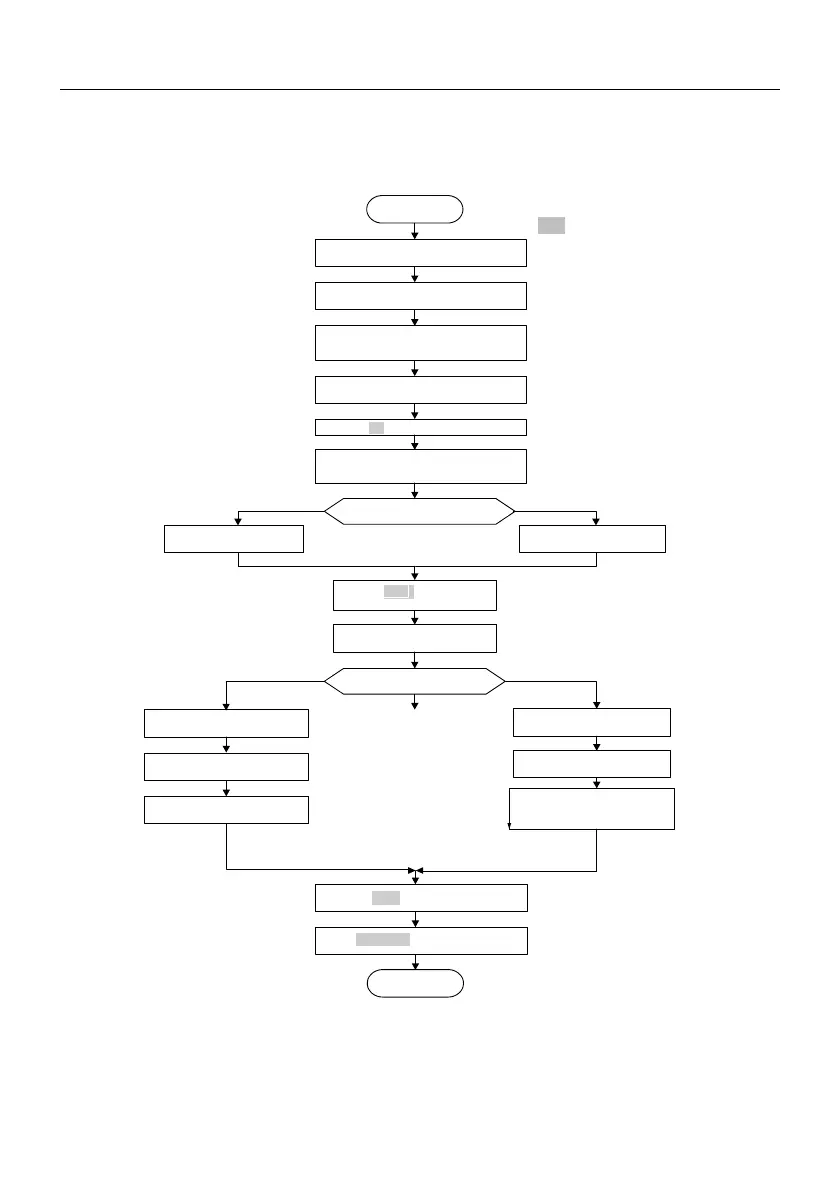
Before power up ,
confirm the
wiring is correct
Setting F0.19=2, restore the
factory setting
Setting max output voltage F4.01
and motor
basic frequency F4.02 according to motor
nameplate
Press M key for jog operation
If motor running direction is wrong , swap
any two phase wires of motor and then
power up
Press RUN key to run the inverter
Setting motor parameter F3.00
to
F3.04 according to motor nameplate
Press key to stop the inverter
Start
END
STOP / RST
Static tuning or rotating tuning
Setting running frequency F0.11
V/F control or open loop vector
control?
Setting F0.02 to vector control
Setting V/ F curve input F4.00
Setting torque boost F 4.07
Setting F0
.02 to 0
open
loop vector control
Refer to F5.06 and F5.07 for torque
input channel selection
Set speed limit F5.00~F5.05
during forward
/
reverse running
process or limit the speed via
analog channel
RUN
Set ting F 3.05 = 2 to
perform rotating auto - tuning
Press RUN key to start auto
tuning , after tuning stop auto
RUN
MF
Setting F3.05=1
to
perform static auto -tuning
Note:
◆If fault happens, please judge the fault
causes and clear the fault according to
7.1 Fault and alarm information list.
◆If motor can without connecting the load
rotating auto tuning can be selected
(F3.05=2),otherwise only static auto
tuning can be selected .When enabling
the auto tuning please ensure the motor is
in standstill status .If over voltage or over
current happens in auto tuning process,
you can prolong the acceleration and
deceleration times of F0.16 and F0.17.






 To Next Page