7
3. Measuring resistance ( Ω ) (see Fig. 2-3)
This functional mode is used to measure the resistance of a resistor, a circuit or a circuit
component.
Warning: Measuring any live part is not possible and such an attempt is dangerous.
An error will result if you make a measurement while touching the test pins.
The O.L. mark appears with nothing connected to the test pins.
The open-circuit voltage of the measurement connector is 0.4 V. Therefore, neither diodes nor
transistors can be checked.
(1) Set the Function switch to Ω /
/
.
(2) Press the Select switch to display MΩ on the upper right part of the readout.
(3) Make the test pins contact with the object under measurement and then read the value
displayed.
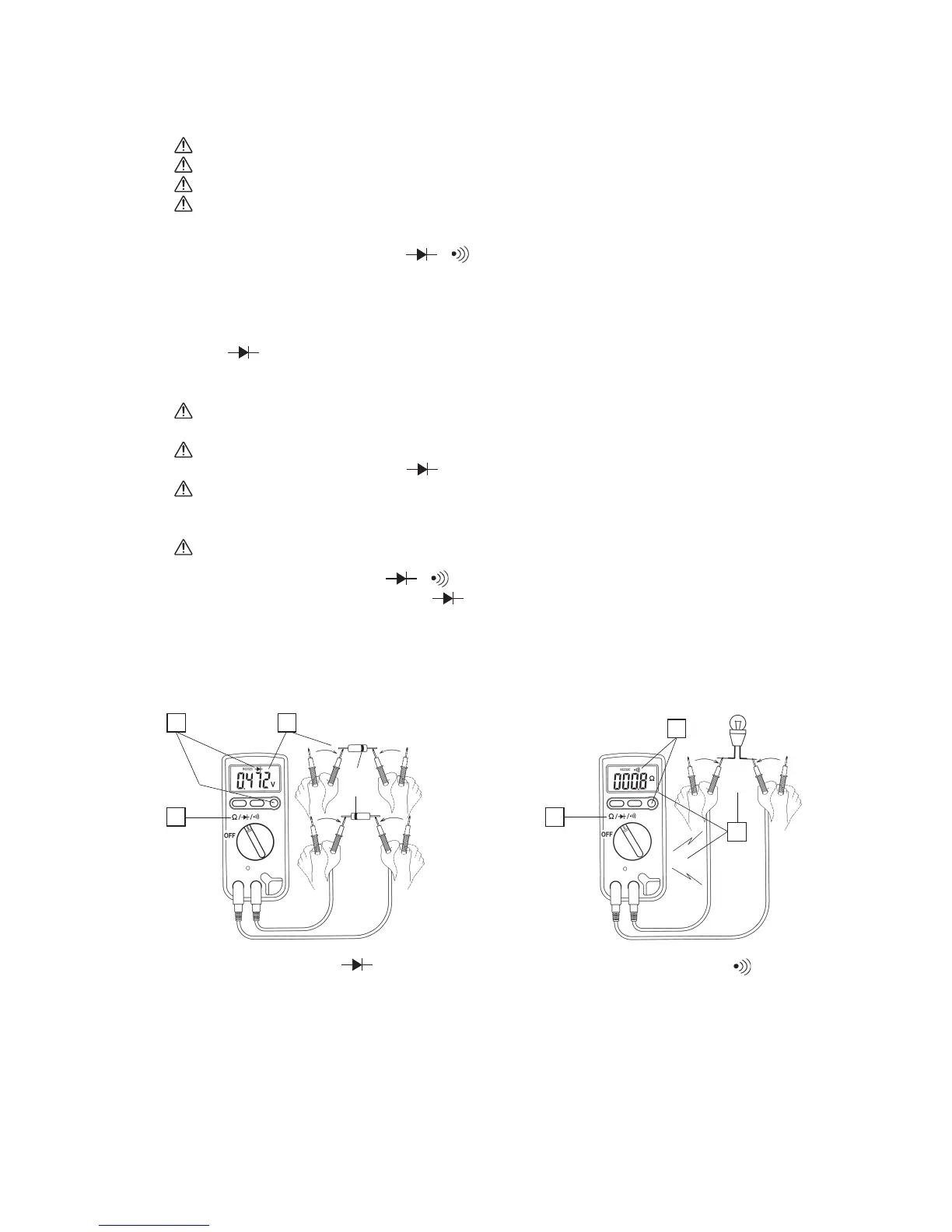
4. Diode (
) test (see Fig. 2-4)
This functional mode is used to determine whether the p-n junction of a single diode or
transistor is acceptable.
Warning: Making a test with voltage applied to the diode or transistor under measurement is
not possible and such an attempt is dangerous.
Positive voltage is output at the measurement connector and the open-circuit voltage 1.1 to
1.5 V (the LCD shows RS232C
OL V when the measurement connector is released).
Voltage drop in the forward direction of the diode becomes a measured value of 0.2 to 0.5 V,
which is almost constant for each diode type. For voltage drop in the reverse direction, the O.L.
mark appears.
No LED can be tested.
(1) Set the Function key to Ω /
/
.
(2) Press the Select switch to display
on the upper part of the readout.
(3) For measurements in the forward direction, make the black test pin contact with the cathode
(K) of the diode and make the red one contact with the anode (A) and then read the value
displayed.
Fig. 2-4: Diode (
) test
Fig. 2-5: Continuity (
) test
Diode
Cathode
mark
Anode
Cathode
Forward
direction
Reverse
direction
1
1
2
3
2 3
COM COM
++


 To Next Page