16 MICRA SATEL
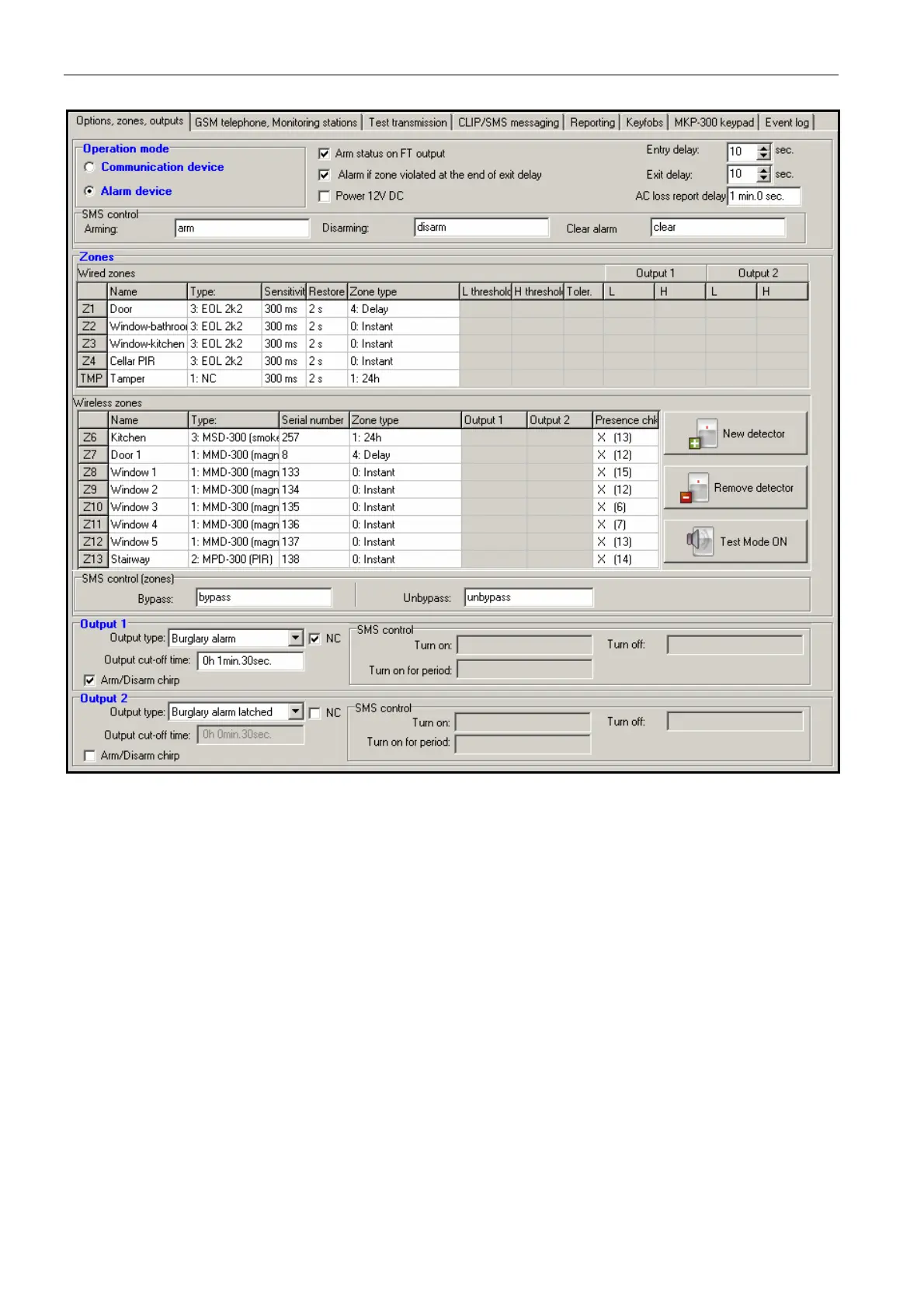
Fig. 9. „Options, zones, outputs” tab, when alarm device mode has been selected.
Parameters and options
Arm status on FT output – option available for the alarm device mode. If it is enabled,
the FT output will work as an armed status indicator (it is active, when the module is
armed). If the option is disabled, the output will work exactly in the same way as in the
communication module mode, i.e. as an indicator of problems with logging into GSM
network.
Alarm if zone violated at the end of exit delay – if this option is enabled, the alarm will
be triggered if any zone is violated at the end of exit delay countdown. If the option is
disabled, the alarm will only be triggered when the zone status changes from normal to
violated during armed mode.
Power 12V DC – enabling this option will result in switching off the built-in power supply,
its control system, and in disconnecting the battery. In order to connect and external
power source to the device, connect the common ground to the COM terminal on the
module electronics board, and 12 V DC voltage to the AUX terminal.
Note: If the "Power 12V DC" option is enabled, do not connect battery to the module.
Entry delay – parameter available in the alarm device mode, denoting the time by which
the alarm will be delayed when an armed zone of the 4. DELAY type is violated. It



 To Next Page