www.satlabgps.com
36
Finally, move to the tab RTK. This secon is extremely important
for inializing a survey. For a receiver that will be ulized as
Mobile Rover CORS;
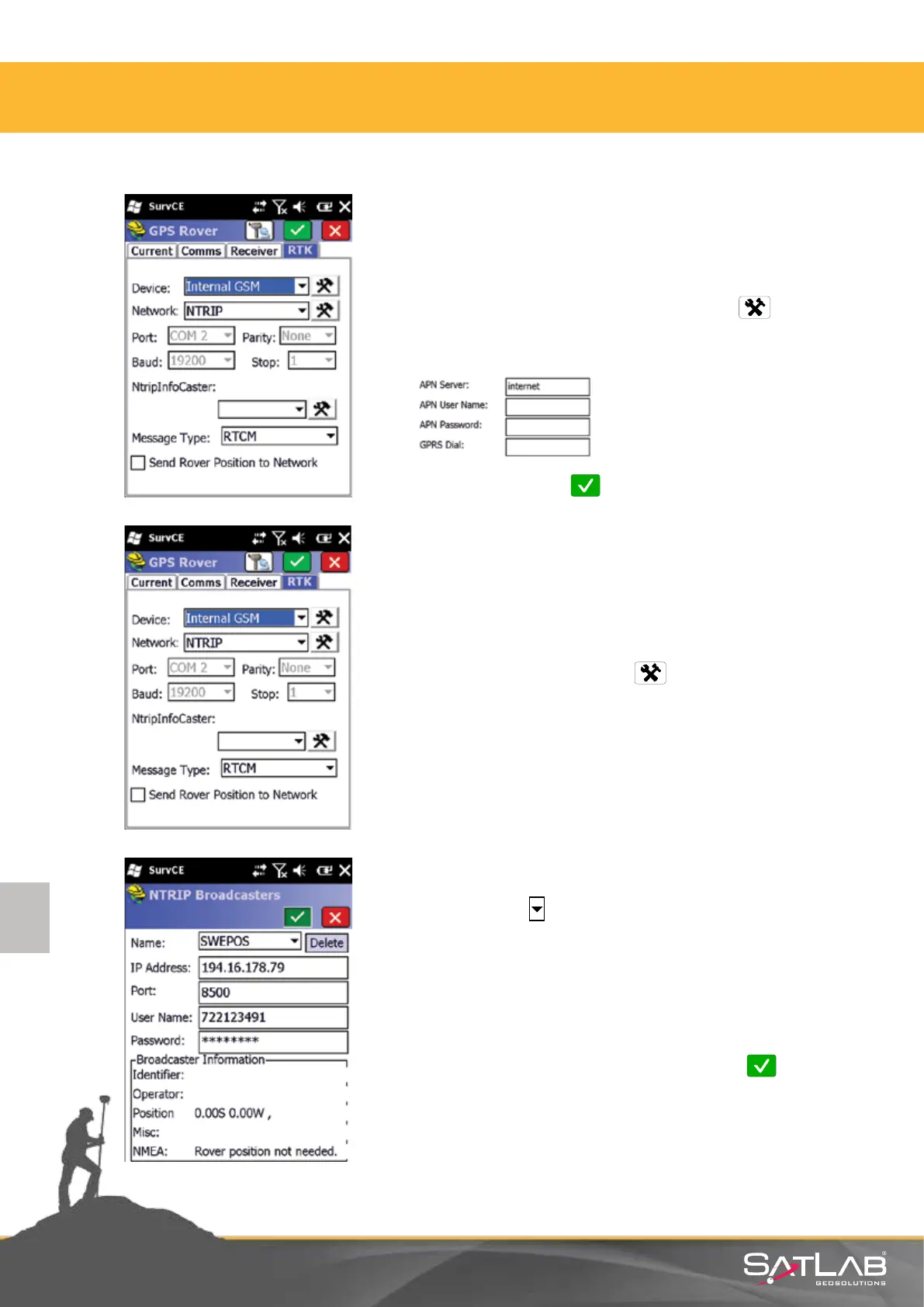
Device: Select Internal GSM Modem and click Sengs.
Select a prole to connect the SIM card in the device to the
Internet.
Aer the selecon click Ok.
Go back to RTK tab.
Network: Select NTRIP and click Sengs. A window will be
opened with NTRIP Servers.
In this secon, enter informaon about the NTRIP Broadcaster
CORS service server to which a connecon will be established.
Click on the arrow in the name box and write a prole name.
Example is shown for SWEPOS (Sweden) Below informaon can be
obtained from the provider of your CORS network:
IP Number:
Port:
User Name:
Password:
Aer this informaon is entered correctly, click Okay and the
connecon process starts.
Cauon: The passwords are case sensive. Please enter the
password as it was sent to you.
4. Satlab SurvCE Guide



 To Next Page