CURRENCY DISCRIMINATION COUNTER SB-7 (SB-1050) SERVICE MANUAL
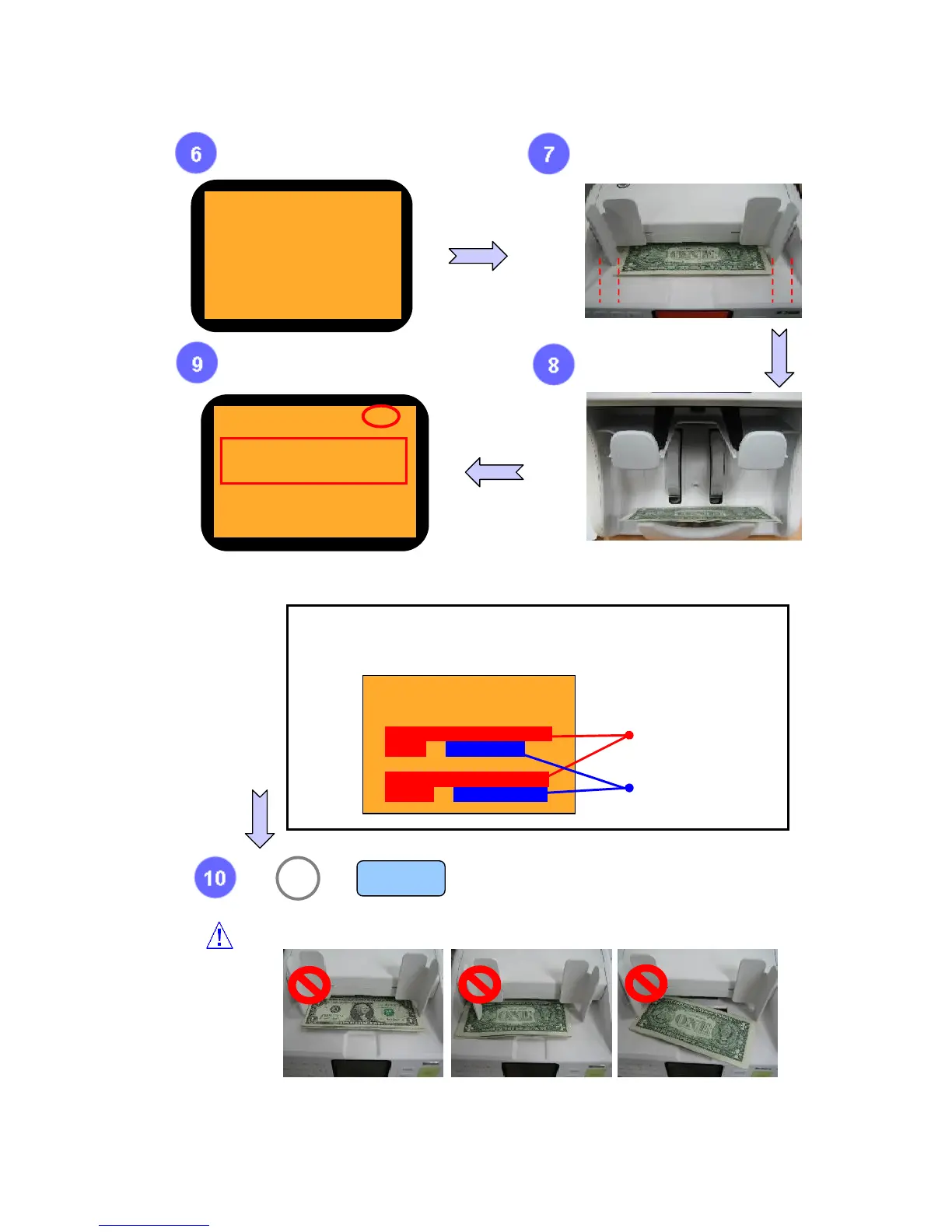
Do not place MR SHADING SHEET on the hopper like the below images.
Place 1~5 pcs of Sheet on the
Hopper.
Check
if ‘OK’ is displayed.
After check shading result, press clear button.
If you want to move previous Menu, press ‘9’.
9 MENU
or
Arrange and place the sheets in the
middle of the Hopper like the picture.
MR SHADING
PLACE SHADING PAPER
ON HOPPER
The note is sent to Stacker.
Reference on MR SHADING ‘NG’
1) Noise : If average value is more than ’10’, it is ‘NG’
2) Level : If average value is less than ’10’, it is ‘NG’
MR Single Sensor
MRA Sensor
Norm: 1.56
Noise:
3 2 1 2 12
2 1 L:1 R:2
Level: 547(High) (5)
55 66 98 98 92
94 68 L:46 R:26
It is better if the value of Noise is lower. When you consider that the value of Noise is the
Minimum after doing MR shading about five times, stop doing MR shading.
Norm: 1.56
Noise:
3 2 1 2 1
2 1 L:1 R:2
Level: 547(High) (5)
55 66 98 98 92
94 68 L:46 R:26
Wrong Direction Lean to the right Skew



 To Next Page