58
SBS-6500 User Manual
Storage Battery Systems, LLC.
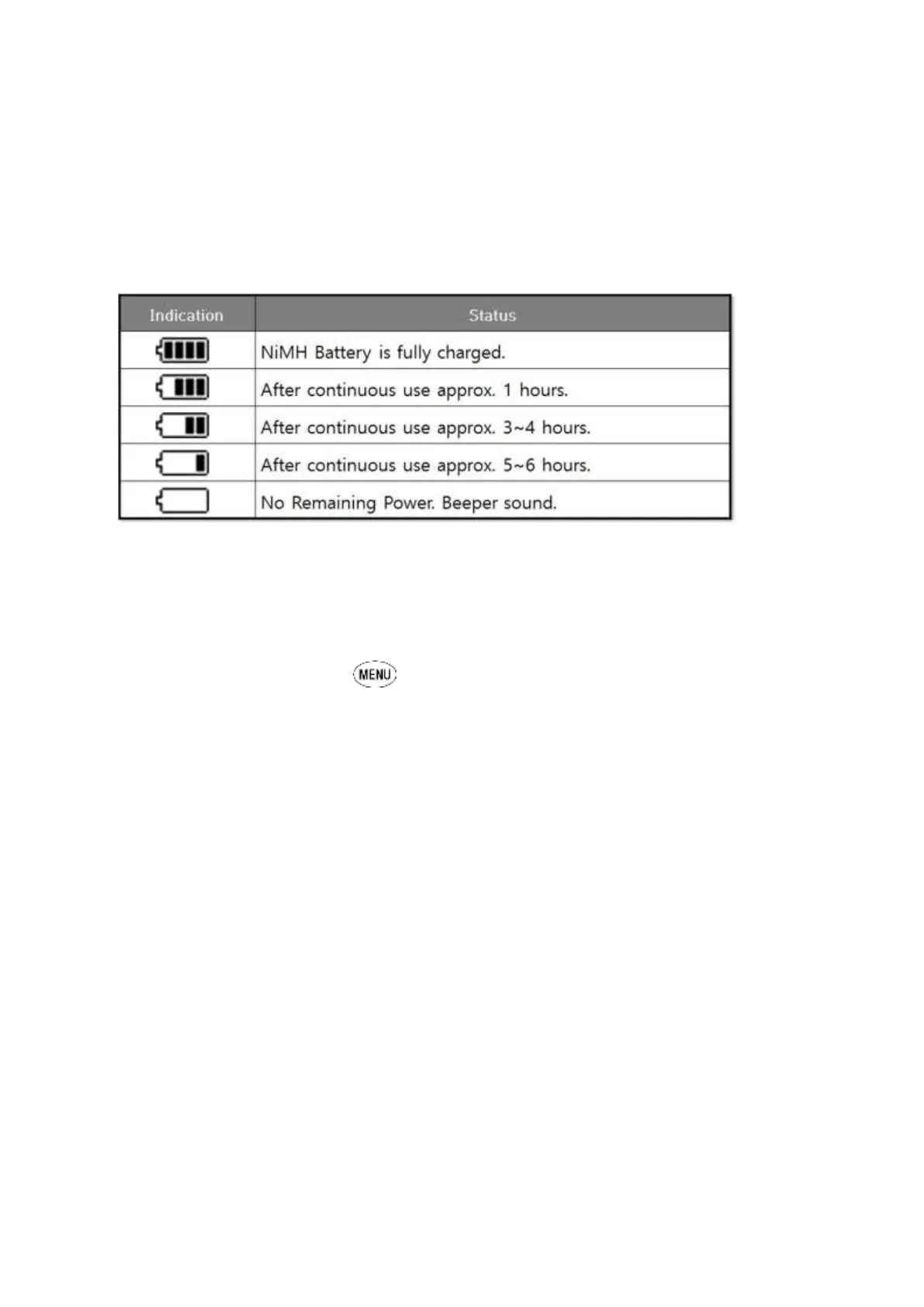
11.2. Low Battery Warning
The remaining battery capacity of the NiMH rechargeable battery pack installed inside of
SBS-6500 is displayed in a BARGRAPH in the upper right corner of the LCD display. This
feature allows the user an estimation of the amount of battery time remaining before
connection to the AC recharger is needed.
When using the battery or the AC adaptor, the symbol for the source of power is
displayed in upper right corner of the LCD screen.
11.3. Menu Mode
[Menu Set-Up Functions]
Contrast Sets the screen contrast level.
Buzzer Turns the audible sound on, off or mute.
Language Allows help file language selection.
Date Format Sets the date format.
Auto Power Off Adjusts the auto power off timer or disables it.
Auto Backlight Off Adjusts the auto backlight off timer or disables it.
Temperature Unit Selects recording of F or C temperature units.
Time Adjusts the real time clock setting of the CPU.
Reset System Setting Restores settings to factory defaults.
Erase Data ERASES ALL DATA from all data blocks in the
entire memory.
Device Information Displays firmware version and serial number of unit.
[Remaining Battery Indication]



 To Next Page