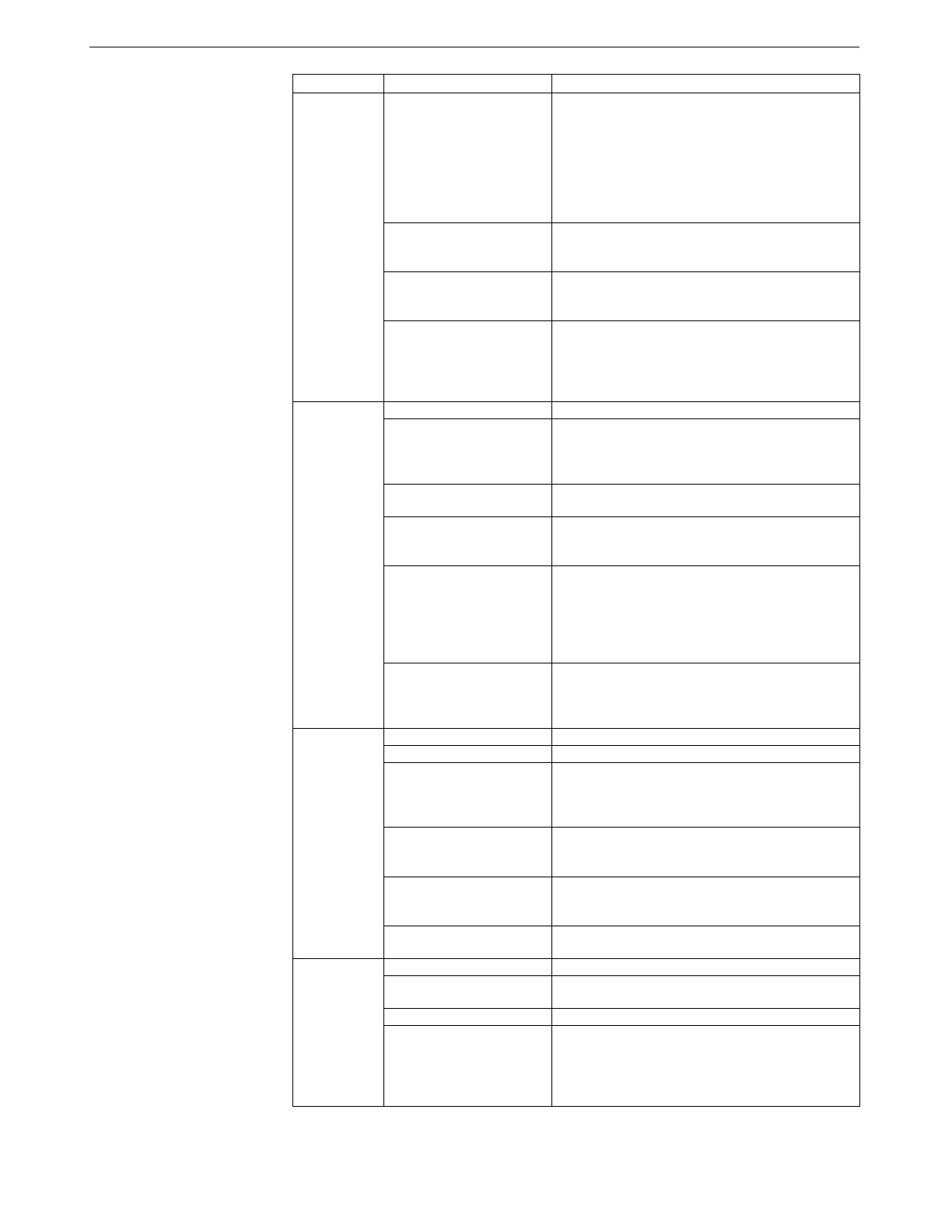
Appendix III: Command Summary
104
CATEGORY COMMAND
DESCRIPTION
OutputFormat=x
x=0: output raw frequencies and voltages in Hex
(required if using SEASAVE or SBE Data
Processing).
x=1: output converted data in Hex.
x=2: output raw frequencies and voltages in decimal.
x=3: output converted data in decimal.
x=4: output pressure and scan number in Hex.
X=5: output converted data in decimal, in XML.
OutputSal=x
x=Y: Calculate and output salinity (psu). Only
applies if OutputFormat=3 or 5.
x=N: Do not.
OutputSV=x
x=Y: Calculate and output sound velocity (m/sec).
Only applies if OutputFormat=3 or 5.
x=N: Do not.
Output
Format
Setup
OutputUCSD=x
x=Y: Calculate and output density sigma-t (kg/m
3
),
battery voltage, and operating current (mA) with data
polled while logging. Only applies if
OutputFormat=3 or 5.
x=N: Do not.
MP
Set to Profiling mode.
NAvg=x
x= number of samples to average. 19plus V2 samples
at 4 Hz and averages NAvg samples. Default 1.
Must be even number (2, 4, etc.) if 19plus V2
includes optional Quartz pressure sensor.
MinCondFreq=x
x= minimum conductivity frequency (Hz) to enable
pump turn-on.
PumpDelay=x
x= time (seconds) to wait after minimum
conductivity frequency is reached before turning
pump on. Default 60 seconds.
AutoRun=x
x=Y: Automatically wake up and start logging when
external power is applied; stop logging when external
power is removed. Magnetic switch position has no
effect on logging.
x=N: Do not automatically start logging when
external power is applied.
Profiling
Mode Setup
(commands
after MP do
not affect
Moored mode
operation)
IgnoreSwitch=x
x=Y: Ignore magnetic switch position for starting
or stopping logging. Use StartNow, StartLater, and
Stop to control logging.
x=N: Do not ignore magnetic switch position.
MM
Set to Moored mode.
SampleInterval=x
x= interval (seconds) between samples (10 - 14,400).
NCycles=x
x= number of measurements to take and average
every SampleInterval seconds. Default 1. Must be
even number (2, 4, etc.) if 19plus V2 includes
optional Quartz pressure sensor)
MooredPumpMode=x
x=0: No pump.
x=1: Run pump for 0.5 seconds before each sample.
x=2: Run pump during each sample.
DelayBeforeSampling=x
x= time (seconds) to wait after switching on external
voltage before sampling (0-600 seconds).
Default 0 seconds.
Moored Mode
Setup
(commands
after MM do
not affect
Profiling mode
operation)
MooredTxRealTime=x
x=Y: Output real-time data.
x=N: Do not.
StartNow
Start logging now.
StartDateTime=
mmddyyyyhhmmss
Delayed logging start: month, day, year, hour,
minute, second.
StartLater
Start logging at StartDateTime=.
Logging
Stop
Stop logging or stop waiting to start logging. Press
Enter key before sending Stop. Must stop logging
before uploading data. If in Profiling mode and
IgnoreSwitch=N, can also turn magnetic switch Off
to stop logging.
111



 To Next Page