Maintenance and Troubleshooting 14400MK2-21 C/Ku-Band TVRO
6-6
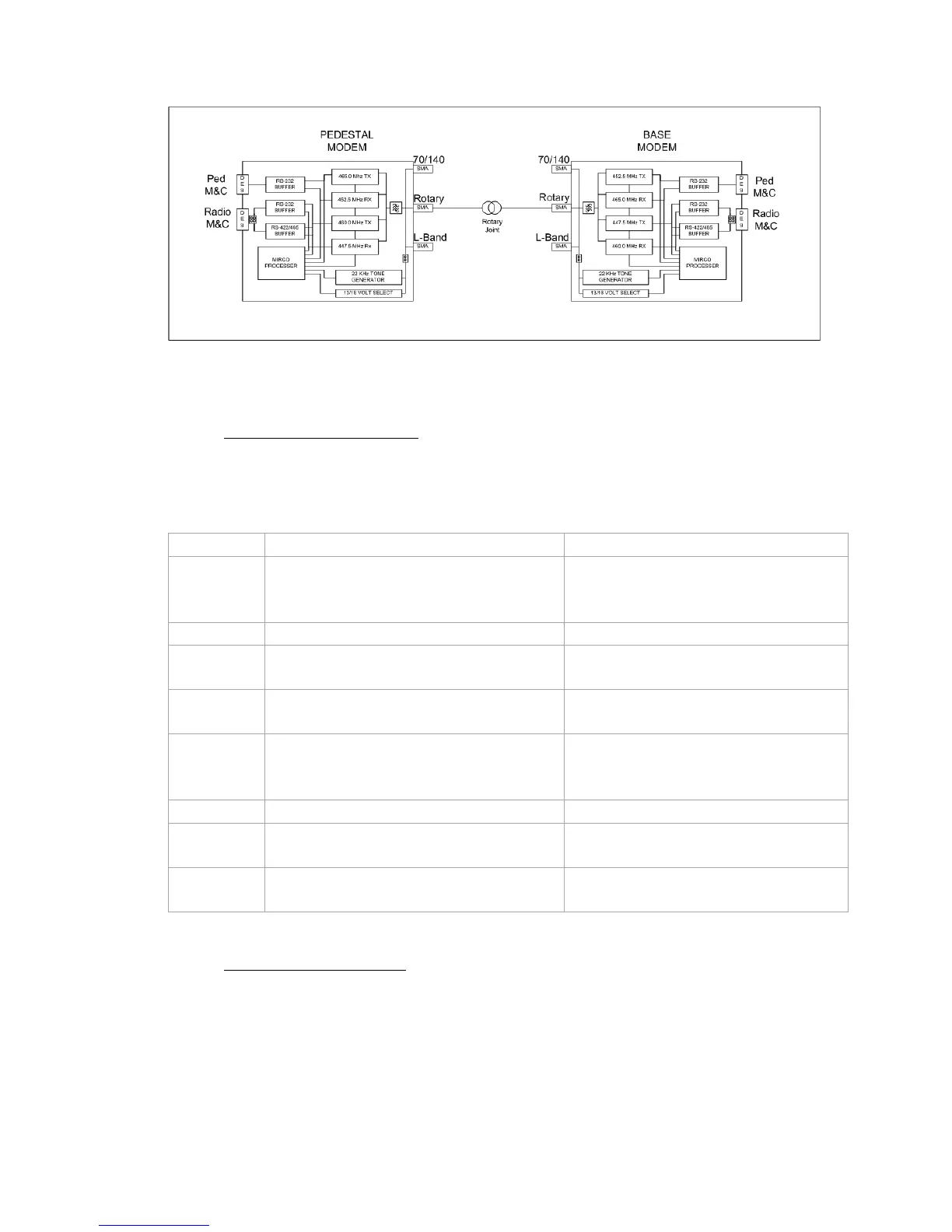
6.6. Troubleshooting 400MHz Modem Communication Faults
6.6.1. 400MHz Modem Queries:
The 400MHz modem assemblies facilitates the use of line-based commands via the ACU’s front panel, its’
internal HTML page, or using remote diagnostic software such as DacRemP or ProgTerm. The use of these
commands will aid in troubleshooting communication failures between the above decks and below decks
modems. Listed below are the available commands:
Command Description Typical Response
<0000 <cr>
BDE Modem RSSI (Receive Signal Strength
Indicator)
RSSI P-43 R-44
P = Pedestal Control Channel
R = Radio Control Channel
<1234 <cr> BDE Modem Serial Number Query
Sn 000001D2F1F1
<0273 <cr> BDE Modem Temperature Query
Temp = 34.9c
Temperature expressed in Celsius
<0411 <cr> BDE Modem Software Version and
Configuration Query
Modem Ver 1.00B-1
Software version – configuration Dash #
>0000 <cr>
ADE Modem RSSI (Receive Signal Strength
Indicator)
RSSI P-43 R-50
P = Pedestal Control Channel
R = Radio Control Channel
>1234 <cr> ADE Modem Serial Number Query
Sn. 00000102FC18
>0273 <cr> ADE Modem Temperature Query
Temp = 27.5c
Temperature expressed in Celsius
>0411 <cr> ADE Modem Software Version and
Configuration Query
Modem Ver 1.00B-2
Software version – configuration Dash #
6.6.2. Modem Query Methods
The following text provides instruction on how to submit modem queries using any one of four different
methods listed below. These instructions assume that the operator have a clear understanding of Menu
navigation and entry via the Antenna Control Unit front panel, or connection requirements for using remote
diagnostic software, and/or the internal HTML page of the ACU. Refer to the appropriate manual text if
further instruction on wiring connections or button pushing is required.








 To Next Page