ST94-21 C/Ku-Band TVRO Maintenance and Troubleshooting
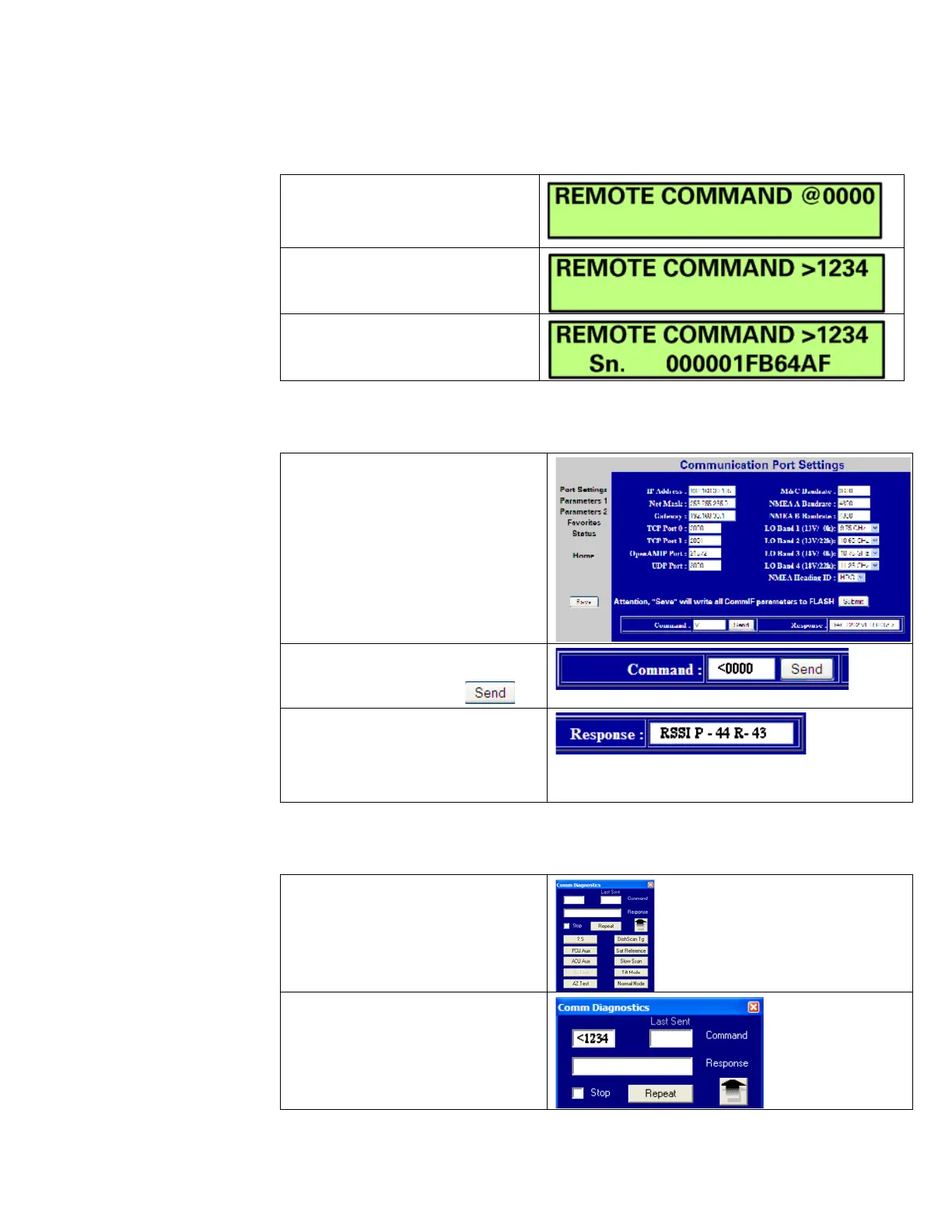
13.6.2.1. Using the ACU Front Panel
1. Using the ACU’s Front Panel,
navigate through the Setup
menu to access the Remote
2. Enter in the desired Modem
Query then press the ENTER
key.
3. Observe and/or Record the
displayed response.
13.6.2.2. Using the Internal HTML Page
1. Logon to the ACU’s Internal
HTML page.
2. Browse to the “Communication
Port Settings” page.
3. In the Command Window,
Type in the desired Modem
4. Observe and/or Record the
displayed response.
5. Repeat as required until all
desired modem queries are
13.6.2.3. Using DacRemP
1. Open up DacRemP and select
the Comm Diagnostics Tool
(cntrl + c).
2. In the Remote Command Entry
Window, type in the desired
Modem Query and hit Enter. i.e
“<1234 <CR>”
EAR Controlled - ECCN EAR99









 To Next Page