EasyManua.ls Logo

Sekonic FLASHMATE L-308X - User Manual

Sekonic FLASHMATE L-308X
52 pages
Print Icon
To Next Page IconTo Next Page
Loading...
Thank you for purchasing our product.
Please read this operating manual so that you will fully understand the features and
operation of this product. Then keep the operating manual in a safe place for future use.
Please see the Startup Guide for information about the basic operations.
L
-308X
L
-308X-U
Operating Manual
Light Meter

Table of Contents

Other manuals for Sekonic FLASHMATE L-308X

Questions and Answers

  • C
    Cory HancockJul 27, 2025
    Why do displayed shutter speed and aperture values on my Sekonic FLASHMATE L-308X Measuring Instruments not match my camera's settings?
    • A
      Adrian WalterJul 27, 2025
      If the displayed shutter speed and aperture values on your Sekonic Measuring Instruments don't match your camera's settings, ensure that the display steps for the light meter are set to match your camera's settings. Adjust the custom settings to select the correct increments of shutter speed and aperture to align the light meter and camera.
  • M
    Matthew GravesAug 2, 2025
    What to do if the EV is not displayed on my Sekonic FLASHMATE L-308X Measuring Instruments?
    • S
      Sheryl MontoyaAug 2, 2025
      If your Sekonic Measuring Instruments aren't displaying the EV, it might be because you're not using a Measuring Mode that supports EV display. The EV is displayed during ambient light measurements in PHOTO Mode. Ensure that you are using a Measuring Mode which displays the EV value.
  • R
    Rebecca ChoiAug 8, 2025
    Why does measured value on my Sekonic FLASHMATE L-308X not look correct?
    • A
      Amanda JohnsonAug 8, 2025
      If the measured value on your Sekonic Measuring Instruments doesn't seem correct, it could be due to the Lumisphere not being in the intermediate position, which alters the light distribution characteristic. Slide the Lumisphere mounting plate to fix it firmly. Also, ensure that the Measuring Mode is correctly set for the type of light you are measuring. For instance, don't measure flash light in Ambient light mode; check if the correct Measuring Mode is selected.
  • D
    Daryl JonesAug 14, 2025
    How to fix a Sekonic FLASHMATE L-308X Measuring Instruments that doesn't turn on?
    • M
      Melissa AndersonAug 14, 2025
      If your Sekonic Measuring Instruments won't turn on and there's no display, ensure that you press and hold the power button for more than one second. Check if the batteries are installed properly, paying attention to the (+/-) orientation. If the batteries are dead, wipe them with a dry cloth. Also, verify that you're using the correct type of batteries.
  • K
    Kimberly DunlapAug 20, 2025
    Why can't I set the shutter speed on my Sekonic Measuring Instruments?
    • C
      Chris ValdezAug 20, 2025
      If you cannot set the shutter speed on your Sekonic Measuring Instruments, even within the setting range, and you're in HD CINE Mode, it's because shutter speeds cannot be set lower than the selected frame rate. For instance, if the frame rate is set to 15 f/s, the shutter speed can only be set up to 1/15 s. To resolve this, select a lower frame rate in HD CINE Mode to set the desired shutter speed.

Summary

Parts Designation

Parts Designation

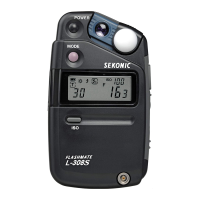
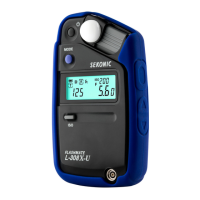
Identifies and illustrates the physical components of the Sekonic L-308X light meter.

Explanation of the Liquid Crystal Display (LCD)

Contents of Display

Explains the various icons and readouts on the meter's LCD screen.

Before Use

Inserting the Batteries

Step-by-step guide for correctly installing AA batteries into the meter.

Basic Operation

Measurement

PHOTO Mode

How to use the meter for standard photographic measurements under ambient or flash light.

Shutter Speed Priority Mode

How to set shutter speed and measure the required aperture for proper exposure.

Aperture Priority Mode

How to set aperture and measure the required shutter speed for proper exposure.

Cordless Flash Mode

Measuring flash brightness without a physical connection to the flash unit.

Cord Flash Mode

Measuring flash brightness using a synchro cord for synchronization.

HD_CINE Mode

For DSLR and video cameras, measuring based on frame rate and shutter speed.

CINE Mode

For film and digital motion-picture cameras, measuring based on frame rate and shutter angle.

Advanced Functions

Specifications

Troubleshooting

Sekonic FLASHMATE L-308X Specifications

General IconGeneral
Light Receiving MethodSilicon photodiode
DisplayLCD
Power Source1 x AA battery
TypeDigital
Measuring ModesAmbient, Flash
ISO Range3 to 8000
Shutter Speed Range (Ambient)60 sec to 1/8000 sec
Aperture Rangef/1.0 to f/90.9
Display Range (ISO 100)EV -2 to 22.9
Cine Speeds8, 16, 18, 24, 25, 30, 32, 64, 96, 128 fps
Dimensions63 x 110 x 22 mm
Weight80 g (without battery)

Related product manuals