19
English
Tufftalk Lite
7.1.2 Ending Two-way Intercom
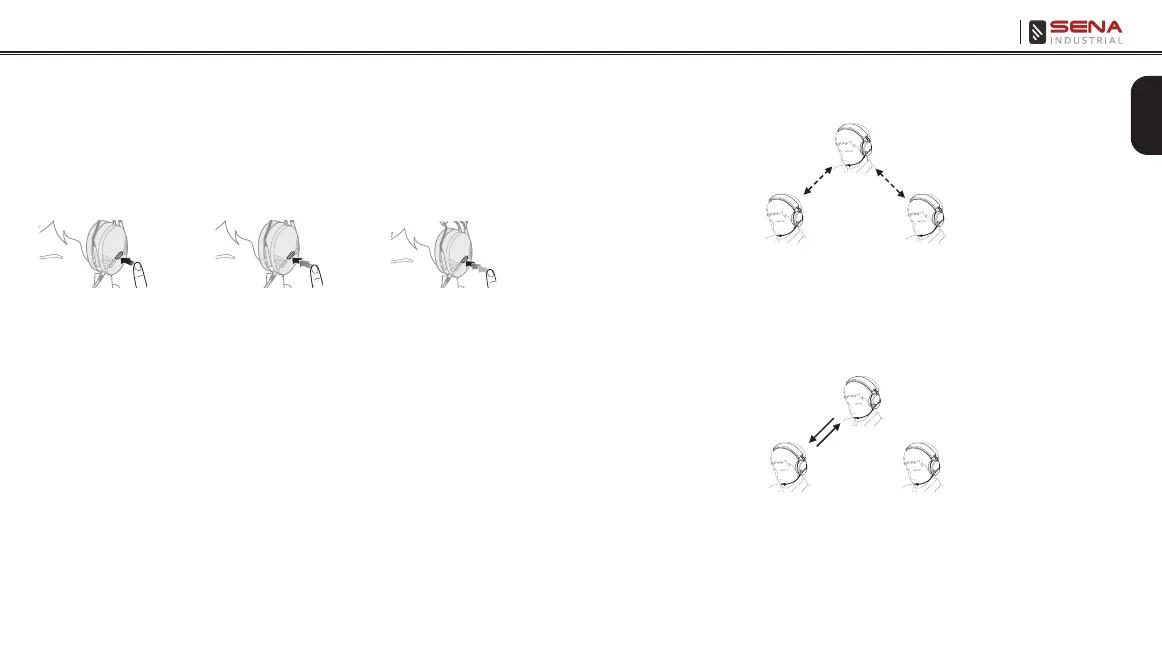
You can end an intercom conversation by using the Center Button.
Press and hold the Center Button for 1 second to end any intercom.
Or, you can single tap to end intercom with the rst intercom friend,
double tap to end intercom with the second intercom friend, and
triple tap to end intercom with the third intercom friend.
1
st
intercom
friend
2
nd
intercom
friend
3
rd
intercom
friend
Start/End Two-way Intercom Conversation
7.2 Three-way Intercom
7.2.1 Starting Three-way Intercom
You (A) can have a three-way conference intercom with two other
Tufftalk Lite friends (B & C) by establishing two intercom connections
simultaneously. While a three-way conference intercom is in progress,
mobile phone connection of all three participants is temporarily
disconnected. However, as soon as the conference intercom
terminates or one of the participants leaves the intercom, all mobile
phones automatically reconnect to their headsets. If you have an
incoming mobile phone call during the conference intercom, terminate
the conference intercom to automatically reconnect and receive the
phone call.
1. You (A) need to be paired with two other friends (B & C) for three-
way conference intercom.
(A)
(B)
First Friend Second Friend
(C)
Pairing
Pairing
2. Start an intercom conversation with one of the two friends in
your intercom group. For example, you (A) may start an intercom
conversation with the intercom friend (B). Or intercom friend (B)
may start an intercom call with you (A).
(A)
(B)
First Friend Second Friend
(C)



 To Next Page