7
English
Tufftalk Lite
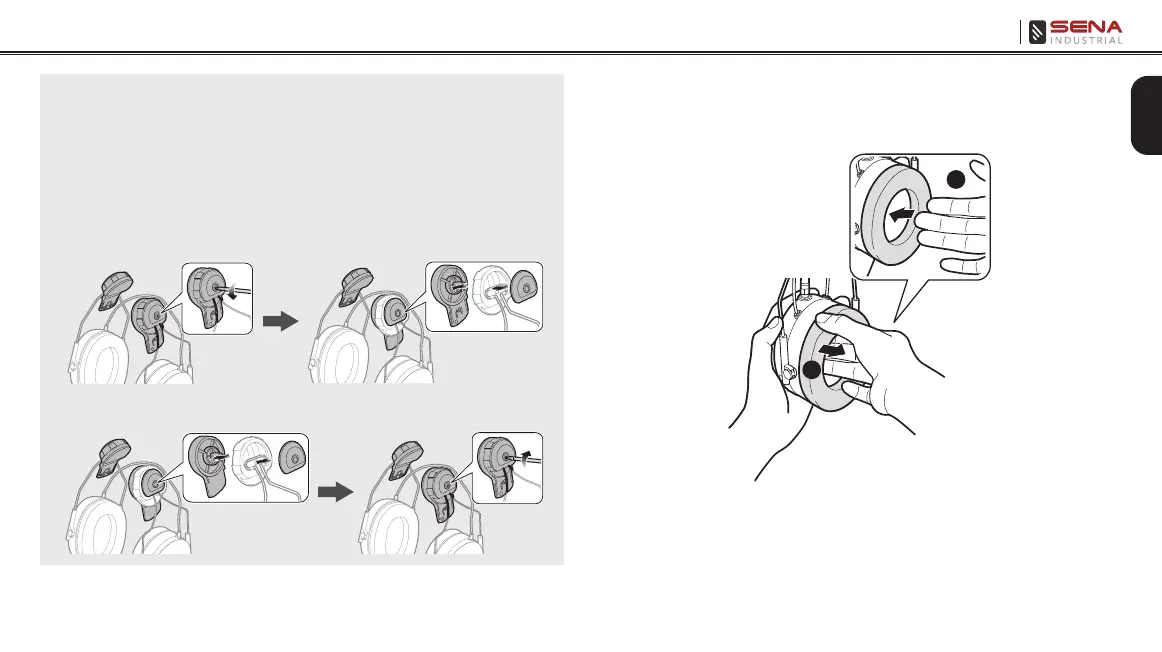
2.2 Replacing the Ear Pads
1. Use your ngers to remove the ear pads.
2. Insert the included ear pads.
1
2
Note:
• If the rubber pad on the inner surface of the bracket-top begins to fray,
replace it with the included pad.
• If the Type A Hard Hat Adapters do not fit in the left and right slots of the
hard hat, replace them with the Type B Hard Hat Adapters. Refer to the
following procedure:
1. Loosen the screws and remove the Type A Hard Hat Adapters and the
top covers.
2. Assemble the Type B Hard Hat Adapters and the top covers, and
tighten the screws.



 To Next Page