PRODUCT INSTRUCTION MANUAL
Page 11 of 29
Part 7 Settings
7.1 Set-up mode
In the measurement mode, pressing the "SETUP" and "MODE" keys
simultaneously allows you enter the parameter set-up mode. You can return to
the measurement mode at any time by pressing the key "SETUP" key.
Setup Mode
+
Mode
Enter
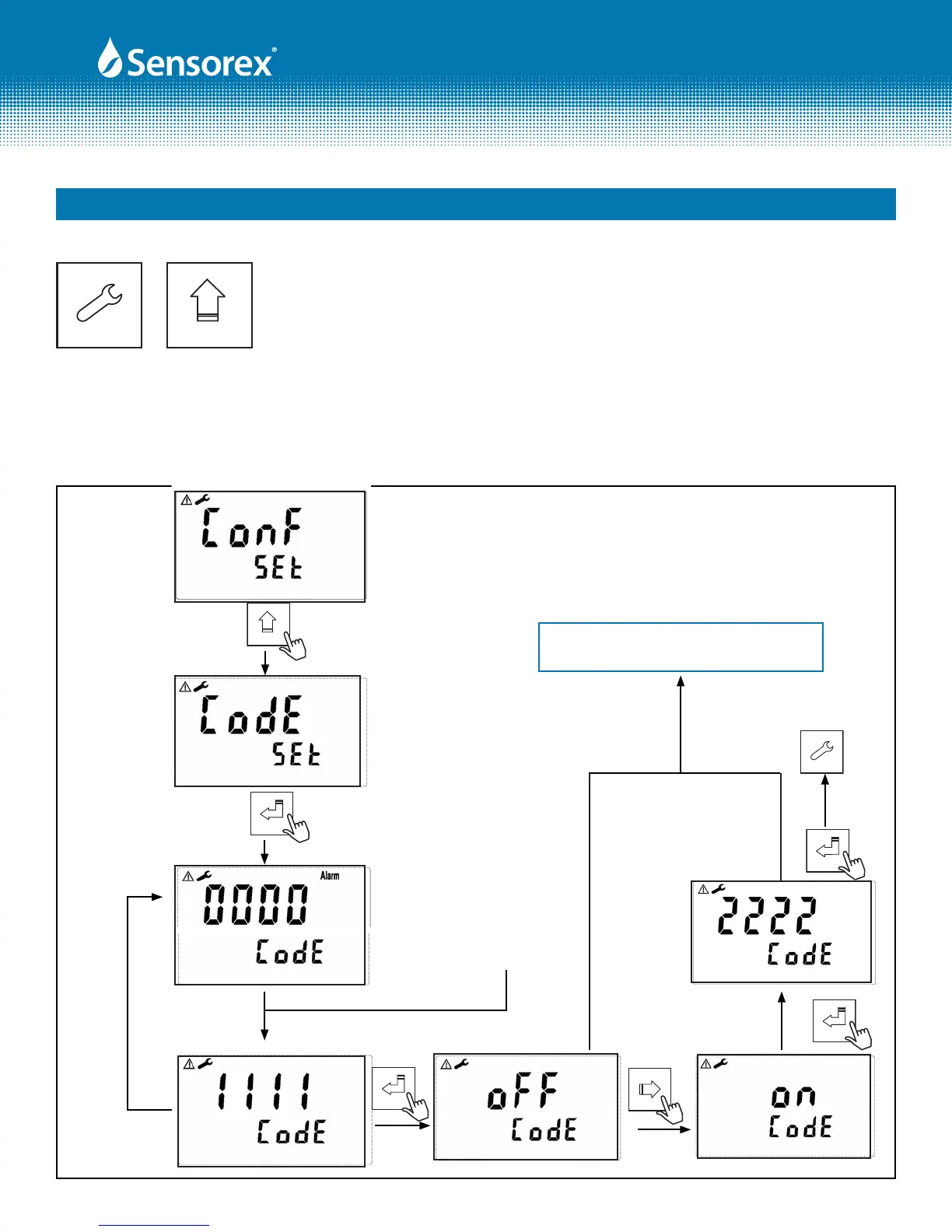
7.2 Security
In the set-up mode, you can set up the code by pressing the key "MODE" , and conrm by pressing the
"ENTER" key . The original code is 1111.
When the rst “0” of the digits 0000
ashes, press "MODE" (up arrow)
key or "right arrow" key to input
the code, and press "ENTER" to
conrm. Then, continue inputting
the second digit, the same way and
repeat until all digits are changed.
If you
input the
wrong
code, the
CODE will
ash
4X, and
then the
display
will
return
back for
another
input.
To cancel
security
code,
press
"MODE"
2X
Enter
Enter
GO TO "MEASUREMENT SETUP,
SECTION 7.3
FIG 7-1
Form: INSTRTX3000-Rev A
Enter
Setup



 To Next Page