PRODUCT INSTRUCTION MANUAL
Page 13 of 29
Part 7 Settings (cont.)
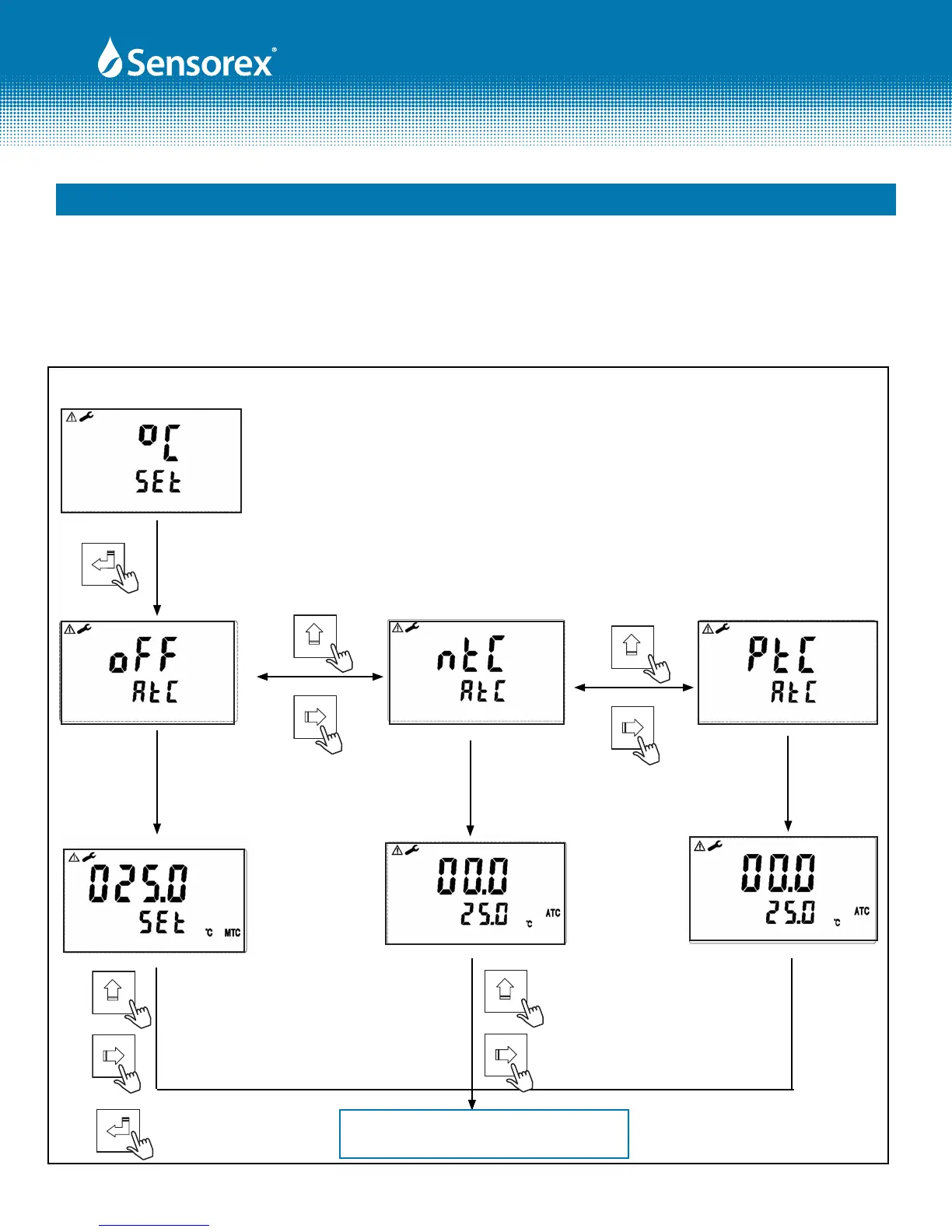
7.4 Temperature Settings
In the Temperature mode you will set the ATC, On or OFF, set the temperature sensor type (PTC or NTC) and
calibrate/adjust the temperature..
Enter
Mode
Mode
GO TO "STANDBY SETUP,
SECTION 7.5
Use a standard thermometer to test the
actual temperature of the solution, and
press "MODE" or "RIGHT ARROW" key to
input the correct temperature value. Press
"ENTER" to conrm.
Mode
If necessary, compare with the
actual temperature value tested by
standard thermometer. Press
"MODE" or "RIGHT ARROW" key to
input the modied value. Press
"ENTER" to conrm.
Mode
Enter
Follow same
steps to left.
FIG 7-3
Form: INSTRTX3000-Rev A
OR PRESS "SET-UP" KEY
TO RETURN TO
MEASUREMENT MODE



 To Next Page