EasyManua.ls Logo

Sequential prophet 5 - Page 116

Sequential prophet 5
141 pages
Print Icon
To Next Page IconTo Next Page
To Previous Page IconTo Previous Page
Loading...
15.
While
holding
S103,
PS1,
press
S108,
PS6.
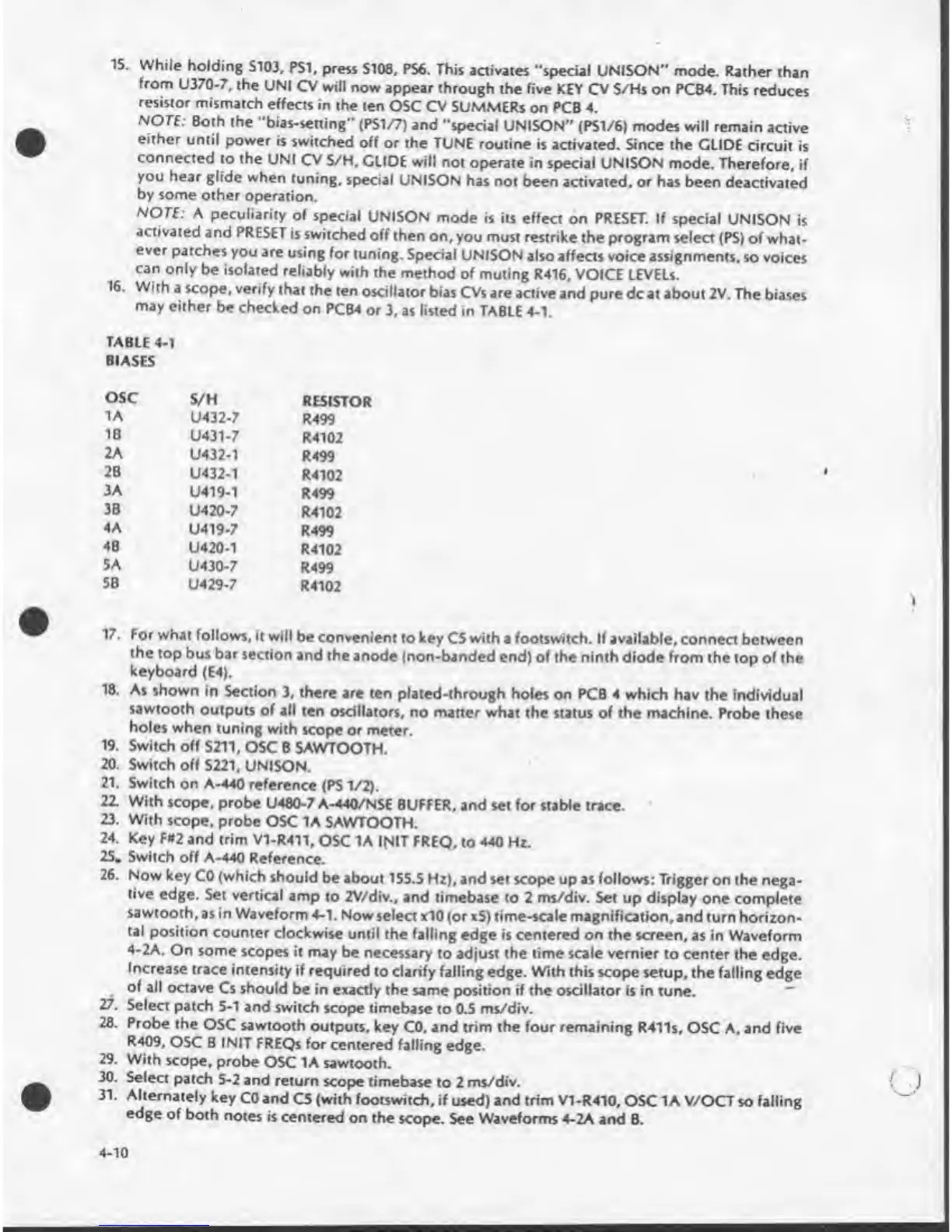
This
activates
“special
UNISON"
mode.
Rather
than
from
U370-7,
the
UNI
CV
will
now
appear
through
the
five
KEY
CV
S/Hs
on
PCB4.
This
reduces
resistor
mismatch
effects
in
the
ten
OSC
CV
SUMMERs
on
PCB
4.
NOTE:
Both
the
“bias-setting”
(PS1/7)
and
“special
UNISON"
(PS1/6)
modes
will
remain
active
either
until
power
is
switched
off
or
the
TUNE
routine
is
activated.
Since
the
GLIDE
circuit
is
connected
to
the
UNI
CV
S/H,
GLIDE
will
not
operate
in
special
UNISON
mode.
Therefore,
if
you
hear
glide
when
tuning,
special
UNISON
has
not
been
activated
,
or
has
been
deactivated
by
some
other
operation.
NOTE:
A
peculiarity
of
special
UNISON
mode
is
its
effect
on
PRESET.
If
special
UNISON
is
activated
and
PRESET
is
switched
off
then
on,
you
must
restrike
the
program
select
(PS)
of
what¬
ever
patches
you
are
using
for
tuning.
Special
UNISON
also
affects
voice
assignments,
so
voices
can
only
be
isolated
reliably
with
the
method
of
muling
R416.
VOICE
LEVELS.
16.
Wi
th
a
scope,
verify
that
the
ten
oscillator
bias
CVs
are
active
and
pure
dc
at
about
2V.
The
biases
TABLE
4-1
BIASES
OSC
S/H
RESISTOR
1A
U432-7
R499
IB
U431-7
R4102
2A
U432-1
R499
2B
U432-1
R4102
3A
U419-1
R499
3B
U420-7
R4102
4A
U419-7
R499
4B
U420-1
R4102
5A
U430-7
R499
SB
U429-7
R4102
17.
For
what
follows,
it
will
be
convenient
to
key
C5
with
a
footswitch.
If
available,
connect
between
the
top
bus
bar
section
and
the
anode
(non-banded
end)
of
the
ninth
diode
from
the
top
of
the
keyboard
(E4).
18.
As
shown
in
Section
3,
there
are
ten
plated-through
holes
on
PCB
4
which
hav
the
individual
sawtooth
outputs
of
all
ten
oscillators,
no
matter
what
the
status
of
the
machine.
Probe
these
holes
when
tuning
with
scope
or
meter.
19.
Switch
off
S211,
OSC
B
SAWTOOTH.
20.
Switch
off
S221,
UNISON.
21.
Switch
on
A-440
reference
(PS
1/2).
22.
With
scope,
probe
U480-7
A-440/NSE
BUFFER,
and
set
for
stable
trace.
23.
With
scope,
probe
OSC
1A
SAWTOOTH.
24.
Key
F#2
and
trim
V1-R411.
OSC
1A
INIT
FREQ,
to
440
Hz.
25.
Switch
off
A-440
Reference.
26.
Now
key
CO
(which
should
be
about
155.5
Hz),
and
set
scope
up
as
follows:
Trigger
on
the
nega¬
tive
edge.
Set
vertical
amp
to
2V/div.,
and
timebase
to
2
ms/div.
Set
up
display
one
complete
sawtooth,
as
in
Waveform
4-1.
Now
select
xIO
(or
xS)
time-scale
magnification,
and
turn
horizon¬
tal
position
counter
clockwise
until
the
falling
edge
is
centered
on
the
screen,
as
in
Waveform
4-2A.
On
some
scopes
it
may
be
necessary
to
adjust
the
time
scale
vernier
to
center
the
edge.
Increase
trace
intensity
if
required
to
clarify
falling
edge.
With
this
scope
setup,
the
falling
edge
of
all
octave
Cs
should
be
in
exactly
the
same
position
if
the
oscillator
is
in
tune.
27.
Select
patch
5-1
and
switch
scope
timebase
to
0.5
ms/div.
28.
Probe
the
OSC
sawtooth
outputs,
key
CO,
and
trim
the
four
remaining
R411s,
OSC
A.
and
five
R409,
OSC
B
INIT
FREQs
for
centered
falling
edge.
29.
With
scope,
probe
OSC
1A
sawtooth.
30.
Select
patch
5-2
and
return
scope
timebase
to
2
ms/div.
31.
Alternately
key
CO
and
C5
(with
footswitch,
if
used)
and
trim
V1-R410,
OSC
1A
V/OCT
so
falling
edge
of
both
notes
is
centered
on
the
scope.
See
Waveforms
4-2A
and
B.
4-10

Table of Contents

Other manuals for Sequential prophet 5

Related product manuals